

Coiled Keyboard Cables Explained: What They Are and Why Enthusiasts Use Them
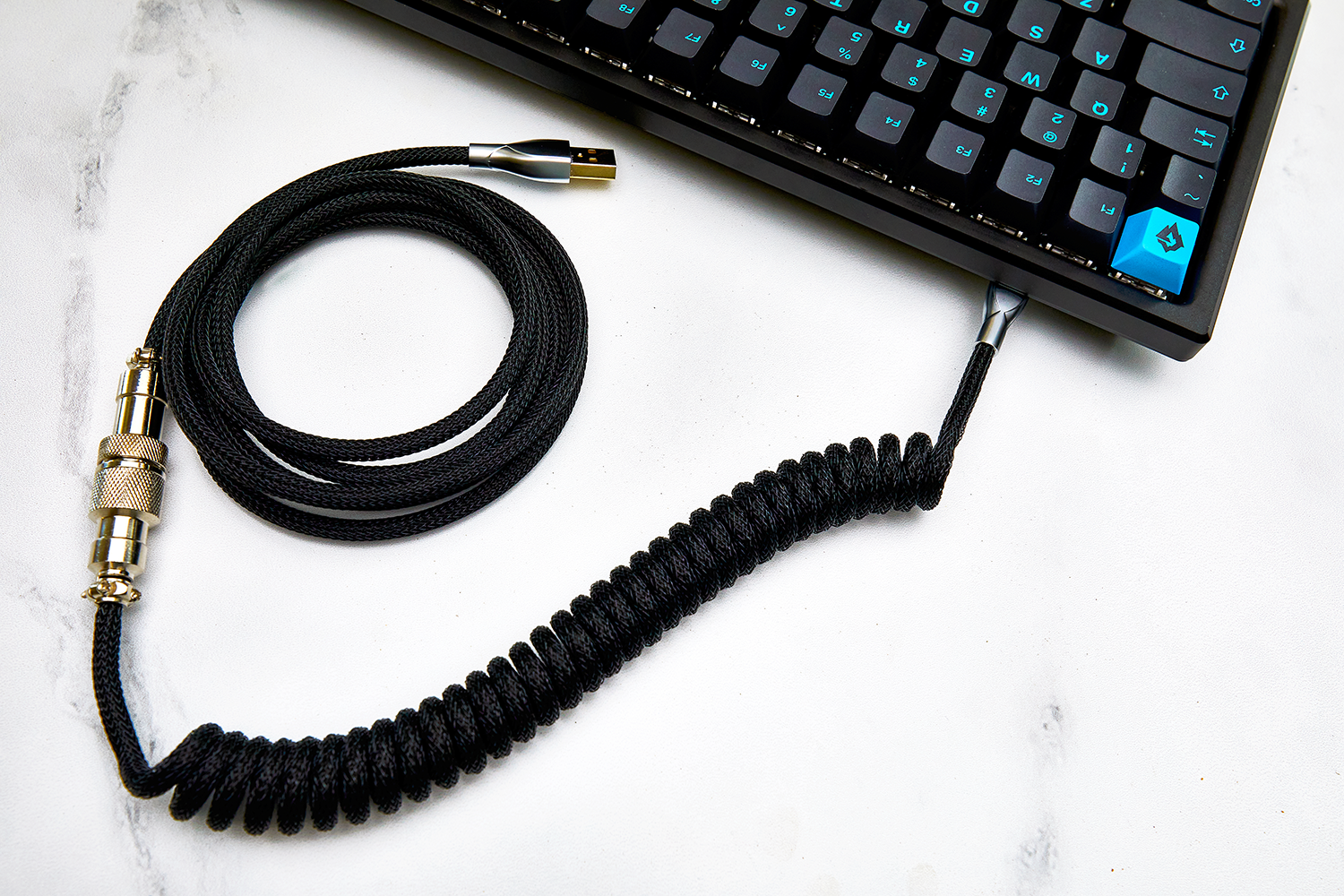
Scroll through any mechanical keyboard photo thread and you will notice the same detail on almost every desk: a thick, colorful coiled keyboard cable with a chunky metal plug sitting a few inches behind the board. That plug is an aviator connector, and together the two have become one of the most recognizable finishing touches in the custom keyboard hobby.
They are also widely misunderstood. New builders ask whether a coiled USB-C keyboard cable makes typing feel faster, whether an aviator connector affects polling rate, what GX16 and GX12 mean, and whether a custom keyboard cable is worth the money. This guide answers those questions honestly, explains how a custom cable is built, and walks through choosing one that fits your keyboard and your desk.
What Is a Coiled Keyboard Cable?
A coiled keyboard cable is a USB cable with a spring-shaped section in the middle. The coil is formed by wrapping the sleeved cable around a mandrel and heat-setting it so it holds the spiral shape permanently. The rest of the cable stays straight: a short lead on the keyboard side and a longer run to your PC.
Almost every modern keyboard cable is a USB-C to USB-A cable or a USB-C to USB-C cable. The end that plugs into your keyboard is the device-side connector; the end that plugs into your computer is the host-side connector. Keyboards have used USB-C almost universally for years, while the host side depends on what ports your PC has.
Under the sleeving, a keyboard cable is simpler than people expect. It carries four conductors, typically 28 AWG: two for power and two for data. Keyboards are USB 2.0 devices, so a keyboard cable only needs to support USB 2.0 High Speed signaling at 480 Mbit/s. That is a fraction of what a modern USB-C cable is capable of, and it is far more bandwidth than any keyboard will ever use.
What Is an Aviator Connector on a Keyboard Cable?
An aviator connector is a circular metal connector placed partway along the cable, splitting it into two detachable halves. The name comes from the industrial circular connectors it was adapted from. In the keyboard hobby, the two most common types are:
- GX16 — the larger, more industrial-looking option, named for its roughly 16 mm barrel diameter. This is the classic enthusiast look.
- GX12 — mechanically the same idea in a slimmer 12 mm body, popular on smaller boards where a GX16 looks oversized.
Both use a threaded metal locking ring that screws together, and both are built around a 4-pin or 5-pin internal layout that matches the number of wires in the cable. Four pins covers the two power and two data lines; five-pin versions add a dedicated line for the USB-C configuration channel.
Aviators are not the only detachable option. Push-pull designs such as YC8, mini-XLR, and LEMO connectors disconnect faster because there is no ring to unscrew. Aviators remain the default because they are cheap, sturdy, and unmistakable.
Do Coiled Cables Improve Keyboard Performance?
This is the question that matters most, and the answer is no. A coil does not lower input latency, raise your polling rate, or clean up your signal. USB is a digital protocol, and a keyboard sending a few bytes per keypress over a USB 2.0 link is nowhere near the limits of the cable. Marketing that promises faster response from a coiled cable is selling you something that physics does not support.
What a coiled cable genuinely does is:
- Manage slack. The coil stores length compactly and extends when you move the board, so you do not have loops of cable pooling behind your keyboard.
- Look intentional. Cables are one of the few parts of a build you see constantly, and a matched cable pulls a colorway together.
- Reduce cable drag. A coil that sits behind the board keeps the weight off the keyboard itself, which matters more on lightweight plastic cases than on heavy aluminum ones.
If you want a genuine performance upgrade, that comes from the board and switches, not the cable. Our guides on keyboard polling rate and rapid trigger cover where the real gains live.
The Real Functional Benefit: Protecting Your Keyboard's USB-C Port
There is one practical, non-cosmetic reason to buy a cable with an aviator connector, and it gets overlooked. The aviator becomes the part that takes the wear instead of your keyboard's USB-C port.
USB connectors are rated for a finite number of insertions. The USB Type-C specification calls for up to around 10,000 mating cycles, while the older USB Type-A standard is rated for roughly 1,500. Those are generous numbers, but not infinite, and a soldered-down USB-C daughterboard port is an annoying thing to repair.
If you rotate keyboards, take a board between home and office, or unplug daily, an aviator gives you a break-away point that is designed to be disconnected. When it eventually wears out, you replace a cable instead of desoldering a port. That is the actual argument for detachable connectors, and it is a much better one than aesthetics.
Anatomy of a Custom Keyboard Cable
Knowing the parts makes it far easier to compare listings. A typical custom or premium coiled cable is built from:
- Inner sleeving. Usually paracord, most often 550 paracord, whose roughly 4 mm inner diameter is a near-perfect fit over 28 AWG USB wire. This is where the color comes from.
- Outer sleeving. An optional braided nylon mesh over the paracord, which adds rigidity and helps the coil hold its shape.
- The coil section. Commonly around 5 to 6 inches of coiled length, with coil diameters typically in the 3/8 inch (9.5 mm), 1/2 inch (12.7 mm), or 5/8 inch (15.9 mm) range.
- Leads. The short straight runs between the coil and each connector, usually 1 to 3 inches.
- The detachable connector. The aviator, YC8, or LEMO junction, with the coil normally sitting on the keyboard side of it.
- Strain relief. Heat-shrink or hot silicone reinforcement where the wire meets the USB-C connector, which is where cheap cables fail first.
The Glacier Braided Premium Cable follows this pattern: a braided, coiled USB-C to USB-A cable with a detachable metal aviator connector plug, available in a dozen colorways so you can match a build rather than settle for black. You can see the full range in the keyboard cables collection.
How to Choose a Coiled Keyboard Cable
Most buying mistakes come from ignoring measurements. Work through these in order:
- Check your host port first. If your PC only has USB-A free, buy a USB-C to USB-A cable. Adapters stacked on an aviator cable create a long, wobbly chain of connectors.
- Measure the real distance. Route the path from your keyboard, off the back of the desk, down to the tower, and add slack. Under-buying length is the single most common regret.
- Match coil size to board size. A fat 5/8 inch coil looks proportional behind a full-size or TKL board and can look bulky behind a 60% or 65%.
- Decide whether you actually need the aviator. If the keyboard never moves, a plain cable is fine. If you swap boards, the detachable junction earns its cost quickly.
- Look at the connector finish. Anodized aluminum resists scratching better than paint, and gold-plated pins resist the oxidation that causes intermittent connections over time.
- Check port clearance. Some cases recess the USB-C port. An oversized or thickly heat-shrunk connector housing may not seat fully.
If you are still assembling a board, note that several kits in our keyboard kits collection, including the Weikav NUT108 Keyboard Kit, are offered with an aviator cable option so the cable arrives matched to the case.
Mistakes That Damage Coiled Cables and Keyboard Ports
Coiled cables are durable, but a few habits shorten their life considerably:
- Stretching the coil to reach. A coil that is permanently under tension loses its spring and never fully recovers. Buy enough length instead of pulling the coil taut.
- Pulling the cable, not the connector. Yanking the cord puts every bit of that force on the solder joints inside the USB-C plug and on the port in your keyboard.
- Cross-threading the aviator. The locking ring should turn easily. If it binds, back it off and realign rather than forcing it.
- Running the coil across a sharp desk edge. Repeated flexing at one point is what eventually breaks a conductor.
- Assuming every cable charges devices well. A keyboard cable is a USB 2.0 cable. It will charge a phone or a wireless board, but slowly, and it is not a substitute for a proper charging cable.
One more thing worth knowing: on a small number of unusually power-hungry keyboards, very long cable runs can cause enough voltage drop to produce flaky behavior. If a board misbehaves on a long custom cable but works on the short one it shipped with, cable length is a reasonable suspect.
Coiled Cable vs Straight Cable: Which Should You Buy?
A straight cable is lighter, cheaper, easier to route through a grommet, and functionally fine. Choose one if your keyboard sits in one spot, the cable disappears behind a monitor anyway, or you want the shortest possible run.
Choose a coiled keyboard cable if the cable is visible on your desk, you want a matched build, you move the keyboard around within arm's reach, or you want a detachable aviator junction. Neither is faster than the other. The decision is about how your desk is laid out and how much you care about how it looks.
Frequently Asked Questions About Coiled Keyboard Cables
Do coiled keyboard cables cause input lag?
No. Keyboards communicate over USB as HID devices, and the data involved is tiny compared to what a USB 2.0 link at 480 Mbit/s can carry. A coil does not add measurable latency. Any perceived difference comes from the keyboard's firmware, polling rate, and switches, not the cable.
What does GX16 mean on a keyboard cable?
GX16 refers to a circular aviator connector with a barrel roughly 16 mm across, using a threaded locking ring. GX12 is the same style in a 12 mm body. The number is a size designation, not a quality or performance rating, and both carry the same USB 2.0 signals.
Are aviator connectors bad for signal quality or high polling rates?
For normal use, no. Aviator connectors are adapted from industrial circular connectors and are not impedance-controlled the way a purpose-built USB cable assembly is, so a poorly made connector can produce intermittent dropouts. In practice, a well-built cable on a USB 2.0 keyboard works reliably. If you ever see random disconnects, reseat the aviator before blaming the board.
How long should a coiled keyboard cable be?
Measure the actual route from your keyboard to your PC and add slack, rather than guessing. Remember that the coil section consumes length: a coil that stores compactly still needs enough straight cable on either side to reach without being pulled tight.
Will a coiled cable work with a wireless keyboard?
Yes. Any wireless keyboard with a USB-C port can run wired or charge over a standard USB-C cable, including a coiled one. Just expect charging to be slower than with a dedicated fast-charging cable, since keyboard cables are built to USB 2.0 wiring.
Final Thoughts on Coiled Cables and Aviator Connectors
A coiled keyboard cable is an aesthetic and ergonomic upgrade, not a performance one, and it is worth being clear-eyed about that before spending. What you get is tidy slack management, a cable that matches your build, and, if you choose an aviator connector, a wear point that protects your keyboard's USB-C port instead of stressing it.
That is fair value for an accessory you look at every day. Browse the wider keyboard accessories range if you are also sorting out switch storage, tools, or a mousepad to finish the desk.


