

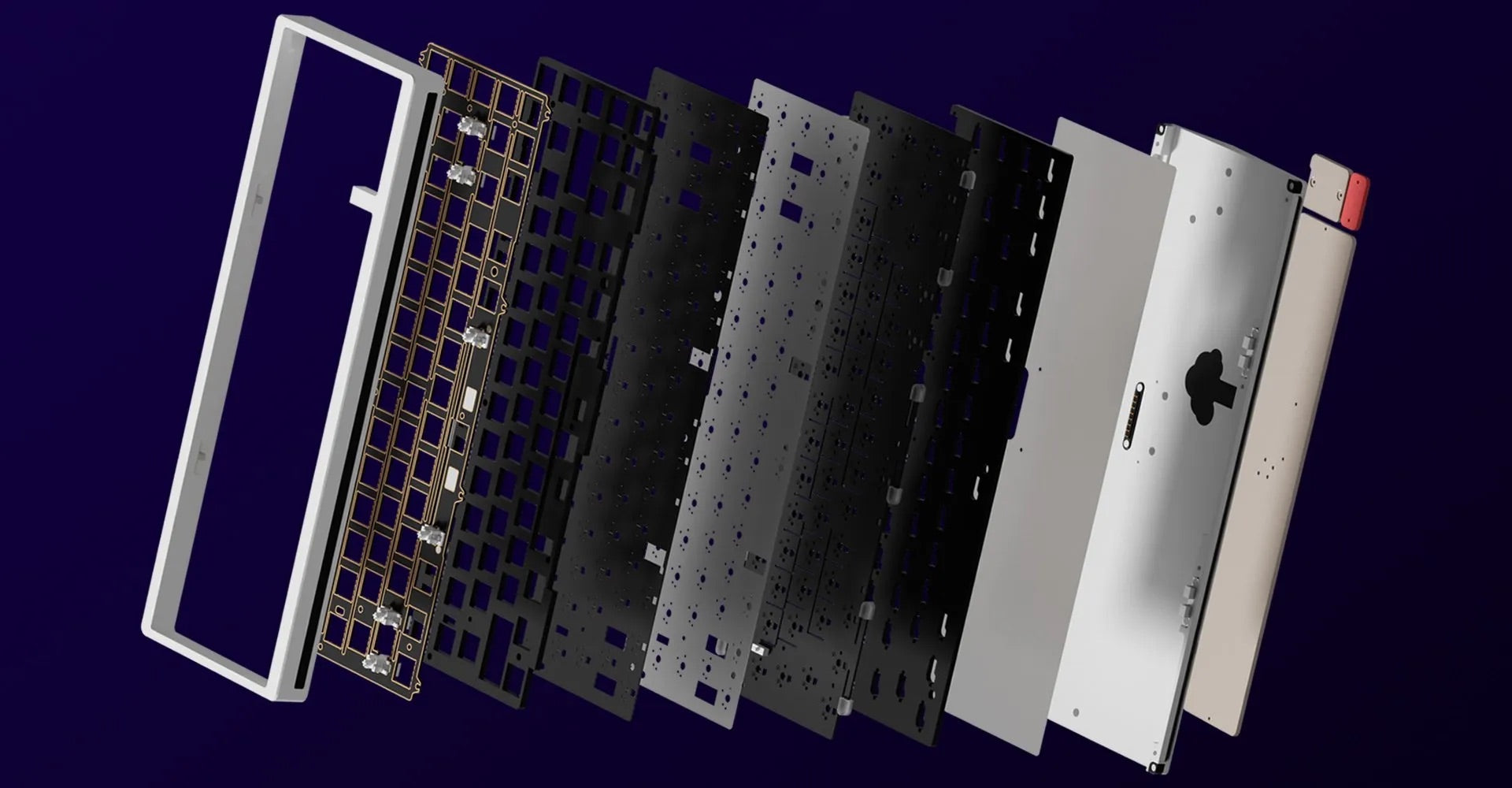
Why foam matters: the short version
Foam layers are one of the easiest, cheapest, and most powerful mods you can add to a mechanical keyboard to change its sound and feel. Case foam, plate foam, and PCB foam absorb vibration, reduce cavity resonance, and dampen high-frequency overtones — turning a bright, echoey board into a warm, muted, or “thocky” instrument depending on the materials and placement you choose.
Quick glossary
- Case foam — Foam between the case halves or sitting under the plate to fill the keyboard cavity.
- Plate foam — Foam sandwiched between the plate and switches (or plate and case) to stop sound transfer and reduce resonance.
- PCB foam — Foam placed directly beneath the PCB to dampen backplate resonance and reduce ping.
- Density — Foam firmness (often described as soft/medium/firm); affects absorption and key feel.
- Thock — The low, satisfying, rounded sound many builders want.
How foam changes keyboard acoustics (the science, simplified)
When a switch is pressed, energy travels through the switch into the plate, PCB, and case. Empty cavities and hard surfaces reflect those vibrations, creating echoes, sustain, and high-frequency "ping." Foam converts some of that vibrational energy into small amounts of heat and friction, reducing echo and reverberation. The result: reduced sustain, fewer high-frequency peaks, and a shift in the perceived tonal balance toward lower frequencies.
Case foam — the big cavity tuner
What it does
Case foam fills the air cavity inside the keyboard. It drastically reduces cavity resonance and the “hollow” sound. It’s the most influential foam layer for changing overall sound signature.
Materials & common choices
- EVA foam — Affordable, medium density, good baseline dampening.
- Neoprene — Firmer, long-lasting, cuts higher frequencies well.
- Poron (polyurethane) — Open-cell, excellent at absorbing vibrations; trims high-frequency peaks without killing the thock.
- Acoustic/damping foams — Specifically formulated for sound absorption; often used by audiophiles/keyboard modders.
Placement tips
- Full-coverage cut: cover the entire cavity while avoiding standoffs and screw posts. Full coverage gives the most even damping.
- Strategic cutouts: leave small voids under the spacebar cluster or cut channels where you want slightly more resonance for character.
- Thickness matters: thicker foam absorbs more low frequencies but can feel like it deadens the board if overdone. Start conservative and layer if needed.
Plate foam — the fine tuner
What it does
Plate foam sits beneath or between the plate and switches and reduces plate-to-case vibrations and switch rattle. It softens the attack, smooths out harsh overtones, and can subtly alter the key feel (sometimes making it feel marginally softer).
Materials & common choices
- EVA or neoprene — Popular and easy to cut; medium density works well.
- Felt — Softer, gives a warmer, muffled sound; good for a heavy thock.
- Thin Poron — Great for keeping tactility while trimming high-frequency snap.
Placement tips
- Exact cutouts around switch positions are required. Too much compression can make stabilizers feel mushy.
- Plate foam below a metal plate reduces plate resonance significantly — especially useful for aluminum plates which can ring.
- Layering with thin plate foam is often safer than one thick layer.
PCB foam — the surgical strike
What it does
Pocketed directly under the PCB, PCB foam limits PCB-to-case vibration and reduces “ping” caused by the PCB acting like a drumhead. It’s especially useful for boards with a thin or flexible PCB.
Materials & common choices
- Poron — Common, compressible, and effective at reducing ping without affecting key feel too much.
- Closed-cell EVA — Stiffer, offers stronger support for the PCB.
Placement tips
- Cut the foam to avoid solder joints, connectors, and screw posts. Use adhesive-backed foam or a non-adhesive sheet held in place by the PCB itself.
- PCB foam can be used with or without case foam; both together produce a more controlled, deadened sound.
Layering strategies — how to combine foam layers
Combining case foam, plate foam, and PCB foam gives you a wide range of tonal control. Here are common strategies:
- Warm thock (most popular): Thin plate foam + poron PCB foam + medium case foam. Preserves attack, reduces high-end harshness, and adds body.
- Muted/quiet: Thicker plate foam + thick case foam + firm PCB foam. Great for offices or late-night typing suppression but can be too dead for some.
- Balanced (light modulation): Thin plate foam or felt only + light case foam. Keeps clarity while smoothing peaks.
Material selection checklist
- Decide your sound goal: thock, muted, bright, or balanced.
- Pick case foam material and coverage first — it has the largest effect.
- Choose plate foam to tame plate resonances (metal plates usually need more attention).
- Use PCB foam to remove ping, especially on flexible PCBs.
- Test with removable layers (double-sided tape or temporary placement) so you can iterate.
Installation — step-by-step
- Disassemble your keyboard safely (remove keycaps, switches if needed; follow your board’s disassembly guide).
- Measure the cavity and trace the foam with a pen. Mark screw posts and connector areas you must avoid.
- Cut with a sharp utility knife or scalpel (straight edge helps). For plate foam, cut precise holes for each switch.
- Dry-fit each layer before final placement. Use thin double-sided tape if you want to hold foam in place.
- Reassemble and test. Record or listen to the difference — many builders keep short voice recordings for before/after comparison.
Practical tuning tips (iterate like a pro)
- Start with case foam only, then add plate foam, then PCB foam. This helps you hear each layer’s effect.
- When chasing “thock,” less can be more: aggressive foam tends to kill character.
- Different switches interact with foam differently. Tactile and linear switches will react to dampening in unique ways.
- Stabilizers may require different foam adjustments — avoid compressing stabilizer areas too much or they’ll feel soffter than desired.
Common mistakes and how to avoid them
- Over-damping: Using excessively thick/firm foam everywhere can make the keyboard sound lifeless. Fix: remove or thin layers.
- Interfering with switches or connectors: Cutting mistakes can block sockets, stabilizers, or USB ports. Fix: dry-fit each layer first.
- Compressing stabilizers: Foam under stabilizers can change their travel and feel. Fix: add cutouts or thinner foam in stabilizer regions.
Material recommendations by goal
- Best for deep thock: Thin plate foam (felt/poron) + full-coverage poron case foam.
- Best for quiet office: Thick neoprene/EVA plate foam + thick case foam + firm PCB foam.
- Best for retaining crispness: Minimal plate foam, light case foam, thin poron PCB foam.
Testing and measuring results
For objective testing, record before/after clips with the same microphone position and room conditions. Listen for changes in:
- Attack (how sharp the initial press sounds)
- Sustain (how long sound lingers)
- High-frequency content (ping/clang)
- Low-frequency weight (thock)
Subjective listening matters most — what sounds pleasant to you is the goal.
Frequently asked questions
Will foam change my typing feel?
Not directly — foam mainly affects sound, but plate and PCB foam can slightly change perceived key sensation (a bit softer or more muted). Proper cutouts avoid negative impacts on stabilizers and switch travel.
Can I use adhesive-backed foam?
Yes; adhesive-backed foam simplifies installation but makes changes harder to reverse. Use removable tape for experimentation.
Do I need different foam for gasket or tray-mounted keyboards?
Yes. Gasket-mounted boards already isolate some vibration; lighter foam often works best to maintain the mount’s characteristics. Tray-mounted boards can often accept more foam without losing feel.
Final thoughts
Foam layers — case foam, plate foam, and PCB foam — are essential tools in the keyboard modder’s toolbox. They let you sculpt the sound from bright and pingy to warm and thocky with low cost and minimal effort. The smartest approach is iterative: test one layer at a time, keep thin removable pieces on hand, and aim for balance. With a few small foam changes you can transform your keyboard’s acoustic signature dramatically.
Next steps
Ready to try it? Start with a thin case foam layer, record a before/after clip, then add thin plate foam if you want to further reduce high-frequency ping. Share your recordings with the community to get feedback — modders love comparing sound profiles.


