

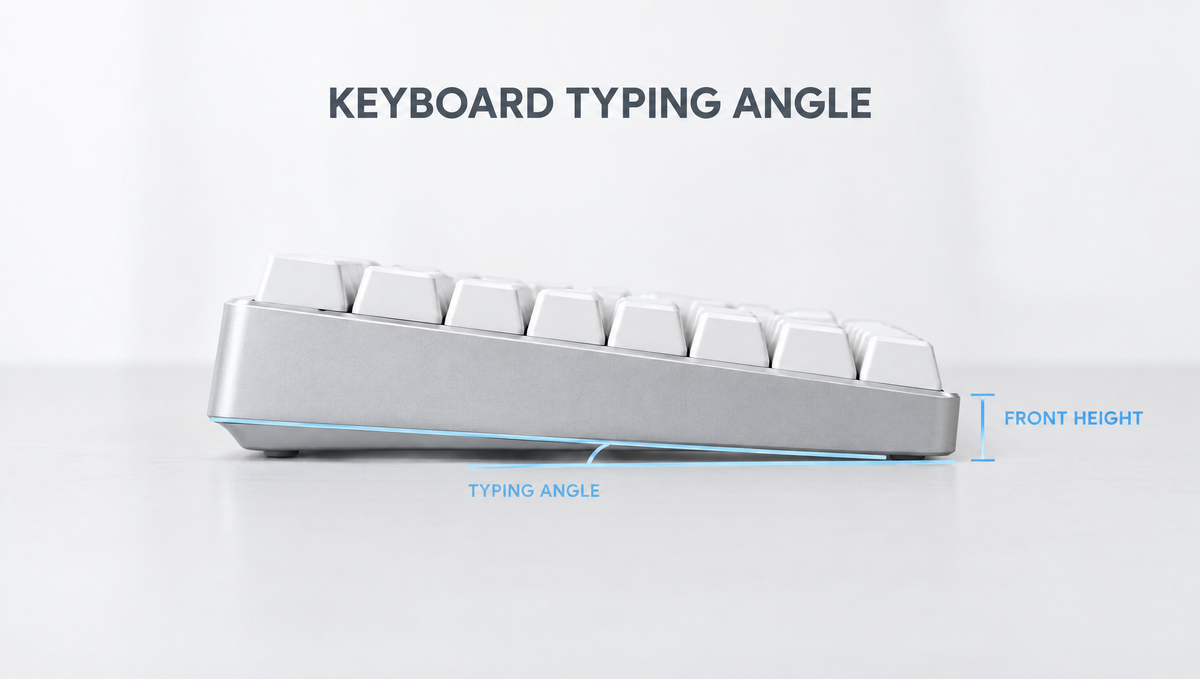
Keyboard Typing Angle: Why the Slope of Your Keyboard Matters
Look at the spec sheet of almost any custom keyboard kit and you will find a number most people skip right past: the keyboard typing angle. Next to it you will often see a second figure, the front height. Together they describe how your keyboard sits on the desk, and they have a real effect on how your wrists, fingers, and forearms feel after a long day of typing or gaming.
This guide explains what typing angle and front height actually mean, how keyboard feet and keycap profiles change them, what the difference is between positive and negative tilt, and how to find the most comfortable keyboard angle for your own setup.
What Is Keyboard Typing Angle?
The typing angle is the slope of the keyboard from front to back, measured in degrees relative to the desk. A keyboard with a 0 degree angle would sit perfectly flat. A keyboard with a positive angle is higher at the back than at the front, which is how nearly every keyboard is designed.
On a custom mechanical keyboard, the typing angle is usually built into the case. The bottom of the case is machined so that the plate and PCB sit on a slope, which means the angle is there even before you touch the feet. On many prebuilt and budget boards, the case is closer to flat and most of the slope comes from flip-out keyboard feet.
Enthusiast kits generally list angles in the single digits. Discussions on keyboard forums mention cases anywhere from below 4 degrees, which many people find quite flat, up to around 9 degrees, with something in the middle of that range being very common. For example, the Domikey Laby81 Keyboard Kit is specified with a 7 degree typing angle, which sits comfortably in that mainstream range.
What Is Front Height on a Keyboard?
Front height describes how tall the front edge of the keyboard is where your hands approach it. It matters just as much as the angle, and sometimes more, because it decides how far your wrists have to bend upward to reach the bottom row of keys.
- Low front height keeps your hands closer to the desk and usually reduces upward wrist bend.
- High front height often means you either bend your wrists up to reach the keys or need a wrist rest to raise your hands.
- Angle and front height work together. Two keyboards with the same typing angle can feel completely different if one has a much taller case.
Enthusiasts often say a lower front height is the bigger comfort upgrade, and some note that a case with a lip on the front edge can make a board feel lower than its measured height.
Positive Tilt vs Negative Tilt vs Flat
When people debate the best keyboard angle, they are usually talking about three positions:
- Positive tilt: the back of the keyboard is higher than the front. This is the standard design and it makes key legends easier to see, but a steep positive tilt tends to bend the wrists upward, which ergonomists call wrist extension.
- Flat (zero tilt): the keyboard sits parallel to the desk. A flat, low-profile setup reduces wrist extension compared with a steep slope, though some typists find it harder to reach the top rows.
- Negative tilt: the front of the keyboard is higher than the back, so the keyboard slopes away from you. Ergonomics guidance from Cornell University recommends a keyboard positioned below seated elbow height and gently sloped away from the user to help keep the hands in a neutral posture.
Negative tilt sounds unusual, but it is mostly practical with a keyboard tray that sits below desk height. On a normal desk, where the keyboard is already relatively high, most people aim for a low, gentle positive angle or a nearly flat board instead.
Should You Use Keyboard Feet?
Flip-out feet are the quickest way to change your keyboard angle, and also one of the most common ways people accidentally make their setup less comfortable. OSHA's computer workstation guidance notes that keyboard tilt caused by extending the legs on the back of the keyboard can bend the wrist upward, and advises not to use keyboard feet if they increase the bending of your wrists.
That does not mean feet are always bad. A few practical rules:
- Try the keyboard with the feet folded first. If your wrists stay fairly straight and you can reach every row, leave them folded.
- Use the feet when your arm position calls for it. OSHA's guidance also describes using keyboard feet to help maintain straight, neutral wrist postures when your arm angle changes, for example if you sit lower or recline slightly.
- Watch your wrists, not the number. The right setting is the one where your hand, wrist, and forearm form a roughly straight line while you type.
How Keycap Profile Changes Your Effective Typing Angle
The case is only part of the picture. Keycaps sit on top of the switches and add their own height and shape, so your keycap profile changes how tall and how steep the keyboard feels.
- Sculpted profiles such as Cherry and OEM use different heights and angles for each row, which creates a gentle curve across the keyboard.
- Cherry profile keycaps are lower than OEM profile keycaps, so swapping from OEM to Cherry lowers the overall height of the keyboard and can reduce wrist extension. Browse our Cherry profile keycaps if you want a lower-sitting set.
- OEM profile keycaps are taller and are common on prebuilt keyboards. Our OEM profile keycaps suit people who like that familiar height.
If your keyboard feels too tall even with the feet folded, a lower keycap profile is one of the easiest fixes and does not require a new case.
Wrist Rests and Typing Angle
A wrist rest is often used to make a tall keyboard more comfortable. Raising your palms to roughly the same level as the front of the keyboard can reduce the upward bend at the wrist. A few things to keep in mind:
- Avoid hard, sharp edges. OSHA notes that hard leading edges on wrist rests, chairs, and desk surfaces can create contact stress on the forearms and wrists.
- Rest during pauses. Many people find it more comfortable to let their hands float while actively typing and rest their palms between bursts, rather than pressing their wrists down and bending the fingers up to reach the keys.
- Match the height. A wrist rest that is much lower than the keyboard front height does little to help.
How to Find the Best Keyboard Typing Angle for You
There is no single best typing angle for everyone. Desk height, chair height, arm length, and typing style all change what feels right. Use this simple process to dial it in:
- Set your chair and desk first. Aim for your elbows to be at or slightly above keyboard height with relaxed shoulders.
- Start low. Fold the feet and type for a day. Note whether your wrists bend upward or your fingers stretch to reach the number row.
- Change one thing at a time. Try the feet, a different keycap profile, or a wrist rest separately so you know what actually helped.
- Check your posture mid-session. Look at your hands while typing. A roughly straight line from forearm to knuckles is the target.
- Give it time. A new angle can feel strange for a few days, especially if you are moving from a steep keyboard to a flatter one.
Typing Angle When Choosing a Keyboard Kit
If you are shopping for a new board, typing angle and front height deserve a place on your checklist next to layout, mounting style, and connectivity. Because a custom case has its angle machined in, it is much harder to change later than keycaps or switches.
- Check the spec sheet for a listed typing angle, and look for front height when the manufacturer provides it.
- Prefer moderate angles if you are unsure. A mid single digit angle is a safe, common choice for most typists.
- Remember adjustability. Cases without feet rely entirely on the built-in angle, while keyboards with feet give you options.
You can compare cases, layouts, and features across our keyboard kits collection.
Keyboard Typing Angle FAQ
What is a good typing angle for a mechanical keyboard?
Most custom keyboard cases use an angle somewhere in the single digits, and a moderate angle in the middle of that range works well for many typists. The best angle is the one that keeps your wrists close to straight at your desk and chair height, so treat the spec as a starting point rather than a rule.
Should keyboard feet be up or down?
Start with the feet down (folded). Workplace ergonomics guidance advises against using keyboard feet when they increase upward wrist bending. Use them only if raising the back helps you keep a neutral, straight wrist in your particular seating position.
Is negative tilt better for your wrists?
Ergonomics guidance from Cornell University recommends a keyboard placed below elbow height and sloped slightly away from the user to support neutral hand posture. In practice, negative tilt works best with a keyboard tray below desk level. On a standard desk, a flat or gently angled low-profile setup is often the more practical choice.
Does front height matter more than typing angle?
For many people, yes. Front height determines how far your wrists bend upward to reach the bottom row, so a tall keyboard can feel uncomfortable even with a modest angle. Lower keycaps or a wrist rest at the right height can help.
Do I need a wrist rest with a mechanical keyboard?
Not always. A wrist rest is most useful on taller keyboards, where it brings your palms closer to the height of the front edge. Choose one without a hard, sharp edge, and use it to rest between typing bursts rather than anchoring your wrists while you type.


