

Silent Switches Explained: What Makes a Mechanical Keyboard Quiet
Silent switches are mechanical keyboard switches built to cut down the clack of every keystroke. If you share an office, game late at night, or are on calls all day, they're one of the most common answers to the question "what are the quietest keyboard switches?"
Silent switches still raise plenty of questions, though. How do silent switches actually work? Are silent switches mushy? Should you pick a silent linear or a silent tactile? Are silent switches good for gaming? And how quiet is a "silent" mechanical keyboard really?
This guide explains how quiet keyboard switches are built, the trade-offs in feel, and how to choose the best silent switches for your keyboard.
Where Does Mechanical Keyboard Noise Come From?
To see how a silent switch works, it helps to know where switch noise comes from in the first place. A standard MX-style switch makes sound at two moments:
- Bottom-out: the stem hits the bottom housing when you press the key all the way down. This is the loudest part of most keystrokes.
- Top-out: the spring pushes the stem back up and it hits the top housing when you let go. This creates the "upstroke" clack.
Clicky switches add a third, deliberate sound from their click mechanism, and tactile switches can add a little noise from the bump itself. Our guides to linear switches, tactile switches, and clicky switches cover those mechanisms in detail.
Silent switches target the bottom-out and top-out impacts, since that's where plastic hits plastic.
How Do Silent Switches Work?
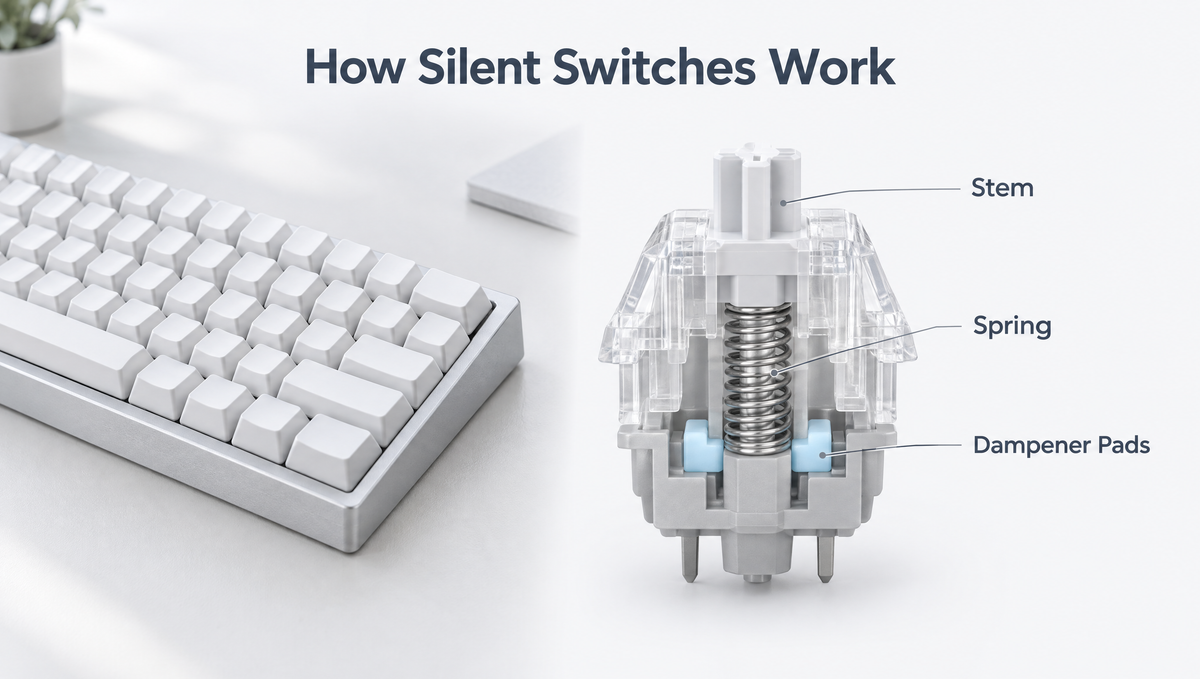
The core idea behind every silent mechanical switch is simple: put something soft between the parts that collide. Manufacturers do this in a few different ways.
- Stem dampeners: the most common design. Small rubber or silicone pads sit on the stem, cushioning the impact at the bottom of the stroke, the top, or both.
- Bottom housing dampening: some designs put the dampening material in the bottom housing instead of on the stem, so only the bottom-out is cushioned by the housing itself.
- Alternative stem shapes and venting: a few switches use a reshaped stem or small vents in the housing to soften and redirect sound.
- Semi-silent designs: a single dampener quiets only the top-out. The upstroke gets quieter, but bottom-out sounds about the same as a normal switch.
Because the dampening material sits in the travel path, it changes how the switch feels as well as how it sounds. That's the central trade-off with silent switches.
Are Silent Switches Mushy?
This is the most common complaint about silent switches, and it has some truth to it. Since the key lands on a soft pad instead of hard plastic, the bottom-out feels softer and less defined than on a standard switch. Some people describe it as cushioned. Others call it mushy.
- Older silent switches earned a reputation for feeling spongy, and that reputation still comes up in discussions.
- Many newer designs feel much firmer, but most silent switches still bottom out a bit softer than standard switches.
- Some silent switches have slightly shorter total travel, because the dampener takes up a little space at the bottom of the stroke.
- How mushy a switch feels varies a lot between models, so reviews and sound tests are worth checking before you buy a full set.
Plenty of people get used to the cushioned landing within a few days and end up preferring it, especially if they bottom out hard when typing.
Silent Linear vs Silent Tactile Switches
Silent switches mostly come in two styles, and the choice works much like regular linear vs tactile.
- Silent linear switches: a smooth keystroke with no bump. They're generally the quietest option, since there's no tactile event to add sound. Silent linears are a common pick for gaming and for anyone who wants the quietest board possible.
- Silent tactile switches: they keep a bump to confirm each keypress while dampening the bottom-out and top-out. They're a good fit for heavy typists who want feedback without the noise.
What about silent clicky switches? Clicky switches are designed to make an audible click, so "silent" and "clicky" don't really go together. If you want quiet, choose a silent linear or a silent tactile.
How Quiet Are Silent Switches, Really?
Silent switches are quieter, not silent. You'll still hear a soft, muted thud, and someone sitting next to you will still know you're typing. The difference is that the sharp clack is gone, which matters most in shared spaces and on voice calls.
Keep in mind that switches are only one source of keyboard noise. Even with silent switches installed, you can still hear:
- Stabilizers on the spacebar, Enter, Shift, and Backspace, which can rattle if they aren't tuned.
- Keycaps, since thicker keycaps and different profiles change the sound of every press.
- The case and plate, especially an empty case that echoes without foam.
- Your desk, which can amplify vibration if the keyboard sits directly on a hard surface.
For the quietest possible setup, pair silent switches with tuned stabilizers, case foam, and a desk mat. Our guide on how to make a mechanical keyboard quieter walks through each fix.
Are Silent Switches Good for Gaming?
Yes. Silent switches register keystrokes just like regular mechanical switches, so you aren't giving up responsiveness by choosing them. The main differences for gaming are feel and preference:
- Silent linears suit fast, repeated inputs, just like standard linears.
- The softer bottom-out can feel less crisp, which some competitive players notice and others don't.
- They're especially useful for streaming and voice chat, where loud keystrokes get picked up by your microphone.
If you play on a magnetic Hall effect keyboard, note that some magnetic switches are also made in silent versions. Magnetic switches only work in keyboards designed for them, though, so they can't go into a standard mechanical hot-swap socket.
Are Silent Switches Good for Typing and Office Work?
Silent switches are one of the best choices for an office keyboard. They keep the feel and durability of a mechanical keyboard while making you a much better neighbor in a shared room. Silent tactiles are popular for typing because the bump helps you avoid bottoming out, while silent linears offer the quietest overall sound.
If the cushioned bottom-out bothers you at first, give it a week. Your fingers adjust quickly, and many typists find the softer landing easier on their hands during long sessions.
Can You Lube Silent Switches?
You can, but go lightly. Many silent switches already ship factory pre-lubed, and too much lube, especially on or around the dampening pads, can make a silent switch feel dead and sluggish.
- Apply a thin coat to the stem rails and housing contact points.
- Keep lube off the rubber or silicone dampeners.
- Test a few switches first before lubing a whole set.
Our step-by-step guide on how to lube mechanical keyboard switches covers the full process.
How to Choose the Best Silent Switches
Use these questions to narrow down the right quiet keyboard switches for your setup:
- Linear or tactile? Choose silent linear for the quietest sound and smooth gaming feel, or silent tactile for typing feedback.
- How much softness can you tolerate? If you dislike a cushioned bottom-out, look for reviews that describe a firmer landing.
- What spring weight do you prefer? Weight works the same way as on any switch. Medium weights are a safe starting point.
- Is your keyboard hot-swappable, and 3-pin or 5-pin? Check compatibility before buying. Five-pin switches can usually be used in a 3-pin board by trimming the two plastic side pins.
- How many do you need? Count your keys before ordering. Our guide on how many switches you need breaks it down by layout.
If you want to try a silent option, the Glacier Skyloong Silent Switches are a quiet choice for hot-swappable keyboards, and you can browse our silent switches collection for the latest options.
Test Silent Switches Before Swapping a Full Board
Because silent switches vary so much in feel, it's worth trying a few before committing to a full set.
- A switch keychain tester lets you press a silent switch side by side with a standard one and compare the bottom-out directly.
- On a hot-swap keyboard, install a few silent switches on keys you use constantly, like the home row or WASD, and use them for a few days.
- Listen with your keycaps installed, because keycaps change the sound noticeably.
When it's time to swap, a proper tool such as the Glacier Keycap/Switch Puller Tool from our keyboard tools collection helps you remove switches cleanly. Pull straight up, and check the pins are straight before pressing new switches into the sockets.
Frequently Asked Questions About Silent Switches
What are the quietest keyboard switches?
Silent linear switches are generally the quietest mechanical keyboard switches, because they dampen both the bottom-out and top-out and have no tactile bump or click mechanism adding sound.
Do silent switches feel different from regular switches?
Yes. The dampening pads give silent switches a softer, more cushioned bottom-out, and some models have slightly shorter total travel. Many people adapt within a few days.
Are silent switches completely silent?
No. Silent switches remove the sharp clack, but you'll still hear a soft thud, plus any noise from stabilizers, keycaps, and the case.
Are silent switches worth it?
Silent switches are worth it if you work in a shared space, take a lot of calls, stream, or game late at night. If noise doesn't bother anyone around you and you love a crisp bottom-out, a standard switch may suit you better.
Can I put silent switches in any keyboard?
Silent mechanical switches fit hot-swappable keyboards that accept MX-style switches, as long as the pin layout is compatible. On a soldered keyboard, you'd need to desolder the old switches first.
Final Thoughts on Silent Switches
Silent switches work by cushioning the impacts that create keyboard noise. The trade-off is a softer bottom-out, but modern quiet switches feel far better than their reputation suggests. Choose silent linear for the lowest noise, silent tactile for typing feedback, and pair either with tuned stabilizers and foam for the quietest mechanical keyboard you can build.
Ready to quiet down your setup? Explore our silent switches and find a quiet feel that suits how you type and play.


