

What Does Bottoming Out Mean on a Mechanical Keyboard?
Bottoming out on a mechanical keyboard means pressing a key all the way down until the switch stem hits the bottom of the switch housing. If you have ever wondered is bottoming out bad, whether it damages switches, or how to stop bottoming out when you type, you are asking one of the most common beginner questions in the hobby.
The short answer: bottoming out is normal, it will not break a quality switch, and most people do it on almost every keystroke. Whether you want to reduce bottoming out comes down to sound, feel, and comfort. This guide explains what happens inside the switch, the real pros and cons, and practical ways to type with a lighter touch if you want to.
How Key Travel Works: Actuation Point vs Bottom Out
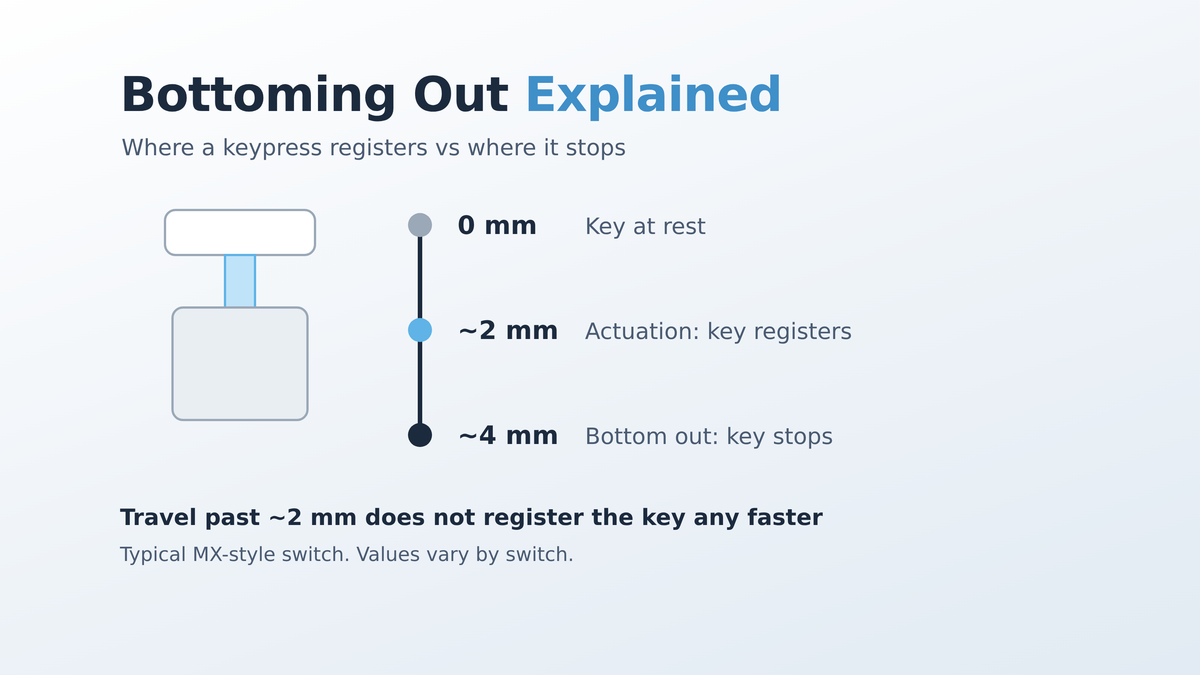
Every switch press has two important points along its travel:
- Actuation point (pre-travel): the distance at which the keypress registers. On many standard MX-style mechanical switches this is around 2mm.
- Total travel: the full distance the stem can move before it physically stops. On many standard MX-style switches this is around 4mm.
For example, the Gateron Oil King Switches are listed with 2mm pre-travel and 4.0mm total travel. That means the key has already registered halfway down, and the remaining travel is extra distance your finger can push through. When you press through that remaining distance and hit the floor, you are bottoming out.
Because the key registers well before the bottom, bottoming out is not required to type. It is simply what happens when you press with more force or speed than the spring can absorb before the stem reaches the end of its travel.
Is Bottoming Out Bad for Your Switches?
No. Mechanical switches are designed to be bottomed out. Normal typing pushes most keys to the bottom, and switch manufacturers build their switches with that in mind. Bottoming out during everyday typing and gaming is not a meaningful cause of switch failure.
What actually affects switch lifespan is usually dirt, liquid spills, worn contacts, or physical damage during installation, not the act of pressing a key fully. If you want to dig into durability, our guide on how long mechanical keyboard switches last covers what wears out and why.
The same goes for keycaps and the keyboard itself. Normal bottoming out will not crack a keycap or damage a PCB. Extremely heavy pounding over a long period can contribute to more noise and wear on stabilizers, but for typical users this is not a real concern.
Is Bottoming Out Bad for Your Fingers?
This is where opinions differ. Some typists say that hammering every key to the bottom makes their fingers feel tired faster during long sessions, and that a lighter touch feels more comfortable. Others bottom out on every key for years with no issue.
There is no simple rule that applies to everyone, and comfort is personal. If your hands feel fatigued or sore after typing, it is worth experimenting with a lighter touch, a different switch weight, or a better typing angle. If you have ongoing pain, talk to a medical professional rather than relying on keyboard changes alone.
Comfort also depends on more than just bottoming out. Desk height, wrist position, and keyboard tilt all play a role, which we cover in our guide to keyboard typing angle and comfort.
Bottoming Out and Keyboard Sound
For many people, the biggest reason to care about bottoming out is sound. When the stem hits the bottom of the housing, it creates the bottom-out sound that makes up a large part of what you hear when you type. When the key returns and hits the top of the housing, that is the top-out sound.
- Heavy bottoming out generally makes a keyboard louder and can make the sound sharper or more clacky.
- Lighter presses usually reduce bottom-out noise, which helps in shared offices, late-night sessions, and on voice chat.
- Switch design changes the character of the bottom-out. Long pole switches, for example, are designed to bottom out on a longer stem pole for a sharper, clackier sound. Learn more in our long pole switches guide.
Some enthusiasts actually enjoy a crisp bottom-out and build their keyboards around it. Others want a soft, muted press. Neither is wrong.
Bottoming Out for Gaming
For gaming, the question is mostly about speed and control rather than damage. On a standard mechanical switch, the key registers at its fixed actuation point and resets on the way back up, so pushing past actuation to the bottom does not make the input register faster.
Many gamers bottom out anyway, especially in fast-paced moments, and that is fine. What matters more is how quickly the key actuates and resets. That is where Hall effect and magnetic keyboards change things.
- Adjustable actuation: magnetic keyboards let you set how far a key must travel before it registers. The Skyloong HE75 Magnetic Keyboard and Skyloong GK68HE Magnetic Keyboard both list adjustable actuation from 0.1mm to 4.0mm.
- Rapid trigger: instead of waiting for a fixed reset point, the key resets once it moves back up by a small, adjustable distance. This means you do not need to bottom out or fully release a key to tap it again quickly.
A shallow actuation setting does not physically stop you from bottoming out, but it means you do not need to press far for the key to register. If you want to tune this, see our guide to rapid trigger.
How to Stop Bottoming Out on a Mechanical Keyboard
If you want to reduce bottoming out for comfort or quieter typing, here are the most practical options.
1. Practice a Lighter Typing Touch
The simplest fix costs nothing. Focus on pressing just past the actuation point instead of driving each key to the floor. Tactile and clicky switches make this easier because the bump or click tells you the key has registered, giving you a cue to let go. Our guide to tactile switches explains how different bumps feel.
2. Try Heavier Switches or Springs
A heavier spring pushes back harder, so the same finger force carries the stem less far. Many typists who bottom out heavily find that moving to a heavier switch helps them stop sooner. You can browse our linear switches and tactile switches collections, and check each product listing for its stated force. Our guide to switch springs covers spring weights and lengths in detail.
3. Use O-Rings or Dampeners
O-rings are small rubber rings that fit onto the keycap stem. They cushion the impact at the bottom of the press and slightly shorten total travel, which reduces bottom-out noise. The trade-off is that the bottom of the keystroke can feel softer or mushier, which some people dislike.
4. Choose Silent Switches
Silent switches use built-in dampening to soften the bottom-out and top-out. They will not stop you from bottoming out, but they make it much quieter. The Glacier Skyloong Silent Switches are one option, and our guide to how silent switches work goes deeper.
5. Soften the Board with Foam and Mounting
Case foam, plate foam, and softer mounting styles like gasket mount do not change how far the key travels, but they can make bottoming out feel and sound less harsh. For more ideas, see our guide on how to make a mechanical keyboard quieter.
6. Switch to a Magnetic Keyboard with Shallow Actuation
If you game a lot and want fast inputs without full presses, a magnetic keyboard with adjustable actuation and rapid trigger lets keys register and reset with very little travel. Browse our magnetic keyboards collection to compare options.
Should You Stop Bottoming Out?
You do not have to. Bottoming out is the natural way most people type, and it will not damage a well-made mechanical keyboard. Consider reducing it if:
- Your fingers feel tired during long typing sessions
- Your keyboard is too loud for your office, home, or voice chat
- You prefer a softer, more controlled keystroke
- You want faster repeated inputs in games and are open to trying a magnetic keyboard
If none of those apply and you like the feel and sound of a full press, keep typing the way you enjoy. If you are unsure which switch feel suits you, trying a few switches first with a switch tester keychain is an easy way to compare.
Bottoming Out FAQ
Does bottoming out damage mechanical switches?
No. Mechanical switches are built to be pressed all the way down, and normal bottoming out during typing or gaming does not meaningfully shorten switch life. Dirt, spills, and physical damage are far more common causes of switch problems.
Do you have to bottom out to register a keypress?
No. A mechanical switch registers at its actuation point, which is usually partway down the travel. On many standard MX-style switches, actuation is around 2mm out of roughly 4mm of total travel.
Do O-rings stop bottoming out?
O-rings do not stop the key from reaching the bottom, but they cushion the impact and slightly shorten travel. This makes bottoming out quieter and softer, at the cost of a slightly mushier feel.
Are heavier switches better if you bottom out a lot?
They can help. A heavier spring resists your finger more, so many people bottom out less often or less forcefully with heavier switches. Whether it feels better depends on your personal preference.
Is bottoming out bad for gaming?
Not really. On a standard mechanical switch, bottoming out does not make inputs faster or slower once the key has actuated. On magnetic keyboards with adjustable actuation and rapid trigger, you can register and reset keys with very little travel, so full presses become unnecessary.


