

Cherry vs OEM Keycap Profile: What Actually Separates Them
If you have spent any time shopping for keycaps, you have run into the same fork in the road everyone hits: Cherry vs OEM keycap profile. Both are sculpted, both use the same MX-style stem, and both will physically fit the vast majority of mechanical keyboards. Yet people argue about them constantly, and a set that feels perfect to one typist feels wrong to another.
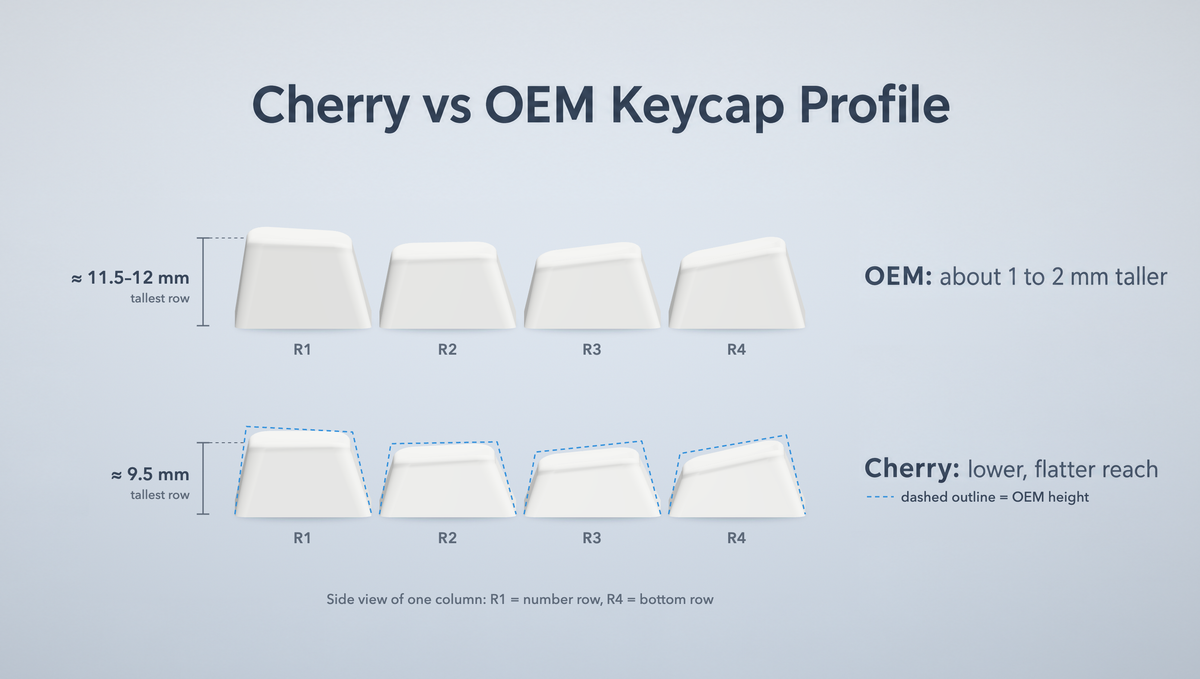
The short version: OEM profile keycaps are taller with steeper row angles, while Cherry profile keycaps sit roughly 1–2 mm lower with gentler sculpting. That small height difference is the whole debate. It changes your wrist angle, how far your fingers reach for the number row, and—to a smaller degree than the internet claims—how your board sounds.
This guide breaks down what each keycap profile actually is, how big the height gap really is, what it does to typing feel and acoustics, and how to decide which one belongs on your keyboard.
What Is OEM Profile?
OEM profile is the default keycap profile on most mass-produced mechanical keyboards. If you bought a prebuilt gaming keyboard and never changed the caps, you have almost certainly been typing on OEM profile keycaps without thinking about it.
Its defining traits:
- Sculpted rows — each row of the keyboard has its own height and tilt angle, so the keys form a shallow bowl under your fingers.
- Cylindrical top surface — the keycap top dishes in one direction, front to back, cradling the fingertip.
- Taller overall — commonly quoted figures put the tallest OEM row somewhere around 11.5–12 mm, though exact measurements vary between manufacturers.
- Steeper row-to-row transitions — the step up to the number row is more pronounced than on Cherry.
Because OEM is the mass-market standard, OEM keycap sets are widely available and tend to be the safest choice if you are simply replacing a worn set on a stock keyboard. Sets like the Glacier Frosted Keycaps Set and the Glacier Crystal Jelly Keycaps Set use this profile, and both are built in PBT.
What Is Cherry Profile?
Cherry profile is the shorter, flatter-feeling cousin, and it has become the default for enthusiast and custom keycap sets. It shares the same basic design language as OEM—sculpted rows, cylindrical tops, MX cross stem—but everything is scaled down.
Its defining traits:
- Lower overall height — the tallest row typically lands near 9.5 mm, again with variation by manufacturer.
- Gentler sculpting — the angle changes between rows are subtler, so the board feels flatter and more uniform.
- Row pattern — Cherry sets are often described with a notation like 1-1-2-3-4-4, running from the function row at the top down to the bottom row, telling you how each physical row is sculpted.
- Enthusiast standard — most custom and group-buy keycap designs are produced in this profile.
The Cherry profile keycaps range covers a lot of ground, from the minimalist Glacier Obsidian Black Keycaps Set to dye-sublimated side-print designs like the Glacier Starry Night Keycaps Set. If you want the doubleshot ABS route instead of PBT, the Domikey All in One Vintage Keycaps are a Cherry profile set built on that exact 1-1-2-3-4-4 sculpt.
Cherry vs OEM Height: How Much Lower Is Cherry, Really?
This is the question behind almost every keycap profile comparison, and the honest answer is: less than people expect, but enough to notice.
Across rows, OEM sits roughly 1 to 2 mm taller than Cherry. That sounds trivial written down. In practice, swapping a board from OEM to Cherry feels like the whole keyboard has been pressed down slightly—your fingers travel a shorter distance up to the number row, and your wrists sit at a flatter angle.
Whether that is an improvement depends entirely on your setup:
- High-profile aluminum cases with a steep typing angle often pair well with Cherry, because the case is already adding height and tilt.
- Low, flat cases can feel cramped with Cherry caps and more comfortable with the extra elevation of OEM.
- Typists who float their hands tend to prefer the lower reach of Cherry.
- Typists who rest their palms on the desk sometimes find OEM's taller number row easier to hit without lifting.
There is no universally correct answer here, which is exactly why both profiles remain popular after decades.
Does Keycap Profile Change How Your Keyboard Sounds?
You will see confident claims in both directions: that Cherry is deeper and thockier because there is less air inside the cap, and that Cherry is higher-pitched because there is less cavity to resonate. Both arguments get made, and they contradict each other.
Here is the accurate framing. Keycap profile does influence sound, but it is a minor variable compared to everything else. The factors that move the needle far more are:
- Keycap material — PBT and ABS have genuinely different acoustic characters.
- Wall thickness — thicker keycap walls generally produce a fuller, less hollow sound.
- Switch choice — stem material, travel, and bottom-out behaviour dominate the result.
- The board itself — case material, mounting style, plate, and foam do most of the work.
If your goal is a specific sound signature, changing from OEM to Cherry profile is not the lever to pull first. Material, foam, and switch selection will get you there far more reliably. Treat profile as an ergonomics and aesthetics decision, and accept whatever small acoustic change comes with it.
Cherry vs OEM for Gaming and Long Typing Sessions
For gaming, the practical difference is small but real. Lower Cherry profile keycaps mean slightly less vertical movement when your hand is anchored on WASD and reaching for number keys or modifiers. Some players find that reduces strain during long sessions. Others prefer OEM's more pronounced sculpting because the taller, more angled rows give clearer positional feedback—you can feel which row you are on without looking.
For long typing and programming sessions, the same trade-off applies. Cherry's flatter geometry tends to suit people who want a low, neutral wrist position. OEM's deeper sculpt suits people who like being guided into each row.
One thing worth saying plainly: neither profile will make you type faster. Adjustment takes a few days either way, and accuracy usually returns to baseline once you have adapted. Choose for comfort over the next several hours of typing, not for a performance claim.
Compatibility: Will Cherry or OEM Keycaps Fit Your Keyboard?
Both profiles use the same MX-style cross stem, so compatibility comes down to your switches and your layout rather than the profile itself.
- Switch stem — both fit MX-compatible switches, including Gateron and Kailh switches and most other MX clones.
- Low-profile switches — neither Cherry nor OEM will work. Low-profile switches require their own dedicated short keycaps.
- Layout coverage matters more than profile — the real compatibility trap is whether the set includes the odd-sized keys your board needs, such as a stepped caps lock, split spacebar, or a shorter right shift.
- Key count — larger sets cover more layouts. The Glacier Obsidian Black set ships with 128 keys and the Glacier Crystal Jelly set with 136, which is why both cover everything from compact boards to full-size.
Before buying any set, check your board's bottom row and right-hand cluster against the set's included keys. That single check prevents the most common keycap purchase mistake, and it applies equally to every profile in the keycaps range.
Can You Mix Cherry and OEM Keycaps on One Board?
Physically, yes—the stems are identical, so nothing stops you. Visually, it shows.
Enthusiasts who have tried it report a visible step of roughly 0.5 to 1 mm where the two profiles meet. Whether that bothers you is personal; some people never notice after a day, others find it impossible to unsee. The mismatch is most obvious when you mix within a single row, because the eye reads the uneven top line immediately.
If you do need to fill gaps from two sets, the least noticeable approach is to keep whole rows consistent and accept the difference between rows rather than within them. Better still, buy a set with enough coverage for your layout in the first place.
How to Choose Between Cherry and OEM Profile Keycaps
Use this as a quick decision guide:
- Choose OEM profile if your keyboard came with it and you are happy with the height, if you use a flat or low-profile case, or if you want the widest selection of straightforward replacement sets.
- Choose Cherry profile if you want a lower, flatter feel, if your case already has a steep typing angle, or if you want access to the enthusiast design selection, where most custom colourways are produced.
- Check your layout coverage before anything else. A beautiful set that does not include your bottom row is a wasted purchase.
- Decide material separately. PBT resists shine and has a drier texture; ABS doubleshot can feel smoother and holds certain colours better. This choice affects feel and sound more than profile does.
- If you are unsure, start with what you know. Staying on your current profile and changing only the material or colourway isolates one variable, so you learn what you actually like.
Frequently Asked Questions
Is Cherry profile better than OEM profile?
Neither is objectively better. Cherry profile is lower and more gently sculpted, OEM is taller with steeper row angles. Cherry has become the enthusiast default and OEM remains the mass-market standard. The right choice depends on your case height, your typing posture, and whether you prefer a flatter or more pronounced sculpt.
How much shorter are Cherry profile keycaps than OEM?
Roughly 1 to 2 mm shorter per row, with the exact figure varying by manufacturer. Commonly quoted numbers put the tallest OEM row near 11.5–12 mm and the tallest Cherry row near 9.5 mm. It is a small gap on paper that is clearly noticeable in use.
Do Cherry profile keycaps fit all mechanical keyboards?
They fit any keyboard using MX-style switches with a standard cross stem, which covers the large majority of mechanical keyboards. They will not fit low-profile switches. The more common compatibility issue is layout coverage—whether the set includes the specific key sizes your board's bottom row and right-hand cluster require.
Which keycap profile is best for gaming?
Both work well. Cherry's lower height slightly reduces the reach from the WASD cluster to the number row, which some players prefer during long sessions. OEM's stronger sculpting gives clearer feel for which row your fingers are on. Switch choice, keyboard layout, and actuation settings affect gaming far more than keycap profile does.
Does keycap profile affect keyboard sound?
It has some effect, but far less than keycap material, wall thickness, switch choice, and the keyboard's case and foam. If you are chasing a particular sound signature, change those variables first. Choose your profile based on comfort and looks instead.
The Bottom Line
The Cherry vs OEM keycap profile question comes down to about 1 to 2 mm of height and a difference in how steeply the rows are sculpted. OEM gives you a taller, more pronounced bowl and the broadest availability of standard replacement sets. Cherry gives you a lower, flatter geometry and the widest selection of enthusiast designs.
Both use MX-compatible stems, both suit gaming and typing, and neither will transform your keyboard's sound on its own. Match the profile to your case height and typing posture, confirm the set covers your layout, then pick the material and design you actually want to look at every day. Browse the full Cherry profile and OEM profile ranges to see what fits your build.


