

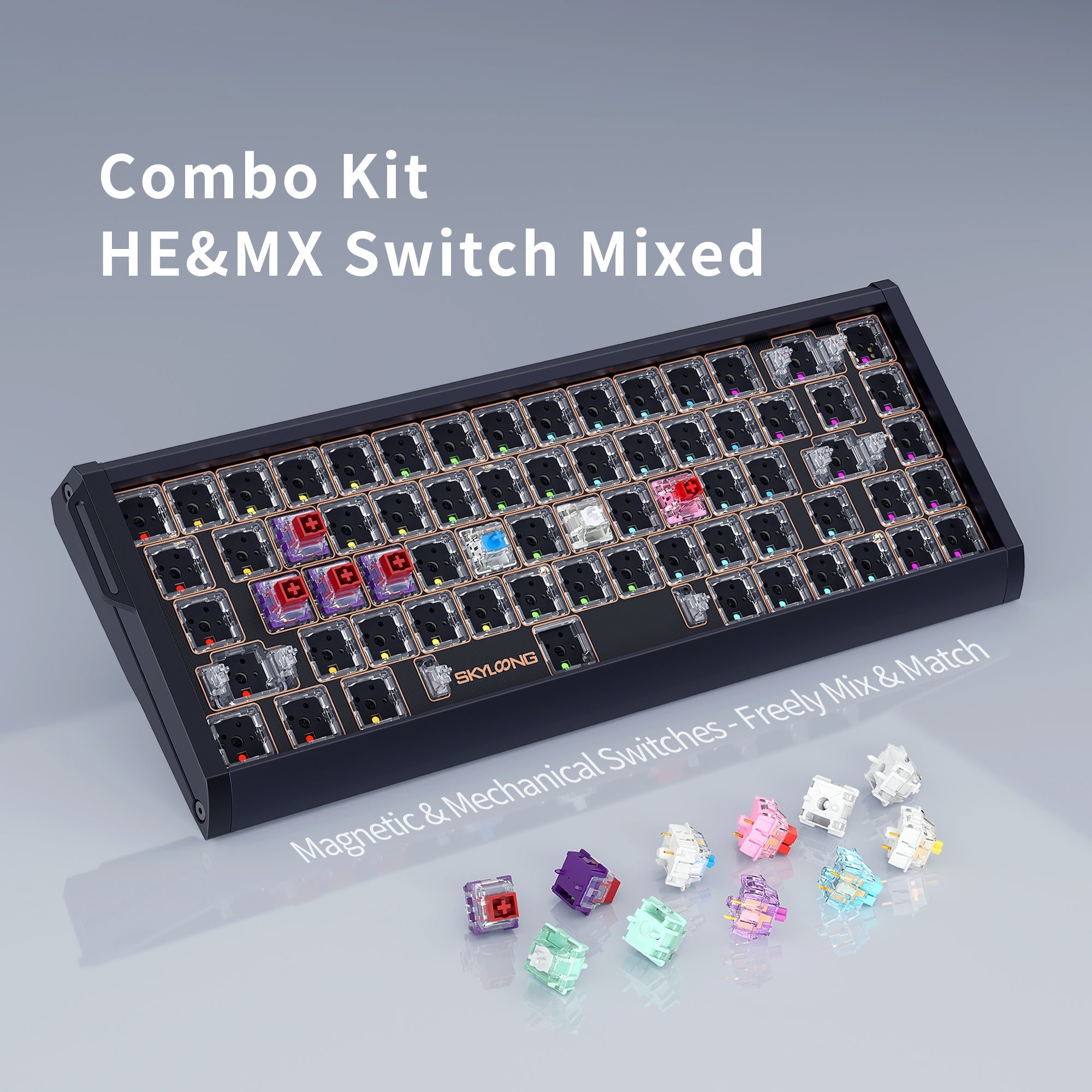
Hybrid Keyboard Guide: What It Means to Mix Magnetic and Mechanical Switches
A hybrid keyboard is a board whose PCB can read both magnetic (Hall effect) switches and traditional mechanical switches — in some cases on the same keyboard at the same time. For years those two switch technologies lived on completely separate keyboards, and the question "can I put normal switches in my Hall effect keyboard?" had one answer: no. Hybrid boards are changing that, and they are one of the most talked-about developments in the custom keyboard scene right now.
This guide explains how a hybrid keyboard PCB works, why magnetic and mechanical switches are normally incompatible, what you gain and give up when you mix them, and what to check before buying a magnetic keyboard or a hybrid one. If you have been reading threads about mixing magnetic and mechanical switches and wondering whether it is a real feature or marketing, this is the practical version.
Why Magnetic and Mechanical Switches Normally Don't Mix
The incompatibility is not about the plastic housing — it is about how each switch tells the keyboard that a key went down.
A traditional mechanical switch is a physical circuit. Inside the housing, a metal leaf makes contact as the stem travels down, closing a circuit through the switch pins and into the PCB. The board sees one thing: closed or open. That is a digital input — a key is either pressed or it isn't.
A magnetic switch works completely differently. There is a small magnet in the stem, and a sensor on the PCB underneath measures the strength of that magnet's field as the stem moves. Because field strength changes continuously with distance, the board can calculate how far down the key is, not just whether it is down. That is an analog input, and it is what makes features like rapid trigger and adjustable actuation possible.
That difference creates a two-way wall:
- Magnetic switches in a normal mechanical PCB won't work. A standard hot-swap PCB has no magnetic sensors under the sockets. Even if the switch physically seats, there is nothing there to read the magnet, and the firmware has no analog input path to process.
- Mechanical switches in a magnetic-only PCB won't work either. A magnetic PCB is built around sensors, not contact points. A standard mechanical switch has no magnet to detect, so the sensor reads nothing and the key stays dead.
This is why physical compatibility does not mean electrical compatibility. A switch that drops neatly into the plate can still be completely non-functional, and forcing one into a socket it was not designed for is a good way to bend pins for no benefit.
How a Hybrid Keyboard PCB Reads Both Switch Types
A hybrid keyboard PCB solves this by not choosing. Instead of building a board around either sensors or contacts, manufacturers put both at each key position: a magnetic sensor to read a magnet's field, and a conventional hot-swap socket wired for a mechanical switch's metal pins.
The firmware then handles the rest. Drop in a magnetic switch and the board reads the sensor, giving you analog travel data. Drop in a mechanical switch and the board reads the contact closing, giving you a standard digital keypress. Each key position is handled independently, which is what allows a single board to run a mixed switch layout.
The Skyloong GK68HEAT Mix Keyboard is a current example of this approach — a 65% aluminum board with a hybrid switch system that supports magnetic Hall effect switches and traditional mechanical switches at the same time, alongside an 8000Hz polling rate, tri-mode connectivity, and a gasket-mounted structure. Compare that with a magnetic-only design like the Skyloong GK68HE Magnetic Keyboard, which is hot-swappable but only for supported magnetic switches — the hot-swap sockets are there, but the board is magnetic end to end.
What You Gain and What You Give Up on the Mechanical Keys
Here is the part people miss when they get excited about hybrid boards: the magnetic features do not transfer to the mechanical switches. A mechanical switch on a hybrid PCB is still a contact switch, so it behaves like one.
What magnetic keys keep:
- Adjustable actuation point — set how far down the key registers
- Rapid trigger — the key resets as soon as you start lifting, rather than at a fixed reset point
- Analog output and multi-action features that depend on knowing key depth
What mechanical keys get instead:
- A fixed actuation point determined by the switch itself
- Whatever tactile bump, click, or linear feel that switch is designed for
- The full range of switch feel, sound, and modding options the mechanical market offers
So the real trade is performance features versus feel and variety. That is exactly why a mixed layout appeals to some people: put magnetic switches under WASD and the movement cluster where rapid trigger and a shallow actuation point genuinely help, and put the tactile or silent mechanical switches you actually enjoy typing on everywhere else.
Who Actually Benefits from a Hybrid Magnetic Keyboard?
A hybrid board is not automatically the right answer. It makes the most sense for a few specific situations.
- You game and type on the same board. Competitive FPS play rewards magnetic switches; long typing sessions often reward a tactile or silent mechanical switch. A hybrid layout gives you both without a second keyboard.
- You want to try magnetic without committing. Run mechanical switches you already own and add a handful of Hall effect switches to the keys that matter.
- You are a heavy switch swapper. A board that accepts both categories widens what you can put in it.
It makes less sense if you play competitively and nothing else — an all-magnetic board is simpler, and every key gets the same tuning.
Where TMR Sensors Fit Into the Magnetic Keyboard Conversation
Alongside hybrid boards, the other topic dominating magnetic keyboard discussion is TMR, short for tunnel magnetoresistance. It is a different way of sensing the same magnet.
A Hall effect sensor outputs a voltage proportional to magnetic field strength. A TMR sensor instead measures a change in electrical resistance across thin magnetic layers as the field shifts. Vendors implementing TMR generally claim finer sensitivity and lower power draw, which is particularly relevant for wireless boards, and the sensing geometry is more flexible about where the sensor sits relative to the magnet.
Keep it in perspective, though: TMR is newer and generally more expensive, and the sensor is only one part of the equation. Firmware, polling rate, calibration, and the switch itself all shape how a board feels, and a well-implemented Hall effect board can easily outperform a poorly implemented TMR one. Hall effect remains the more established and widely supported option today.
What to Check Before You Buy a Hybrid or Magnetic Keyboard
Magnetic and hybrid boards are less standardized than ordinary mechanical keyboards, so the spec sheet matters more than usual.
- Which magnetic switches are actually supported. Magnetic switches are not universally interchangeable the way standard mechanical switches largely are. Manufacturers list specific compatible switch models, and going outside that list can mean inconsistent readings.
- Whether hybrid support covers every key. Some hybrid designs enable mixed switches across the whole board; others limit it to a subset of key positions.
- Actuation range and adjustment granularity. The GK68HE, for example, lists an adjustable actuation range of 0.1mm to 4mm with a 0.01mm rapid trigger, an 8000Hz polling rate, and 0.125ms latency. Ranges and step sizes vary a lot between boards.
- Calibration support. Magnetic boards rely on calibration to know each key's baseline field. Good software makes recalibration easy after a switch swap; poor software makes it a chore.
- Connectivity. Check whether a board's top polling rate applies to wired mode only.
Swapping Switches on a Hybrid Board Without Damaging Anything
Because hybrid boards invite frequent switch changes, technique matters. The process is the same as any hot-swap board, with one extra step at the end.
- Remove the keycap first with a wire-style puller, gripping opposite edges of the cap and lifting straight up. Ring-style pullers are more likely to scuff the sides of a keycap.
- Grip the switch across its top and bottom latches — not the sides — and pull straight up. Rocking the switch is what bends pins.
- Check the pins on the new switch before inserting. A pin that is even slightly splayed should be straightened with tweezers first.
- Seat the switch flat and evenly. If it resists, stop and check pin alignment rather than forcing it.
- Recalibrate after installing magnetic switches so the board learns the new baseline for those keys.
A dedicated tool makes this far safer than improvising. The Glacier Keycap/Switch Puller Tool covers both jobs, and you can browse the rest of the keyboard tools if you are building out a maintenance kit. For the switches themselves, the magnetic switches and broader key switches collections are the places to start — the Gateron Magnetic Jade Linear Switches are a popular pre-lubed magnetic linear option.
Frequently Asked Questions About Hybrid and Magnetic Keyboards
Can you put normal mechanical switches in a Hall effect keyboard?
Only if the keyboard is specifically designed as a hybrid. A magnetic-only PCB reads magnetic fields and has no contact circuitry under the socket, so a standard mechanical switch will not register even when it physically fits. Boards advertised as hybrid or "mix" designs include both a sensor and a mechanical hot-swap socket at each key.
Do mechanical switches get rapid trigger on a hybrid keyboard?
No. Rapid trigger, adjustable actuation, and analog output all depend on the board measuring how far a magnet has moved. A mechanical switch simply closes a circuit at one fixed point, so on a hybrid board it behaves as a normal digital key. Those features stay exclusive to the magnetic switches you install.
Are magnetic switches interchangeable between different magnetic keyboards?
Not reliably. Unlike standard mechanical switches, which are broadly cross-compatible, magnetic switches vary in magnet strength and placement, and each board is tuned for specific models. Check the manufacturer's supported switch list before buying, and recalibrate after any swap.
Is a hybrid keyboard worth it for gaming?
It depends on how you use the board. If you play competitively and do little else on that keyboard, an all-magnetic layout is simpler and more consistent. If the same board handles gaming and long typing sessions, a hybrid lets you put magnetic switches only where the speed helps and keep the typing feel you prefer elsewhere.
Do magnetic keyboards need to be calibrated?
Yes. Magnetic sensing depends on knowing each key's resting magnetic baseline, so boards ship calibrated and offer a recalibration routine in software. You should recalibrate after swapping switches, and it is the first thing to try if you see inconsistent actuation, dead zones, or keys registering on their own.
Final Thoughts on Mixing Magnetic and Mechanical Switches
Hybrid keyboards are a genuinely useful idea rather than pure marketing, but the value depends entirely on your use case. The technology removes a real limitation — you no longer have to choose one switch technology for an entire board — while leaving the underlying trade intact: magnetic switches buy you adjustable actuation and rapid trigger, mechanical switches buy you feel, sound, and variety.
If you want the fastest, most tunable gaming input across every key, a dedicated magnetic keyboard is still the cleanest answer. If your keyboard has to be a gaming board and a typing board at once, a hybrid is worth the look — just go in understanding which keys get which capabilities, and check the supported switch list before you start buying switches.


