

Switch Compatibility Explained: Will These Switches Fit Your Keyboard?
Switch compatibility is one of the most common questions new keyboard owners ask before an upgrade. You have found a switch with the perfect sound and feel, the listing says "hot-swappable," and you want to know one thing: will these switches fit my keyboard? Most of the time the answer is yes, but there are a handful of cases where a switch will not seat, will not register, or needs a small modification first.
This guide walks through mechanical keyboard switch compatibility in plain language: MX-style footprints, 3-pin vs 5-pin switches, hot-swap versus soldered PCBs, why magnetic switches and mechanical switches are not interchangeable, low-profile and optical exceptions, and a quick checklist you can run before you order a new set of switches.
Are Keyboard Switches Universal? The MX-Style Standard
Keyboard switches are not universal, but most modern mechanical keyboards share one dominant standard: the MX-style switch. An MX-style switch has a cross-shaped stem on top for the keycap and, underneath, two metal contact pins plus a large center plastic post that locates the switch on the PCB.
Gateron, Kailh and most other major switch makers build their standard switches to this footprint, which is why a single hot-swap keyboard can take switches from many different brands. If your keyboard is an MX-style hot-swap board, the vast majority of full-size MX-style mechanical switches will physically fit. You can browse MX-style options in the key switches collection.
The switches that do not follow this standard are the ones to watch for:
- Magnetic (Hall effect) switches, which need a magnetic sensing PCB
- Low-profile switches such as Kailh Choc, which use their own footprint
- Optical switches, which need an optical PCB and are often specific to one design
- Topre and Alps-style switches, which use entirely different mechanisms and mounting
3-Pin vs 5-Pin Switches: Which Fit Your PCB?
The 3-pin vs 5-pin question causes more confusion than anything else, but the rule is simple once you know what the extra pins are.
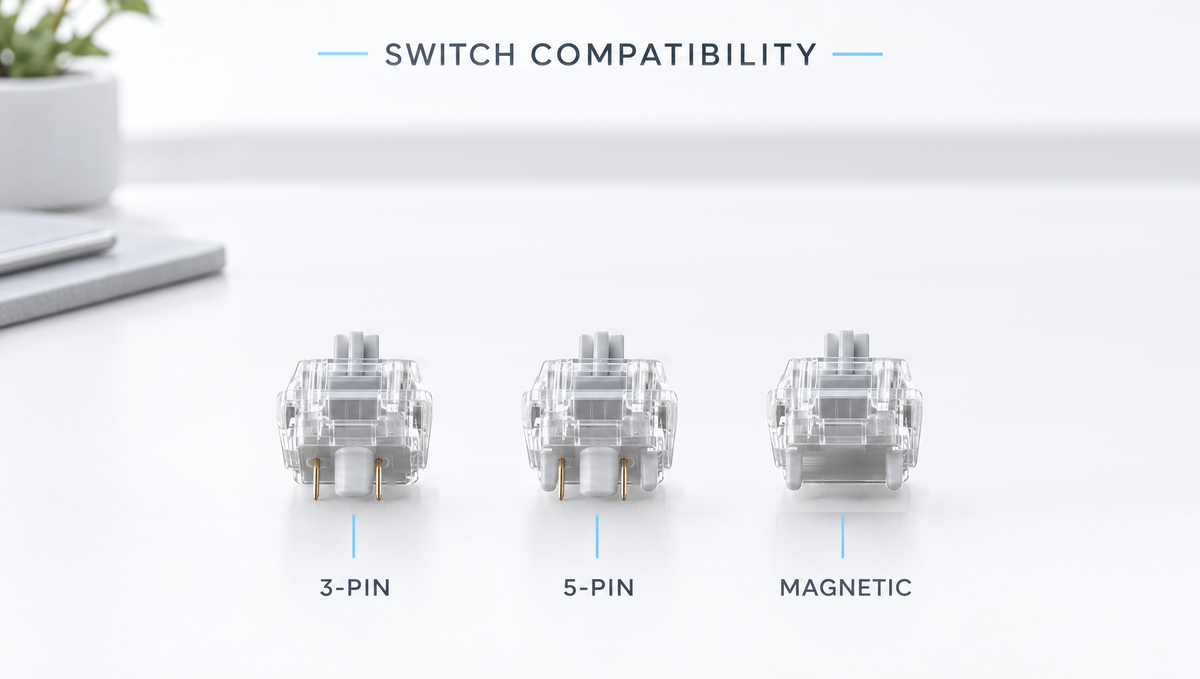
- 3-pin switches (also called plate-mount switches) have the two metal pins and the center post.
- 5-pin switches (also called PCB-mount switches) add two small plastic legs on either side of the center post. These legs add stability; they carry no electrical signal.
That leads to the compatibility rule:
- 3-pin switches fit 5-pin PCBs. A 5-pin board has the extra holes, but a switch without legs simply leaves them empty.
- 5-pin switches fit 3-pin PCBs only if you clip the legs. A 3-pin board has no holes for the plastic legs, so the switch will not sit flat. Trimming the two plastic legs with flush cutters makes a 5-pin switch work on a 3-pin board. It does not affect how the switch registers, but it is permanent.
Many popular switches ship in the 5-pin format, including the Gateron Smoothie Linear Switches and the Kailh Box Winter Tactile Switches. Before buying, check whether your keyboard's PCB has the two extra holes beside each switch position. Our full breakdown of 5-pin vs 3-pin switches covers the stability differences in more depth.
Hot-Swap vs Soldered: Can You Change Switches at All?
Before worrying about brands or pin counts, confirm that your keyboard is hot-swappable. A hot-swap PCB uses small sockets that grip the switch pins, so you can pull a switch out and push a new one in without any tools beyond a switch puller.
A soldered PCB has the switch pins soldered directly to the board. You can still change switches, but each one has to be desoldered and the new switch soldered in place. That is a much bigger job and is not something to attempt casually. If you are unsure which type you have, our guide to hot-swappable vs soldered PCBs explains how to tell.
On a hot-swap board, installation technique matters as much as compatibility. Bent pins are the most common reason a newly installed switch does not register. Line the pins up with the socket holes, keep the switch straight, and press gently until it clicks into the plate. If a key stops working after a swap, our guide to fixing bent pins and socket issues walks through the fix.
Magnetic Switch Compatibility: Hall Effect Switches Are a Separate System
This is the compatibility question that has exploded alongside the popularity of Hall effect keyboards, rapid trigger and adjustable actuation. The short answer: magnetic switches and mechanical switches are not interchangeable.
A mechanical switch closes a metal contact, which is why it has metal pins. A magnetic switch has a magnet in its stem and no electrical contact at all; a sensor on the PCB measures the magnetic field as the key travels. That means:
- A magnetic switch will not work in a standard mechanical hot-swap socket, because there is no contact for the socket to read.
- A mechanical switch will not work on a magnetic-only PCB, because there is no magnet for the sensor to detect.
Even between magnetic keyboards, magnetic switch compatibility is not guaranteed. Magnet strength and position vary between switch models, and each keyboard's sensors and firmware are tuned for certain switches. The safe approach is to use switches from the keyboard maker's supported list. For example, the Skyloong HE75 Magnetic Keyboard names the specific magnetic switch models it supports for hot-swapping in its product details. If a switch is not on your keyboard's list, treat it as unconfirmed rather than assuming it will work.
After swapping any magnetic switches, run the calibration routine in your keyboard's software. Because these keyboards measure distance rather than a simple on/off contact, a fresh calibration helps keep actuation points and rapid trigger behaving consistently. Our guide to magnetic keyboard calibration covers the process.
There is one middle ground: hybrid keyboards. The Skyloong GK68HEAT Mix Keyboard supports both magnetic Hall effect switches and traditional mechanical switches at the same time. Even on a hybrid, follow the keyboard's own documentation for where each switch type goes. Our hybrid keyboard guide explains how mixing works. You can browse magnetic options, such as the Gateron Magnetic Jade Linear Switches, in the magnetic switches collection, and confirm them against your board's supported list before ordering.
Low-Profile and Optical Switches: The Other Exceptions
Low-profile switches are built for thin keyboards and use their own footprint. Kailh Choc switches, for example, need a PCB designed for Choc switches. They will not fit an MX-style hot-swap socket, and MX-style switches will not fit a Choc board. Low-profile switches also generally need low-profile keycaps.
Optical switches register a keypress by interrupting a beam of light rather than closing a metal contact, so they need an optical PCB. Optical designs vary between manufacturers, so an optical switch from one brand will not necessarily fit another brand's optical keyboard, and none of them work in a standard mechanical socket. If you want the background, our comparison of optical vs mechanical switches covers how they work.
Other Switch Fit Issues: LEDs, Keycaps and Plates
Even when a switch physically fits, a few smaller factors can affect the result:
- North-facing vs south-facing PCBs. This describes where the switch LED sits. It does not stop a switch from fitting, but on north-facing boards some Cherry profile keycaps can contact the switch housing. Our north vs south-facing guide explains the issue.
- RGB shine-through. Switches with clear or translucent top housings let more light through than solid opaque housings. This is cosmetic, not a compatibility issue.
- Switch fit in the plate. Housings vary slightly between brands, so some switches feel tighter or looser in a given plate. A slightly loose fit is normal; it is not a sign the switch is incompatible. Our guide to switch wobble covers this in detail.
- Keycap stems. MX-style switches use a cross stem, so standard MX keycaps fit. Our keycap compatibility guide covers sizes and layouts.
How to Check Switch Compatibility Before You Buy
Run through this switch compatibility checklist and you will avoid nearly every fitment problem:
- Confirm your keyboard is hot-swappable. Check the product listing or manual. If it is soldered, plan for desoldering.
- Identify the switch type your board uses. Mechanical MX-style, magnetic, low-profile or optical. These are separate systems.
- Pull one switch and look at the PCB. Two extra small holes beside the center hole mean the board accepts 5-pin switches. No extra holes means 3-pin only.
- Match pin count. 3-pin switches work everywhere MX-style; 5-pin switches need a 5-pin PCB or clipped legs.
- For magnetic keyboards, check the supported switch list from the keyboard maker, and plan to recalibrate after installing.
- Count how many switches you need. Our guide to switch count by layout helps you order the right quantity with spares.
- Try before committing. A switch tester or keychain lets you feel a switch before buying a full set. The Glacier Keycap/Switch Keychain Tester holds MX-style mechanical switches for exactly this purpose.
For the actual swap, use a proper switch puller that grips the top and bottom clips of the switch so you lift it straight out. The Glacier Keycap/Key Switch Tool handles both keycaps and switches, and the full range is in keyboard tools. Spare switches are easy to lose, so a dedicated case such as the Kailh Switches Storage keeps your extras organized.
Frequently Asked Questions About Switch Compatibility
Can I put any switch in a hot-swappable keyboard?
No. A standard hot-swap keyboard accepts MX-style mechanical switches from most brands, but not magnetic, low-profile or optical switches. You also need to match pin count: 5-pin switches need a 5-pin PCB unless you clip the plastic legs.
Do 5-pin switches work on a 3-pin keyboard?
Yes, if you clip the two plastic legs with flush cutters. The legs only add stability and carry no signal, so removing them does not affect how the switch registers. Going the other way, 3-pin switches fit 5-pin boards with no changes.
Can I put mechanical switches in a Hall effect keyboard?
Not on a magnetic-only board. A Hall effect keyboard reads a magnet in the switch stem, and mechanical switches do not have one. The exception is a hybrid keyboard designed to accept both types, such as one that supports magnetic and mechanical switches at the same time.
Are magnetic switches compatible across all magnetic keyboards?
Not reliably. Magnet strength and position differ between switch models, and each keyboard is tuned for certain switches. Check your keyboard's supported magnetic switch list and recalibrate after installing new switches.
Are Gateron and Kailh switches interchangeable?
Their standard MX-style mechanical switches are. Gateron and Kailh MX-style switches use the same basic footprint, so they fit the same hot-swap sockets. Just match the 3-pin or 5-pin format to your PCB. For help choosing between them, see our Kailh vs Gateron comparison.
Getting Switch Compatibility Right the First Time
Almost every switch fitment problem comes from one of three things: buying a switch from the wrong system (magnetic, low-profile or optical instead of MX-style mechanical), mismatching 3-pin and 5-pin, or assuming every magnetic switch works in every magnetic keyboard. Confirm your board type, check the PCB holes, read your keyboard's supported switch list if it is magnetic, and test a switch first if you can. Do that and a switch swap becomes a quick upgrade instead of a return.
When you are ready to shop, the key switches collection lists linear, tactile, clicky, silent and magnetic options, and the keyboard accessories range covers the tools and storage you will want alongside them.


