

Why Is My Mouse Double Clicking?
If your mouse is double clicking when you only clicked once, you are dealing with one of the most common gaming mouse problems there is. A single press opens two folders, drag-and-drop lets go halfway across the screen, a semi-auto weapon fires twice, or a held click drops for no reason. It tends to show up after a year or two of heavy use, and it usually gets worse rather than better.
The good news is that a mouse double click problem is not always a dead mouse. Sometimes it is a setting, sometimes it is debris, and sometimes it really is a worn switch. This guide explains what causes a mouse to double click, how to tell software problems from hardware failure, the fixes worth trying, and why so many newer gaming mice have moved to optical mouse switches.
How Mouse Switches Work (and Why They Fail)
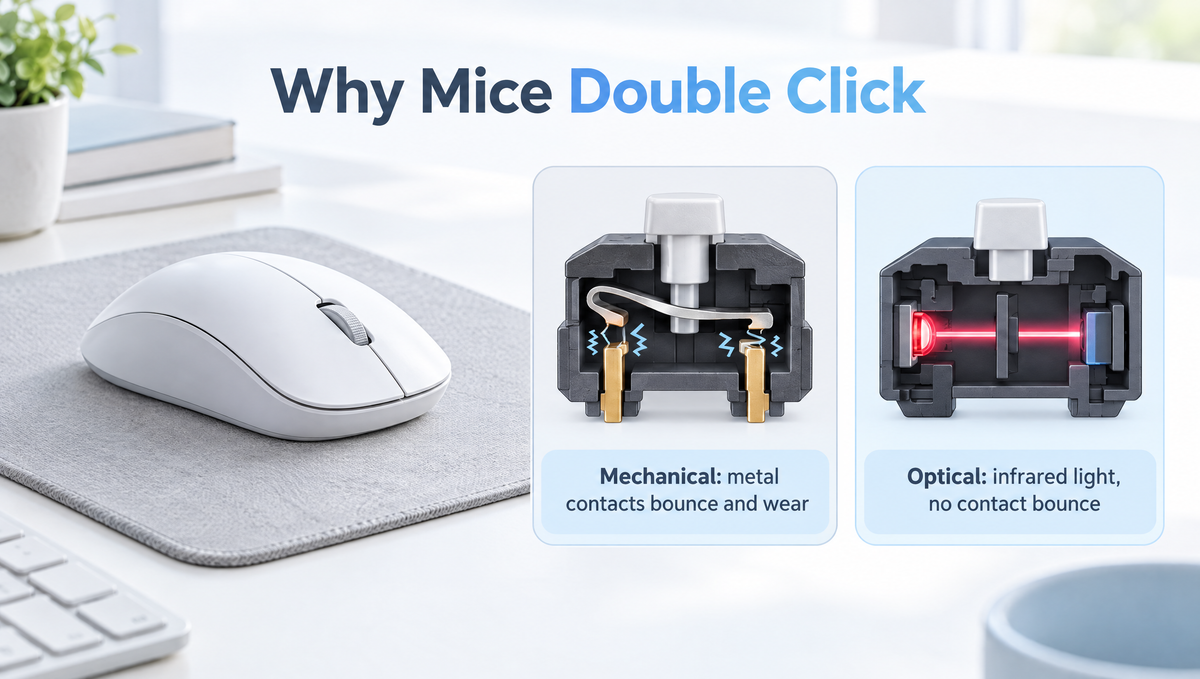
Underneath each main button is a small switch. In a traditional mechanical mouse switch, pressing the button pushes a plunger that snaps a thin metal spring leaf onto a contact. Metal touching metal closes the circuit, and the mouse reports a click.
That metal-on-metal design has two weak points:
- Contact bounce. When two metal contacts meet, they do not settle instantly. For a brief moment they bounce, so the electrical signal flickers on and off several times from one press.
- Contact wear. Over many thousands of presses, the contact surfaces oxidize and wear, and the spring leaf can lose tension. A worn contact is more likely to bounce, and to bounce for longer.
To hide the bounce, mouse firmware uses debounce time: after the first signal, it ignores further changes for a few milliseconds. When a worn switch bounces for longer than that window, the extra signal gets through and the computer sees a second click. That is the classic mouse switch chatter behind most double clicking.
Signs Your Mouse Double Click Is a Hardware Problem
Before you start fixing anything, figure out whether the switch or something on the computer side is to blame. The pattern of the problem tells you a lot.
- Only one button is affected. If left click double clicks but right click is fine, a worn switch is the likely cause. Software issues usually affect the whole mouse.
- Held clicks drop. If dragging a window or holding a trigger randomly releases, the contact is breaking for a moment while held. That is also a switch symptom.
- It follows the mouse. Plug the mouse into a different computer. If it still double clicks, the problem is in the mouse, not your PC.
- It started gradually. Switch wear builds over time, so an occasional double click that slowly becomes frequent points to hardware.
An online mouse click test or double click tester is the quickest way to confirm it. Click slowly and deliberately, one press at a time. If the tester logs two clicks from one press, or shows extremely short gaps between clicks you did not make, the switch is chattering.
How to Fix a Mouse That Double Clicks
Work through these fixes in order, from the easiest and safest to the most involved.
1. Check your double-click speed setting
Your operating system decides how quickly two separate clicks must happen to count as a double click. In Windows, it is the double-click speed slider in Mouse Properties, reached through Additional mouse settings. If it is set very slow, two deliberate single clicks can be read as a double click. Set it back to around the middle and test again. This will not fix a chattering switch, but it rules out a common false alarm.
2. Update or reinstall the mouse software and firmware
Gaming mice rely on firmware and companion software for button behavior. A macro accidentally assigned to the main button, a corrupted profile, or outdated firmware can all cause odd click behavior. Reset the mouse to its default profile, check that no macro is bound to left or right click, and install any firmware updates the manufacturer provides.
3. Raise the debounce time if your software allows it
Many gaming mouse apps let you adjust debounce time, sometimes called click delay or button response time. Lowering it is popular with competitive players because it shaves a little latency off each click, but a low debounce setting on a mechanical switch makes double clicking far more likely. Raising it a few steps is the most effective software fix for mild chatter. It will not restore a worn contact, but it can buy a mouse a lot more life.
4. Clean around the button
Dust and grime around the button or plunger can make a press land unevenly. With the mouse unplugged or switched off, use short bursts of compressed air into the gaps around the main buttons while clicking them several times. Avoid soaking anything in liquid, which can get into the switch and make things worse.
5. Try a different port, cable, or connection mode
Plug a wired mouse into a different USB port, ideally directly on the PC rather than through a hub. For a wireless mouse, test it wired if it supports that, and try a fully charged battery. Move a wireless receiver closer or onto an extension so it has a clear line to the mouse.
6. Use the warranty
Double clicking from a worn switch is a recognized hardware fault. If the mouse is still under warranty, a claim is usually the best route, and opening the shell to repair it can void that warranty.
7. Replace the switch (advanced)
Out of warranty, enthusiasts often replace the mouse switch themselves. On most mice the switches are soldered to the main board, so this means opening the shell, desoldering the old switch, and soldering in a new one of the same footprint. It is very doable with a soldering iron and some patience, but it is a real repair job, not a quick tweak. Some people also open the switch and re-tension the metal leaf, which can work as a temporary fix, though the worn contact surfaces remain.
Optical vs Mechanical Mouse Switches
The double click problem is the main reason optical mouse switches have become so common on gaming mice. Instead of two metal contacts, an optical switch uses a beam of infrared light. Pressing the button moves a shutter that changes whether the light reaches a sensor, and the mouse reads that change as a click.
Because no metal contacts touch, an optical switch has:
- No contact bounce, so there is no chatter to filter out.
- Little or no debounce delay, which can make clicks register slightly faster.
- No contact oxidation, removing the most common cause of double clicking.
Optical switches are not perfect. The plunger, spring, and plastic parts can still wear, and the overall mouse still needs well-tuned firmware. Feel is also a matter of taste: some players find certain optical switches lighter or less crisp than the mechanical switches they are used to, while newer designs have closed much of that gap. The practical takeaway is that optical switches remove the biggest reason mice start double clicking, not every possible failure.
Click Latency, Debounce, and Competitive Gaming
Click latency is the delay between pressing the button and the computer receiving the click. Debounce is part of it on mechanical switches, along with the mouse's internal processing and its polling rate, which sets how often the mouse reports to your PC. If you want the full picture on reporting speed, see our guide to mouse polling rate.
For most players, the difference of a few milliseconds of debounce is far smaller than human reaction time, and a stable click matters more than a marginally faster one. If you play competitive shooters and your mouse uses mechanical switches, the sensible approach is to use the lowest debounce setting that produces zero double clicks in a click test, not the lowest setting available.
Magnetic Mouse Buttons: The Newest Trend
The same technology that changed gaming keyboards is now reaching mouse buttons. Some newer mice use magnetic sensing, such as Hall effect or TMR sensors, for their main buttons. Like a magnetic keyboard, the button's position is measured continuously instead of relying on a contact closing, which allows features such as adjustable actuation and rapid-trigger-style click resets.
Magnetic mouse buttons are still a small, emerging category, and the long-term durability and feel will become clearer as more of them reach players. They share the main benefit of optical switches, though: no metal contacts to wear out and chatter.
How to Make Your Mouse Switches Last Longer
- Do not set debounce to the minimum unless the switch is new and tests clean.
- Keep the mouse clean and away from food and drink, especially around the button gaps.
- Avoid heavy slamming clicks when a normal press does the job.
- Use a good surface. A clean mousepad like the Glacier Frosted Mousepad keeps grit off your desk and out of the mouse.
- Store it in a dry place. Humidity can speed up contact oxidation in mechanical switches.
When to Replace Your Mouse
If a raised debounce time no longer stops the double clicking, the mouse is out of warranty, and you are not comfortable soldering, a replacement is usually the practical choice. When you shop, check the spec sheet for the switch type, whether the software lets you adjust debounce, and the connection options you need.
For example, the Skyloong M1 Mouse is a 65g wireless gaming mouse with 2.4GHz, Bluetooth, and wired USB-C modes, adjustable DPI up to 15,000, a 1000Hz polling rate, and software for DPI levels, lighting, macros, and button assignments. You can browse the current lineup in our gaming mice collection.
Frequently Asked Questions
Why does my mouse double click when I single click?
Most often, the metal contacts inside a mechanical mouse switch have worn or oxidized, so they bounce for longer than the mouse's debounce time can filter out. The extra bounce registers as a second click. A double-click speed setting that is too slow, a bad macro, or corrupted mouse software can cause similar symptoms, so rule those out first.
Can you fix a double clicking mouse without opening it?
Sometimes. Raising the debounce time in your mouse software, resetting its profile, updating firmware, and cleaning around the button with compressed air can stop mild double clicking. If the switch contacts are badly worn, the only permanent fixes are a warranty replacement or replacing the switch.
Do optical mouse switches double click?
Optical switches do not have metal contacts, so they do not suffer from the contact bounce and oxidation that cause most double clicking. They can still fail in other ways, such as worn plastic parts or firmware issues, but double clicking is far less common than with mechanical switches.
Does lower debounce time make a mouse faster?
Lower debounce time can reduce click latency by a few milliseconds on a mechanical switch, but it also makes double clicking more likely, especially as the switch ages. Use the lowest setting that still passes a click test with no double clicks.
How do I test if my mouse is double clicking?
Use an online mouse click test or double click tester and click slowly, one press at a time. If one press shows up as two clicks, or if held clicks drop out, the switch is chattering. Testing on a second computer confirms whether the fault is in the mouse itself.
Final Thoughts
A mouse double clicking on its own is usually a switch that has started to chatter, and it is fixable more often than people think. Check your settings, raise the debounce time, clean the buttons, and use the warranty before giving up on it. If you are buying new, look closely at the switch type: optical and magnetic mouse buttons remove the metal contacts that cause most double clicking in the first place.


