

How Many Switches Do You Need for Your Keyboard?
If you are buying switches for the first time, the most practical question is also the most common: how many switches do I need for my keyboard? Switches are sold in fixed pack sizes — usually 35, 70 or 105 pieces — and keyboards come in layouts with awkward key counts like 67, 84 or 108. Get the math wrong and you either pay for a pack you did not need or end up three switches short with a half-built board on your desk.
The short answer: one switch per key, plus a handful of spares. The longer answer is that almost no keyboard has the key count its model name suggests, and several layout options change the total. This guide covers the keyboard switch count by layout for 60%, 65%, 75%, TKL, 96% and full-size boards, how to match that to real pack sizes, and what to do with the leftovers.
Keyboard Switch Count by Layout: The Quick Answer
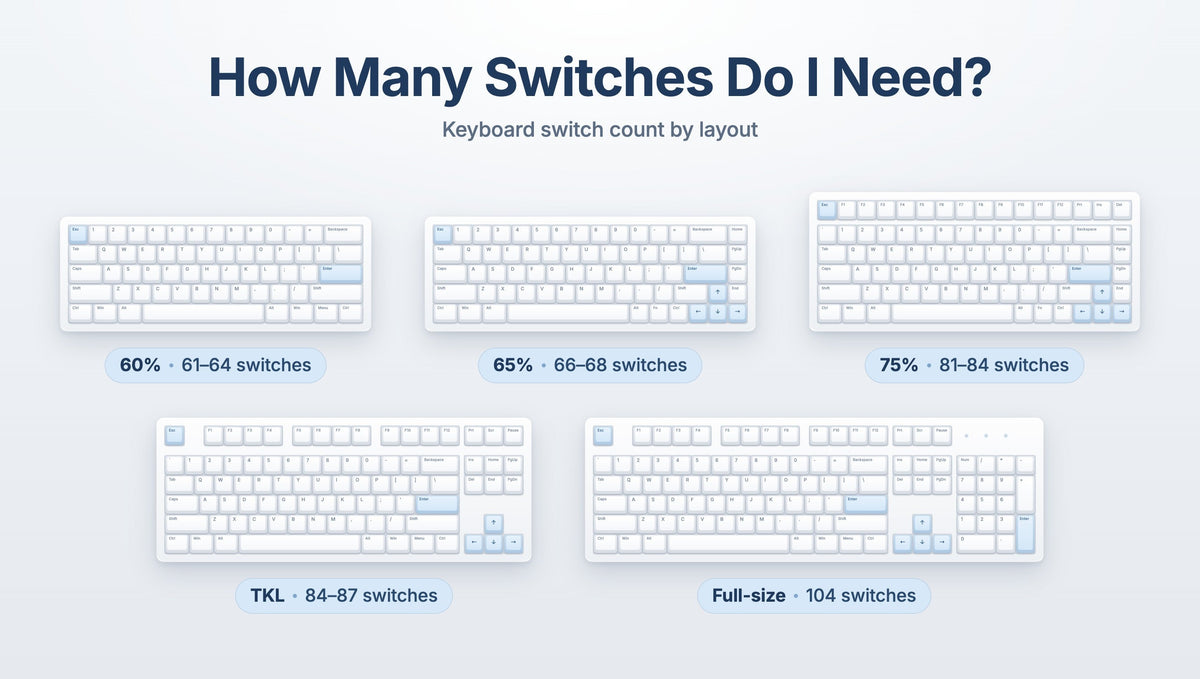
Here is roughly how many switches each common mechanical keyboard layout needs. Treat these as ranges — manufacturers shift key counts by a few in every category.
- 40% keyboards — about 41 to 47 switches. A 35-pack usually falls short; a 70-pack covers it easily.
- 60% keyboards — about 61 to 64 switches. A 70-pack is the natural fit.
- 65% keyboards — about 66 to 68 switches. A 70-pack works, but leaves only a couple of spares.
- 75% keyboards — about 81 to 84 switches. You need a 105-pack, or a 70-pack plus a 35-pack.
- TKL / 80% keyboards — about 84 to 87 switches (87 on a standard ANSI tenkeyless). A 105-pack covers it comfortably.
- 96% and 1800-compact keyboards — about 96 to 104 switches, typically around 100. A 105-pack just covers it.
- Full-size keyboards — 104 switches on a standard ANSI board, 105 on ISO, and up to 108 on kits with extra keys. This is the size where a 105-pack can genuinely run out.
That last line catches people out. A 105-piece switch pack sounds designed for a full-size keyboard, and on a 104-key ANSI board it is — with exactly one switch to spare. On a 108-key kit such as the Weikav NUT108 Keyboard Kit, a single 105-pack leaves you three short.
Why the Model Name Is Not the Switch Count
A keyboard's model number usually hints at its key count, but it is not a specification. Three examples from real boards:
- The Skyloong GK68HE Magnetic Keyboard is a 67-key board despite the 68 in the name.
- The Weikav MAX102 Keyboard Kit is a full-size board with 102 keys — two fewer than a standard 104-key full-size.
- The Glacier GK84 Keyboard Kit is an 84-key 75% layout, at the top of the 75% range.
Before you buy, count the switch sockets on the PCB or check the key count on your board's product page — and on a hot-swap PCB with optional layout support, count only the sockets you will actually populate. If you are still choosing a size, our guide to choosing the best keyboard layout walks through the trade-offs, and you can browse by size in the 60% layout, 75% layout, TKL layout and full-size layout collections.
Switch Pack Sizes Explained: 35, 70 and 105 Packs
Most key switches are sold in three tiers, and each exists for a reason.
- 35-piece packs. Too few for a complete build on almost any board. These are for sampling a switch before committing, for accent switches on modifiers, or for topping up a larger pack.
- 70-piece packs. The sweet spot for 60% and 65% keyboards — plenty spare on a 60%, a couple on a 65%.
- 105-piece packs. Built for TKL and full-size keyboards — generous on a TKL, tight on a 104-key full-size, short on a 108-key kit.
Two smaller packs can beat one large one. A 75% board needing 84 switches is covered by a 70-pack plus a 35-pack with 21 spare, and buying that way lets you run two switch types — linears on the alphas, something heavier on the modifiers. That mix is easy on a hot-swappable keyboard.
How Many Spare Switches Should You Buy?
Buy five to ten spare switches beyond your key count. Spares cover four specific situations:
- Bent or broken pins. The most common build failure. A pin that folds under the housing instead of entering the socket can snap when straightened.
- Dead or inconsistent switches. Even good batches contain the occasional switch that feels scratchy or does not register.
- Damage during removal. Switch housings get chewed up by careless pulling, particularly where the top housing clips are tight.
- Future layout changes. Moving to a split backspace, a split right shift or split spacebars creates sockets you need to fill later.
Bent pins are avoidable rather than inevitable. Inspect every switch before insertion, check that both pins are straight and parallel, and press the switch in vertically until it clicks flat against the plate. When removing switches, grip the housing squarely and pull straight up with a proper tool such as the Glacier Keycap/Switch Puller Tool — our guide to using a keycap puller and switch puller without damage covers the technique, and the keyboard tools collection has the options.
What Changes Your Switch Count
Several layout details move the number up or down. Check these against your own board before ordering.
- ISO versus ANSI. An ISO layout adds one key beside enter, so an ISO full-size needs 105 switches, not 104.
- Split spacebars. Splitting the spacebar into two or three keys adds one or two switches — see our guide to split and dual spacebars.
- Rotary knobs. A knob usually occupies a position where a key would go, reducing your switch count by one.
- Alice and ergonomic layouts. Split-angle boards often add a duplicate key or an extra spacebar half, pushing the count above what the percentage suggests.
- Optional layout sockets. Many hot-swap PCBs include extra sockets for alternate bottom rows or split backspace. Fill only the ones your keycap set covers.
One point that trips up first-time builders: every stabilized key still needs exactly one switch. The spacebar, shift keys, enter, backspace and the large numpad keys each take a single switch plus a stabilizer, and a stepped or oversized keycap is still one switch. Stabilizers steady the keycap; they do not replace the switch underneath it.
Counting Switches for Magnetic and Hall Effect Keyboards
The same one-switch-per-key rule applies to magnetic and Hall effect keyboards, but two things differ.
First, magnetic switches are not interchangeable with mechanical switches. A magnetic board needs a magnet in the stem, and a standard mechanical switch will not register on that PCB at all. Compatibility is also board-specific, since magnet strength and stem geometry vary, so check the supported switch list on your keyboard's product page.
Second, pack sizes differ. The Gateron Magnetic Jade Linear Switches ship in 70-piece and 140-piece packs rather than the usual 35/70/105 tiers. A 70-piece pack covers a 67-key magnetic board with a few spares; the 140-piece pack covers a full-size build with a healthy reserve. Browse the magnetic switches collection for what is available.
Buying Switches Before You Know Which Ones You Want
Buying 105 of a switch you have never pressed is how people end up with an expensive drawer of regrets. Try a switch tester. A small tester or a switch keychain tester lets you feel the actuation and hear the sound before committing to a full set — our guide to whether switch testers are worth it covers what they do and do not tell you. Or buy a 35-pack first, install it on the keys you use most, type for a week, then order the rest. That costs a little more per switch than one large pack, and far less than replacing a set you dislike.
Narrow by switch family before you narrow by model: linear switches for smooth uninterrupted travel, tactile switches for a bump at actuation, clicky switches for an audible click, or silent switches for shared spaces and offices.
What to Do With Leftover Switches
Loose switches rattling in a plastic bag get scratched, lost, or mixed up with another batch. A few practical options:
- Store them properly. A dedicated switch storage case keeps spares sorted, visible and undamaged. The Kailh Switches Storage case holds up to 60 switches in a clear PC shell — enough for the spares from several builds.
- Display them. Clear storage cases pair with a Kailh Light Base Holder to turn a collection into a lit desk piece rather than a drawer of bags.
- Keep a build kit. Set aside five or so of each switch type you own alongside your pullers, so a failed switch is a two-minute fix rather than a new order.
- Use them as accents. Leftovers from one build make good modifier switches on the next, changing how a board feels without buying a full set.
Label what you store — switches that look alike can differ in spring weight, and an unlabeled mixed case is worse than none. See the switch storage and keyboard accessories collections.
Frequently Asked Questions About Switch Counts
How many switches do I need for a 75% keyboard?
Between 81 and 84, depending on the specific board — 84 is common. That means a single 70-piece pack is not enough. Buy a 105-piece pack, or combine a 70-pack with a 35-pack, which also lets you use two different switch types across the board.
Is a 105-pack enough for a full-size keyboard?
On a standard 104-key ANSI full-size, yes — with exactly one spare, which is thin margin for a bent pin. On a 105-key ISO board you have none, and on a 108-key kit you are three short. For full-size builds, plan on a 105-pack plus a 35-pack, or a larger pack where one is offered.
Do stabilized keys like the spacebar need their own switch?
Yes. The spacebar, shift, enter, backspace and the large numpad keys each use one switch, exactly like every other key. The stabilizer sits alongside the switch to keep the wide keycap level; it has no electrical function and does not substitute for the switch.
Can I mix different switch types on the same keyboard?
On a hot-swappable board, yes, and it is one of the best reasons to buy in smaller packs. Common approaches are lighter linears on the alphas with heavier switches on modifiers, or silent switches on the keys you hammer hardest. Keep pin counts in mind — see our guide to 5-pin versus 3-pin switches, since some PCBs only have holes for 3-pin switches, and 5-pin switches need their two plastic legs clipped to fit.
Do magnetic keyboards need a different number of switches?
No — the count is still one per key, so a 67-key magnetic board needs 67 magnetic switches. What differs is that magnetic switches cannot be replaced with standard mechanical switches, compatibility is specific to each board, and magnetic switch packs often come in different sizes such as 70 and 140 pieces.
The Bottom Line on How Many Switches You Need
Count the keys on your board — not the number in its model name — then add five to ten spares and pick the pack size that covers the total. For most builders that means a 70-piece pack for 60% and 65% keyboards, a 105-piece pack for 75% and TKL boards, and a 105-pack plus a 35-pack for full-size, especially on kits that exceed 104 keys.
The costlier mistake is not the wrong quantity, though — it is a large pack of a switch you have never tried. Sample first with a tester or a 35-pack, confirm the weight and the sound, then buy the rest. Compare options in the key switches collection and browse barebone boards in keyboard kits.


