

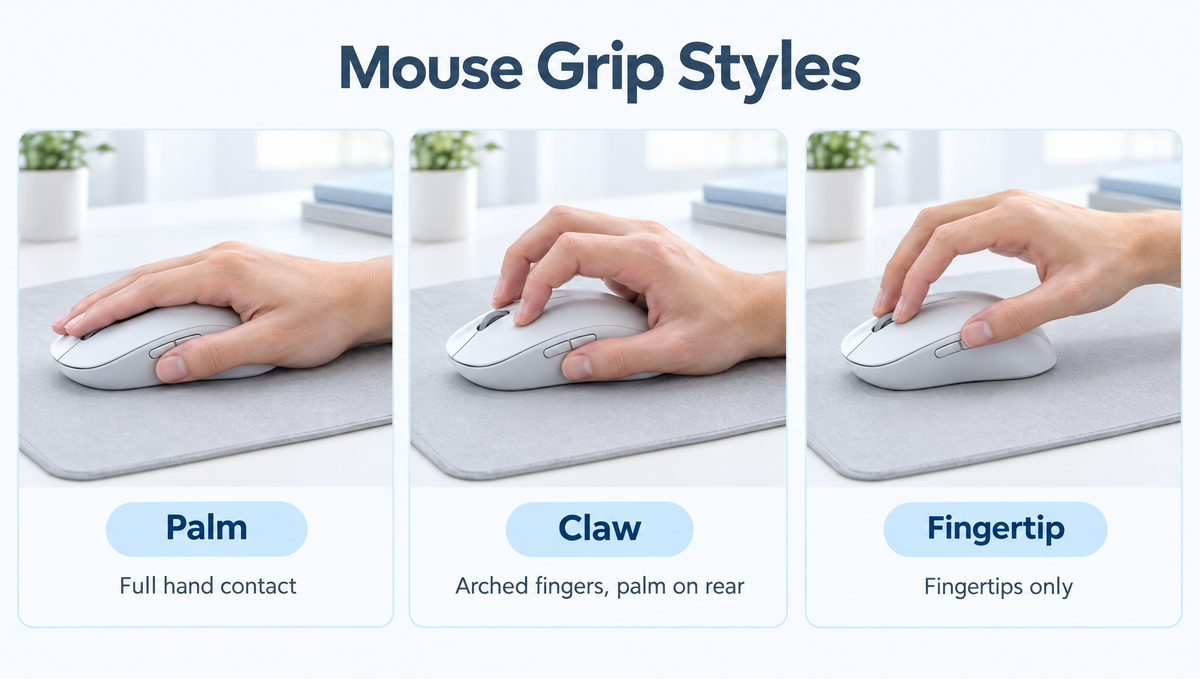
Mouse Grip Styles Explained: Why Your Grip Matters
If you have ever wondered which mouse grip style is best, or why a mouse that reviewers love feels awkward in your hand, the answer usually comes down to grip. The three classic mouse grip styles are palm grip, claw grip, and fingertip grip, and each one changes how you aim, how much control you have, and which mouse shape and size will feel right.
This guide explains palm vs claw vs fingertip grip in plain terms, shows you how to figure out your own grip, covers how to measure your hand for a gaming mouse, and helps you match your grip to the right mouse shape, weight, and mousepad.
What Are the Three Main Mouse Grip Styles?
Almost every way of holding a mouse falls into one of three categories, or a blend of them. The difference is simply how much of your hand touches the mouse.
- Palm grip: your whole palm rests on the back and top of the mouse, and your fingers lie flat along the buttons.
- Claw grip: only the rear of your palm touches the back of the mouse, and your fingers arch up so the fingertips press the buttons.
- Fingertip grip: only your fingertips touch the mouse, and your palm floats above it with little or no contact.
None of these is objectively "correct." Many skilled players use each style, and many people use a hybrid grip that sits somewhere between two of them.
Palm Grip: Comfort and Stability
The palm grip is the most relaxed way to hold a mouse and the one most people use without thinking about it. Because your hand is fully supported, it tends to be the most comfortable mouse grip for long sessions of gaming or work.
Aiming with a palm grip usually comes from the wrist and arm rather than the fingers, since the fingers are resting flat and have little room to make small adjustments. That makes palm grip a natural fit for:
- Long gaming sessions and all-day office use
- Smooth tracking and larger, sweeping arm movements
- Players who use lower sensitivity and aim with their arm
Best mouse shape for palm grip: palm grip users generally prefer longer and fuller mice, often with a higher rear hump that fills the palm. Ergonomic, right-handed shapes that support the hand are popular with palm grippers, but plenty of palm users are happy with a larger symmetrical mouse too.
Claw Grip: The Balance of Control and Speed
The claw grip sits between palm and fingertip. The back of your palm anchors on the rear of the mouse while your fingers arch into a claw shape. This arched position lets you make quick clicks and small corrections with your fingers while your palm keeps the mouse stable.
Claw grip is popular in competitive shooters because it blends stability with fast micro-adjustments. It is often recommended for:
- FPS games where you need both tracking and quick flicks
- Players who want more finger control than a palm grip allows
- Rapid clicking, since the arched fingers sit ready above the buttons
The trade-off is that holding your fingers arched can feel more tiring than resting them flat, especially if your mouse is the wrong size.
Best mouse shape for claw grip: claw grippers usually prefer medium-length mice with a well-defined rear hump that the back of the palm can lock onto. A mouse that is too long pushes your palm off the back, and one that is too short leaves nothing to anchor against.
Fingertip Grip: Maximum Agility
With a fingertip grip, only the tips of your fingers and thumb touch the mouse. Your palm hovers above or behind it. This gives you the most freedom of movement, because your fingers can steer the mouse on their own for very fine adjustments.
Fingertip grip is often favored by players who:
- Play at higher sensitivity and aim mostly with their fingers and wrist
- Lift and reposition the mouse often
- Want quick, twitchy movements in fast-paced games
The downside is less support. Your hand does more work to hold the mouse steady, which some people find tiring over long sessions, and tracking can feel less stable than with a palm grip.
Best mouse shape for fingertip grip: fingertip users tend to like small, low-profile, and lightweight mice. A light mouse is easier to control with just your fingertips and easier to lift and reset.
Hybrid Grips: Relaxed Claw and Claw-Fingertip
In real life, most people do not hold a mouse in a textbook palm, claw, or fingertip position. Common in-between styles include:
- Relaxed claw (palm-claw): more palm contact than a true claw, with fingers only slightly arched. It is a very common grip and a good middle ground for comfort and control.
- Aggressive claw: minimal palm contact and sharply arched fingers, close to a fingertip grip.
- Claw-fingertip: the palm barely touches the very back of the mouse while the fingertips do most of the steering.
Many players also shift grips depending on the game, for example relaxing into a palm grip for slower tracking and tightening into a claw for fast flicks. If you do this, that is completely normal.
How to Tell Which Mouse Grip You Use
Not sure what your mouse grip style is? Try this quick check the next time you play:
- Hold your mouse the way you normally would without thinking about it.
- Look at your palm. If it rests fully on the mouse, you use a palm grip. If only the base of your palm touches the back, it is a claw grip. If there is a gap between your palm and the mouse, it is a fingertip grip.
- Check your fingers. Flat fingers point to palm grip. Arched, raised knuckles point to claw. Only the tips touching points to fingertip.
- Notice how you aim. Large arm movements suggest palm grip. Lots of small finger adjustments suggest claw or fingertip.
It also helps to check yourself mid-game, since many people change grip without noticing when things get intense.
How to Measure Your Hand for a Gaming Mouse
Grip style is only half the picture. Hand size matters just as much when choosing a mouse. Here is the common way to measure:
- Hand length: lay your hand flat with fingers together and measure from the crease at the base of your wrist to the tip of your middle finger.
- Hand width: measure straight across your palm at its widest point, usually across the knuckles, not including the thumb.
Sizing charts vary between sources, but many treat a hand length under roughly 18 cm as small and over roughly 21 cm as large, with medium in between. A popular community rule of thumb is to start with a mouse whose length is around 60% of your hand length, then adjust: palm grippers often go a little longer, and fingertip grippers a little shorter. Treat it as a starting point, not a strict rule.
Matching Grip Style to Mouse Weight and Features
Beyond shape and size, a few other specs interact with your grip:
- Mouse weight: lighter mice are easiest to control with claw and fingertip grips because you lift and flick more. Palm grippers can be comfortable with a bit more weight, though lightweight mice are popular across all grip styles today.
- Side button placement: with a fingertip grip, your thumb sits further forward or back than it does with a palm grip, so check that the side buttons are reachable in your natural position.
- Wireless vs wired: wireless removes cable drag, which many players appreciate with any grip, especially when lifting the mouse often.
- DPI and sensitivity: grip often goes hand in hand with sensitivity. Arm aimers (often palm grip) tend to use lower sensitivity, while finger and wrist aimers often use higher. Our guide to mouse DPI and sensitivity covers how to dial this in.
As an example, the Skyloong M1 Mouse is a lightweight 65g wireless gaming mouse with an ergonomic shape, adjustable DPI up to 15,000, a 1000Hz polling rate, and tri-mode 2.4GHz, Bluetooth, and USB-C wired connectivity. Low weight like this suits players who lift and reposition often, but as with any mouse, the shape should also fit your hand and grip. You can browse all options in our gaming mice collection.
Does Your Mousepad Matter for Grip Style?
Your mousepad affects how your grip feels in practice. Palm grippers who aim with their arm usually want enough space for long, smooth swipes, while fingertip and claw players who make lots of small corrections often care most about a consistent balance of glide and stopping power.
A larger cloth pad gives you room to move and a controlled feel for most grips. Take a look at our mousepads collection, and see our comparison of cloth vs hard vs glass mousepads for more detail on surfaces.
Which Mouse Grip Is Best for FPS Games?
There is no single best mouse grip for FPS games. Professional and high-level players use all three styles. In general:
- Palm grip suits smooth tracking and arm-based aim.
- Claw grip is a popular all-rounder for tracking plus fast flicks.
- Fingertip grip suits fast micro-adjustments and high-sensitivity play.
The best grip is the one that lets you aim consistently without strain. If you are comfortable and your aim is improving, there is usually no need to force a change.
Mouse Grip Styles FAQ
Is claw grip better than palm grip?
Not automatically. Claw grip gives more finger control for quick adjustments and clicks, while palm grip gives more support and comfort for long sessions. Which is better depends on your hand, your mouse, your sensitivity, and the games you play.
Should I change my mouse grip style?
Only if your current grip is uncomfortable or clearly holding back your aim. Switching grips takes time to get used to, and your aim may feel worse at first. Often, changing to a mouse that better fits your hand solves the problem without changing grip at all.
What size mouse do I need for fingertip grip?
Fingertip grip usually works best with a smaller, lighter mouse, since your palm should not bump into the back of it. Measure your hand length and look at mice on the shorter side of what you would use for a palm grip.
Is fingertip grip bad for your hand?
Fingertip grip gives your hand less support, so some people find it more tiring over long sessions. Taking breaks, keeping a relaxed grip pressure, and using a mouse that fits your hand all help. If you feel ongoing pain or discomfort, it is a good idea to talk to a medical professional.
Can I use a palm grip on a small mouse?
You can, but a mouse that is too small for a palm grip often leaves your palm hanging off the back and pushes you into a relaxed claw instead. If you want a true palm grip, a longer mouse with a fuller rear usually feels better.
Final Thoughts on Choosing a Mouse Grip
Understanding palm vs claw vs fingertip grip makes choosing a gaming mouse much easier. Figure out how you naturally hold your mouse, measure your hand, and then look for a shape, size, and weight that support that grip. Pair it with a mousepad that gives you room to move, and you will have a setup that feels comfortable and consistent every time you play.


