

Clicky Switches Explained: What Makes a Keyboard Switch Click?
Clicky switches are the loudest and most unmistakable of the three main mechanical keyboard switch types. Where linear switches move straight down and tactile switches add a silent bump, a clicky switch adds a bump and a sharp, audible click on every keypress. If you have ever heard the classic "typewriter" sound of a mechanical keyboard, you were almost certainly listening to clicky switches.
But not all clicky switches click the same way. The two most common designs, the click jacket and the click bar, produce noticeably different sounds and feel, and the difference matters more than most beginners expect. This guide explains how clicky keyboard switches work, compares click jacket vs click bar switches, and covers who should (and should not) buy clicky switches.
How Do Clicky Switches Work?
Most mechanical switches have a stem, a spring, and a set of metal contacts. In a clicky switch, an extra part is added to the mechanism to create a sudden "snap" partway through the keystroke. That snap does two jobs at once:
- It creates the tactile bump you feel under your finger, telling you the key is about to register.
- It creates the click sound, a separate noise on top of the normal bottom-out and spring sounds.
The part that makes the snap is what separates one kind of clicky switch from another. The two designs you will see most often are the click jacket used in traditional MX-style blue switches and the click bar popularized by Kailh's Box clicky switches.
Click Jacket Switches: The Classic Blue Switch Sound
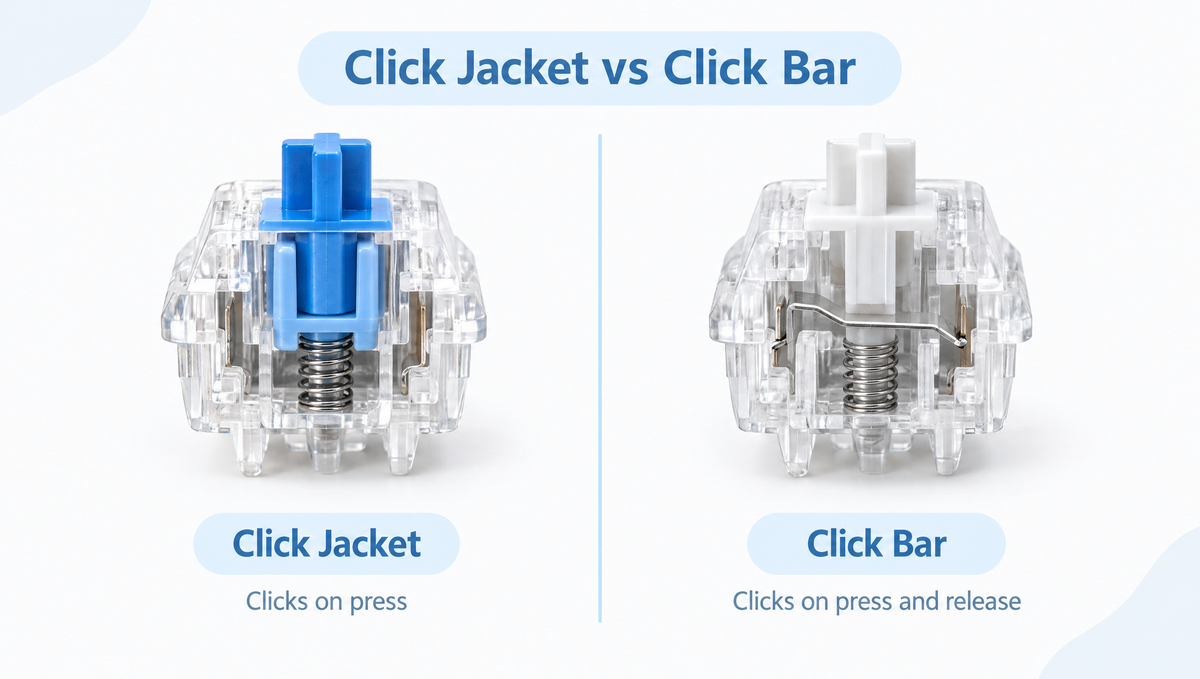
A click jacket switch uses a two-part stem. The upper stem sits on top of a separate plastic sleeve, the "jacket." As you press the key, the jacket is held up briefly by the housing, then slips past a ledge and snaps down, striking the housing and producing the click.
What to know about click jacket switches:
- The click happens on the downstroke. The return stroke is much quieter because the jacket resets more gently.
- The sound is softer and a little "scratchier" than a click bar, with more of the familiar high-pitched blue switch character.
- They often have noticeable hysteresis. Hysteresis is the gap between the point where a key actuates and the point where it resets. Classic click jacket blues are widely noted for having a reset point that differs from the actuation point, which some typists enjoy and some fast gamers find sluggish for rapid repeat presses.
- Many budget and mainstream "blue" switches use this design, so it is the click most people recognize.
If you want an MX-style blue to try, the Gateron G Pro 2.0 Switches Set is offered in a Blue option alongside its linear and tactile colors.
Click Bar Switches: Sharper, Crisper, and Louder
A click bar switch uses a thin metal bar inside the housing instead of a plastic jacket. As the stem moves down, it pulls the bar back under tension. Once the stem clears it, the bar snaps forward against the housing, producing a sharp, crisp click and a defined tactile bump.
What to know about click bar switches:
- The click is sharper and more defined. Many enthusiasts describe it as cleaner and more "precise" than a click jacket.
- They click on both the downstroke and the upstroke. Because the bar snaps again as the stem returns, you hear a second click when you release the key. Some people love this; others find the double click distracting.
- Thicker click bars mean louder clicks. Some popular click bar variants use a thick click bar for an even more pronounced sound, available with both lighter and heavier springs.
- Box-style stems add stability. Kailh's Box switches surround the stem with a box-shaped wall, which helps reduce stem wobble.
To explore Kailh's Box clicky family, browse our Kailh clicky switches collection, which includes the Kailh Box Summer Clicky Switches and the Kailh Box Autumn Clicky Switches.
Click Jacket vs Click Bar: Side-by-Side Comparison
Here is how the two clicky switch mechanisms compare at a glance:
- Click mechanism: Click jacket uses a plastic sleeve on a two-part stem. Click bar uses a separate metal bar inside the housing.
- When it clicks: Click jacket clicks mainly on the press. Click bar clicks on the press and again on the release.
- Sound: Click jacket is softer and more traditional. Click bar is crisper, sharper, and usually louder.
- Feel: Click jacket bumps can feel slightly rounded. Click bar bumps feel snappy and well defined.
- Hysteresis: Click jacket switches often show noticeable hysteresis. Click bar switches are generally not singled out for it in the same way.
- Best for: Click jacket suits people who want the classic blue switch experience. Click bar suits people who want the crispest possible click and do not mind an upstroke click.
Neither design is objectively better. It comes down to which sound and feel you prefer, which is why trying both is the smartest move before buying a full set.
Other Clicky Switch Designs You May See
Click jackets and click bars cover most of the market, but enthusiasts also talk about a few less common approaches:
- Snap spring or leaf-style clicky switches, which use a specially shaped spring or metal leaf to create the click. Some fans describe them as cleaner and less rattly than a click jacket.
- Vintage clicky mechanisms such as buckling spring designs found on older keyboards, which are a different technology from modern MX-style switches.
Some newer clicky switches, such as the Gateron Melodic Clicky Switches, focus on refining the sound itself. The Melodic is factory pre-lubed and has a 60±12gf operating force, aimed at a clicky sound that is more musical than harsh. See all current options in our clicky switches collection.
Are Clicky Switches Good for Gaming?
Clicky switches work fine for gaming, but they are rarely the first choice for competitive players. A few reasons:
- The tactile bump adds resistance before actuation, which some players feel slows rapid inputs.
- Hysteresis in click jacket switches can make fast repeated taps feel less responsive, because the key has to travel back past its reset point before it can register again.
- Voice chat picks up clicks. If you stream or talk to teammates, a loud clicky keyboard is often audible through the microphone.
Many gamers who love clicky switches still use them happily, especially for slower-paced games, MMOs, and strategy titles. If you mainly play fast shooters, a linear switch or a magnetic Hall effect board with adjustable actuation is usually a better match.
Are Clicky Switches Good for Typing and the Office?
For typing at home, clicky switches are some of the most satisfying switches you can use. The click gives clear confirmation of each keypress, which many writers and programmers enjoy, and the bump can help you avoid bottoming out hard.
For shared spaces, clicky switches are the least considerate choice. Offices, shared bedrooms, late-night typing, and video calls are all situations where a clicky keyboard can bother people around you. If quiet matters, consider a tactile switch for a bump without the click, or browse our silent switches collection.
Can You Make Clicky Switches Quieter?
This is one of the most common clicky switch questions, and the honest answer is: not by much. The click comes from the switch mechanism itself, so the usual sound mods only address part of the noise.
- O-rings and foam can soften bottom-out and case noise, but they do not remove the click.
- Lubing the click mechanism can dull or nearly eliminate the click, which defeats the purpose of buying a clicky switch. If you lube clicky switches, many builders avoid the click jacket or click bar entirely and focus on the spring and stem rails.
- Swapping switches is the real fix. On a hot-swap keyboard, you can replace clicky switches with tactile or silent switches in minutes.
How to Choose the Right Clicky Switch
Use these questions to narrow down which clicky switch fits you:
- Do you want an upstroke click? If yes, a click bar switch delivers it. If not, go with a click jacket.
- How loud is too loud? Click bars, especially thick click bar variants, are generally louder and sharper than click jacket blues.
- How heavy do you like your keys? Clicky switches come in light and heavy spring weights. Heavier springs make the click feel more forceful and reduce accidental presses; lighter springs are easier on the fingers during long sessions.
- Does your keyboard support the pin count? Many clicky switches are 5-pin. Check whether your hot-swap board accepts 5-pin switches or whether you need to clip the two plastic legs.
- Will you use it around other people? If so, consider whether a tactile switch gives you enough feedback without the noise.
The best way to decide is to press them yourself. A small tester like the Glacier Keycap/Switch Keychain Tester lets you feel and hear a clicky switch before committing to a full keyboard's worth. For more on that approach, see our guide on whether switch testers are worth it.
Clicky Switches FAQ
What is the difference between click jacket and click bar switches?
A click jacket switch uses a plastic sleeve on a two-part stem that snaps down to make the click, mostly on the downstroke. A click bar switch uses a thin metal bar that snaps against the housing, producing a sharper click on both the press and the release.
Why do some clicky switches click twice?
Click bar switches click on both the downstroke and the upstroke because the metal bar snaps once as the stem passes it on the way down and again as the stem returns. Click jacket switches mostly click only on the downstroke.
Are clicky switches bad for gaming?
They are not bad, but they are not ideal for fast competitive games. The tactile bump and, in click jacket switches, hysteresis can make rapid repeated presses feel slower, and the click is often picked up by microphones. Linear or magnetic switches are more common choices for competitive play.
Can you make clicky switches silent?
Not really. O-rings and foam reduce bottom-out and case noise, but the click comes from the switch mechanism. Lubing the click mechanism can dampen it but also ruins the clicky character. Swapping to tactile or silent switches is the practical solution.
Are clicky switches louder than tactile switches?
Yes. Tactile switches give you a bump without an added click, so they are noticeably quieter. Clicky switches add a distinct click sound on top of the normal keystroke noise, making them the loudest of the three main switch types.
Final Thoughts: Is a Clicky Switch Right for You?
Clicky switches are perfect if you love loud, confident feedback and type somewhere the noise will not bother anyone. Choose a click jacket for the classic blue switch sound with a quiet return, or a click bar for the crispest click available, upstroke and all. If you are unsure, test a few switches first, then explore our key switches collection to build a keyboard that sounds exactly the way you want.


