

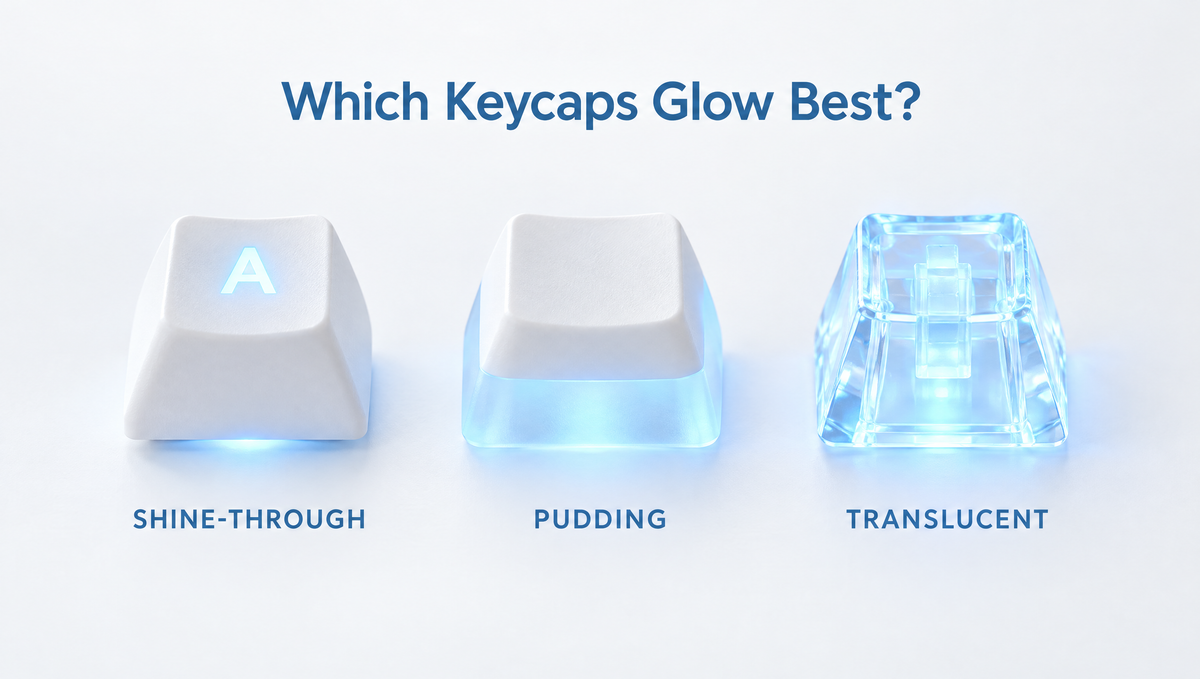
Shine-Through vs Pudding vs Translucent Keycaps: Which Is Best for RGB?
If your keyboard has RGB backlighting, your keycaps decide how much of that light you actually see. Choosing between shine-through keycaps, pudding keycaps, and translucent or jelly keycaps is one of the most common questions new keyboard owners ask once they start shopping for RGB keycaps. All three let light through, but they do it in very different ways, and the results range from crisp glowing letters to a soft wash of color across the whole board.
This guide explains how each type of backlit keycap works, how frosted and side-printed caps fit in, why your keyboard's LED direction matters, and how to choose the best keycaps for RGB lighting on your own setup.
How Light Reaches Your Keycaps
On a backlit mechanical keyboard, each switch sits over a small LED on the PCB. That light passes up through the switch housing and then into the keycap. What you see depends on three things:
- The keycap: which parts of the cap are translucent and which are opaque.
- The switch housing: clear top housings pass more light, while milky or solid housings diffuse or block it.
- The LED position: whether the LED sits toward the top (north-facing) or bottom (south-facing) of each switch.
Keep in mind that keycaps can only redistribute the light your LEDs produce. A translucent set will not make dim LEDs brighter; it only changes where the light ends up.
What Are Shine-Through Keycaps?
Shine-through keycaps have an opaque body with translucent legends, so the letters glow while the rest of the cap stays solid. This is the classic look of most gaming keyboards. There are two main ways to make them:
- Double-shot shine-through: The cap is molded in two shots of plastic. The legend is formed by a translucent inner shot that runs through the opaque outer shell, so the letters cannot wear off. Our guide to PBT double-shot keycaps covers the process in detail.
- Laser-etched or coated shine-through: A translucent cap is coated with an opaque layer, and a laser removes the coating in the shape of the legend. This is common on budget prebuilt keyboards, and the coating can wear on heavily used keys over time.
Best for: typing and gaming in the dark, when you want readable glowing legends without lighting up the whole keyboard.
Watch out for: legend placement. Shine-through legends on the top of the keycap are brightest when the LED sits directly under them. On some boards, the light can look uneven from key to key.
What Are Pudding Keycaps?
Pudding keycaps use a two-layer design: an opaque top surface over a translucent lower wall, or skirt. Light escapes around the sides of every key, creating a ring of glow beneath each keytop. Many pudding sets also include shine-through legends on the opaque top.
The result sits between standard shine-through caps and fully translucent caps. You get far more visible RGB than a normal set, but the tops still look clean and legible.
- Pros: strong, even glow; tops stay readable; a popular look for RGB setups.
- Cons: the bold two-tone style is not for everyone, and with lighting off the translucent skirts can look plain or milky.
Best for: people who want RGB to be a feature of the keyboard, not just a way to see the letters.
What Are Translucent or Jelly Keycaps?
Translucent keycaps, often called jelly keycaps or crystal keycaps, are see-through or semi-transparent from top to bottom. With no opaque layer, they let the most light through of any keycap style and give the brightest, most saturated RGB.
That brightness comes with trade-offs:
- Legend readability: because the entire cap glows, legends can be harder to read when the lighting is on, especially if they are lightly printed.
- Visible internals: you may see the switch, LED, and stabilizer wires through the caps. Clean switches and tidy stabilizers matter more.
- LED hotspots: very clear caps can show a bright point where each LED sits rather than a smooth glow.
Best for: maximum RGB, showpiece builds, and setups where looks matter more than legend clarity.
Frosted Keycaps: Translucent With Softer Light
Frosted keycaps are translucent caps with a matte, textured finish. The frosting scatters light as it passes through, which smooths out LED hotspots and produces a softer, more even glow than glossy clear caps. Frosted caps also tend to show fingerprints less than glossy ones.
Material plays a role here. PBT tends to look milky rather than glass-clear when made translucent, so translucent PBT sets often have a naturally frosted, diffused look. Clear polycarbonate or ABS caps can be more transparent but usually feel smoother and, in the case of ABS, develop shine faster. If you want to know more about how plastics wear, see our article on why keycaps get shiny.
Side-Printed Shine-Through Keycaps and South-Facing LEDs
Many enthusiast keyboards now use south-facing LEDs, which place the light toward the front edge of each switch, closer to you. That works well for many keycap setups, but it means top-printed shine-through legends often sit away from the LED and can look dim or uneven.
That is a big reason side-printed shine-through keycaps have become so popular. With the legend on the front face of the keycap, the light source sits closer to the characters, and the top of the cap stays clean. Our guides on north vs south-facing PCBs and side print vs top print keycaps explain both topics in more depth.
A quick rule of thumb:
- North-facing LEDs: top-printed shine-through legends usually light well.
- South-facing LEDs: side-printed shine-through legends, pudding caps, or translucent caps usually make better use of the light.
What About Dye-Sub Keycaps on an RGB Keyboard?
Dye-sublimated keycaps have their legends and artwork infused into opaque PBT, so the legends do not let light through. On an RGB keyboard, you will only see light spilling out from under the keys. That is not a problem; many people prefer the subtle underglow and the detailed artwork dye-sub allows. Just do not expect glowing letters. Our dye-sublimation keycaps guide explains the process.
Shine-Through vs Pudding vs Translucent: Quick Comparison
- Amount of RGB visible: translucent and jelly caps show the most, pudding caps are next, and shine-through caps show the least.
- Legend readability with lights on: shine-through and pudding caps are the clearest; fully translucent caps are the hardest to read.
- Look with lights off: shine-through caps look like a normal set; pudding and translucent caps keep their two-tone or see-through style.
- Best LED pairing: top-printed shine-through suits north-facing LEDs; side-printed shine-through, pudding, and translucent caps suit south-facing LEDs.
- Shows switch internals: only translucent caps do, so switch and stabilizer appearance matters more.
How to Choose the Best Keycaps for RGB Lighting
- Check your LED direction. Look at the PCB or your keyboard's product page to see whether the LEDs face north or south, then pick a legend placement that suits it.
- Decide how much glow you want. Glowing letters only means shine-through. A glowing ring around each key means pudding. A fully lit board means translucent.
- Consider your switches. Clear-top switch housings pass more light. Milky or opaque housings soften and dim it.
- Choose the material. PBT resists shine and often has a frosted, diffused look when translucent. ABS and polycarbonate can be clearer but feel smoother.
- Confirm compatibility. Check the profile, key count, and stem type against your layout. Our keycap compatibility guide walks through what to check.
If you want to try different looks, a few sets in our keycaps collection cover the main styles:
- The Glacier Crystal Jelly Keycaps Set is a 136-key translucent PBT set in OEM profile for MX-style switches, built to let RGB shine through.
- The Glacier Frosted Keycaps Set is a PBT set in OEM profile with a frosted finish that diffuses backlighting into a soft glow.
- The Skyloong GK7 Keycaps Set uses translucent PBT with laser-etched legends.
- The Glacier Contour Lines Keycaps combine PBT plastic and Cherry profile with side-print, shine-through legends, a good match for south-facing RGB.
When swapping sets, pull caps straight up with a wire-style puller to avoid stressing the switch stems. The Glacier Keycap/Switch Puller Tool handles both keycaps and switches, and you can find more in our keyboard tools collection.
Frequently Asked Questions
What is the difference between pudding and shine-through keycaps?
Shine-through keycaps have an opaque body with translucent legends, so only the letters glow. Pudding keycaps have an opaque top and translucent sides, so light glows around the base of every key as well. Many pudding keycaps also have shine-through legends.
Do translucent keycaps make RGB brighter?
Translucent keycaps let more of the existing light through, so RGB looks brighter and more colorful than it does with opaque caps. They cannot increase the output of your LEDs, and very clear caps can show bright hotspots where each LED sits.
Are shine-through keycaps good for south-facing LEDs?
Top-printed shine-through legends can look dimmer on south-facing LEDs because the light sits toward the front of the switch. Side-printed shine-through legends, pudding keycaps, and translucent keycaps usually light more evenly on south-facing boards.
Are jelly keycaps PBT or ABS?
Jelly keycaps are made from several plastics, including ABS, polycarbonate, and PBT. Translucent PBT is usually more frosted than glass-clear, while ABS and polycarbonate can be clearer. Check the product listing to see which material a set uses.
Can I use dye-sub keycaps on an RGB keyboard?
Yes. Dye-sub keycaps fit and work normally on RGB keyboards, but their legends are opaque and will not glow. You will see light around and beneath the keys rather than through the letters.


