

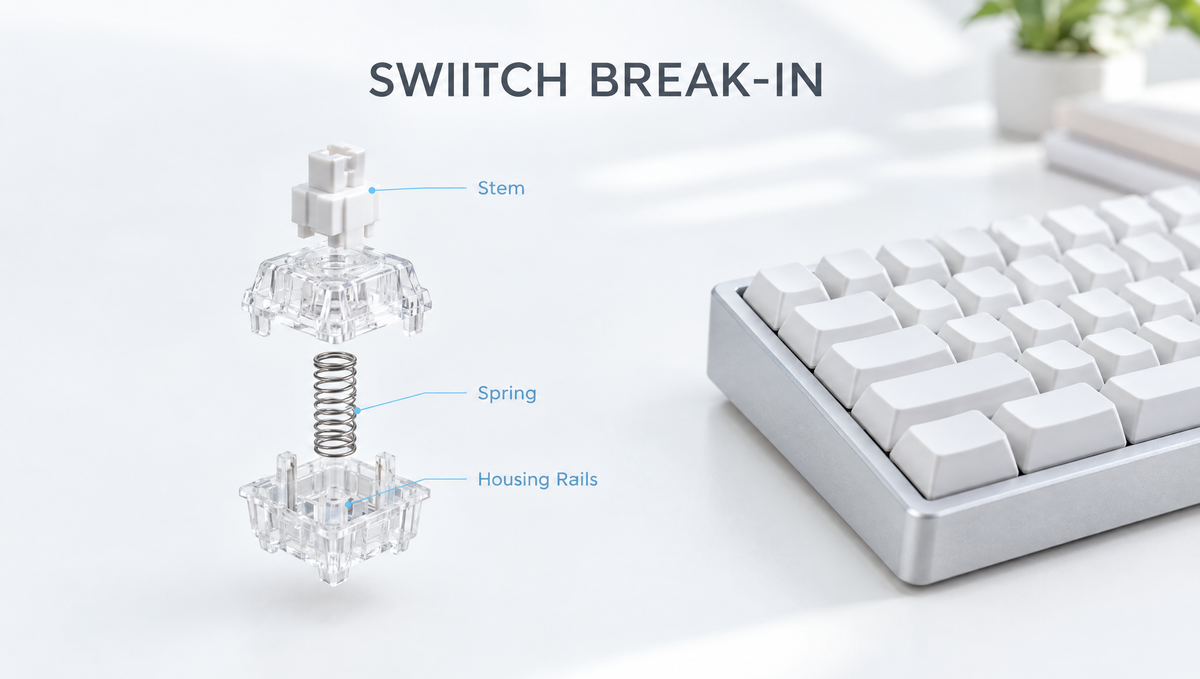
Do Mechanical Switches Break In? What Really Changes Over Time
Do mechanical switches break in? It is one of the most repeated questions in keyboard communities, usually asked right after someone installs a new set of switches and finds them a little scratchier, louder, or stiffer than expected. The short answer is yes, switch break-in is real, but it is much smaller than many people hope. A few weeks of typing can make a switch feel slightly smoother and more settled. It will not turn a rough, scratchy switch into a buttery one.
This guide explains what actually happens inside a switch as it breaks in, how long switch break-in takes, which switches benefit most, what break-in cannot fix, and how to tell whether you should keep typing or reach for a different fix.
What Does "Breaking In" a Keyboard Switch Mean?
When people talk about breaking in mechanical keyboard switches, they mean the change in feel and sound that happens over the first stretch of use. New switches are fresh off the mold. The stem rails, housing rails, and contact surfaces have never rubbed against each other, and any factory lubricant has not yet spread evenly.
As you type, three things happen:
- Wear fitting. Tiny high spots and mold texture on the stem and housing rails get smoothed down where the parts rub. Mechanical parts tend to wear fastest at the very start of their life, which is why the early weeks are when any difference shows up.
- Lubricant spreading. On pre-lubed switches, the factory coat is pushed along the rails with every press, which can even out spots that felt dry at first.
- Parts settling. The spring, stem, and housing settle into their positions relative to each other, and the contact points find their natural paths.
None of this changes the switch's actuation point, total travel, or electrical behavior in any meaningful way. Switch break-in is a feel and sound effect, not a performance upgrade.
Is Switch Break-In Real or a Myth?
Long-running threads on Geekhack and KeebTalk keep landing in the same place: switch break-in is real, but overstated. Experienced builders generally agree on a few points:
- The effect is small. Switches are rated for many millions of keystrokes, so a few weeks of normal typing is a tiny fraction of their life. Expect a subtle change, not a transformation.
- Scratchy switches change the most. A switch with noticeable rail scratch has the most surface texture to wear down, so it is where people most often report improvement.
- Already smooth switches barely change. If a switch feels smooth out of the box, there is little left to break in.
- Lube matters more than break-in. A properly applied coat of lubricant does far more for smoothness than any amount of typing, and it makes break-in largely irrelevant.
Part of the "break-in" people notice is also simple adaptation. After a couple of weeks, your fingers get used to a new spring weight and sound, and a switch that felt odd on day one feels normal. That is real from the typist's point of view, even if the switch itself changed very little.
How Long Does It Take to Break In Mechanical Switches?
There is no official number, and nobody has published a large controlled study on it. Community reports most often describe a few weeks of regular typing before a set feels settled. One well-known switch reviewer who breaks in switches by machine reported a noticeable increase in stem wobble after about 36,000 actuations, which shows that measurable changes can appear within that kind of range.
Keep in mind that keys wear unevenly. Your E, space, and WASD keys get pressed far more often than F12 or the right Ctrl key, so a well-used keyboard can end up with switches at different stages of break-in. On a hot-swap board, that is one reason a freshly swapped switch can feel slightly different from its neighbors.
What Switch Break-In Can and Cannot Fix
Knowing the limits of switch break-in saves a lot of waiting around for a change that will never come.
What break-in can help with
- Mild scratchiness on the stem and housing rails
- Uneven factory lube that feels dry in spots at first
- A slightly sharp, "new" sound that softens a little as surfaces settle
What break-in will not fix
- Heavy scratch or grinding. Forum veterans are blunt about this: a very scratchy switch will not become smooth through typing alone. That calls for lubing or a different switch.
- Spring ping. The metallic ringing after a keypress comes from the spring vibrating. Typing does not stop that; lubricating the springs does.
- Stem wobble. Break-in can actually increase wobble slightly, because wearing down friction points loosens tolerances. If wobble bothers you, see our guide to keyboard switch wobble.
- Stabilizer rattle. A rattling spacebar or Enter key is a stabilizer issue, not a switch issue.
- Spring weight. If a switch is simply too heavy or too light for you, break-in will not change that enough to matter. A different spring or switch will.
Does Opening a Switch Undo Break-In?
Often, yes. Builders on Geekhack and KeebTalk point out that when you open a switch to lube it or swap springs, the parts rarely go back in exactly the same positions. Stems and housings that have worn against each other lose that matched fit, especially if parts get mixed between switches. That is why there is little point in breaking switches in before lubing them. If you plan to hand lube, do it first, then let the switches settle.
If you want the full process, our step-by-step switch lubing guide covers it. Use a proper puller like the Glacier Keycap/Key Switch Tool to remove switches from a hot-swap board, gripping the top and bottom latches and pulling straight up to avoid bending pins.
Do Pre-Lubed and Factory Broken-In Switches Need Breaking In?
Modern factory lubing has narrowed the gap considerably. Many current switches arrive with a usable coat of lubricant, so they feel close to their final state on day one. Some manufacturers and vendors also sell switches that have been run through break-in machines before shipping.
Results from machine break-in are mixed. The same reviewer mentioned above found that one batch of switches broken in for 600,000 actuations showed virtually no difference in stem wobble compared with standard versions, while other switches changed noticeably after far fewer presses. How the machine presses the switch, straight down or slightly off-center, likely affects which surfaces wear. In practice, factory break-in is a nice extra, not a reason to choose one switch over another.
Housing material plays a role too. POM is known for its naturally low friction, which is why full-POM switches like the pre-lubed Gateron Smoothie Linear Switches tend to feel smooth out of the box rather than relying on break-in. Our guide to switch housing materials explains how nylon, PC, and POM differ.
Do Magnetic and Hall Effect Switches Break In?
Magnetic switches detect key position with a sensor and a magnet in the stem, so there is no metal contact leaf to wear in. The stem still slides against the housing rails, though, so any change in smoothness comes from the same plastic-on-plastic fit as a mechanical switch. The sensing side does not "break in" in the same way.
If a magnetic keyboard starts registering keys inconsistently over time, that is not break-in. It is usually a calibration issue, which our magnetic keyboard calibration guide walks through.
How to Break In New Switches (and Judge Whether It Worked)
The simplest way to break in keyboard switches is to use the keyboard normally. A few practical tips make the process more useful:
- Give it two to three weeks of regular typing before deciding whether a new set is right for you, especially if the main complaint is mild scratch or an unfamiliar sound.
- Keep a stock reference switch. Put an unused switch from the same set on a Glacier Keycap/Switch Keychain Tester. Comparing it against a well-used key on your board is the only honest way to tell how much changed, instead of relying on memory.
- Do not use power tools. Rigging a drill or vibrating device to press switches can push them off-axis, wear the wrong surfaces, and damage stems. Normal typing is the safest way to break switches in.
- Store spares properly. Keep spare switches clean and dust-free in a case like the Kailh Switches Storage, since dust on lubed rails adds back the scratchiness you were trying to lose.
- Decide, then act. If the switches still feel rough after a few weeks, they are not going to transform. Lube them, or try a different switch from the linear switches or tactile switches collections.
If you are still choosing, testing a few switch types before buying a full set is far more effective than hoping break-in will fix a mismatch. Our guide on whether switch testers are worth it explains how to compare switches before you commit.
Frequently Asked Questions About Switch Break-In
Do mechanical keyboards get smoother over time?
Slightly, in most cases. The stem and housing rails wear against each other during the first weeks of use, and factory lube spreads more evenly, so many switches feel a little smoother. The change is subtle, and switches that were already smooth out of the box show very little difference.
How many keystrokes does it take to break in a switch?
There is no agreed number. Community reports usually describe a few weeks of regular typing, and one machine-based test saw measurable changes in stem wobble after roughly 36,000 actuations. Because results vary by switch design and material, treat any specific number as a rough guide.
Will scratchy switches become smooth if I keep typing?
Mild scratch can improve a little, but heavily scratchy switches will not become smooth from typing alone. Lubing the stem and housing rails is the fix that actually removes scratch.
Should I break in switches before lubing them?
No. Opening a switch to lube it usually undoes much of the matched fit from break-in, because the parts do not go back in exactly the same positions. Lube first, then let the switches settle with normal use.
Do switches get lighter as they break in?
Not in a way most people would feel. The spring weight is what sets how heavy a switch feels, and break-in mainly affects friction and sound. If a switch feels too heavy, a lighter spring or switch is the real solution.
The Bottom Line on Breaking In Mechanical Switches
Switch break-in is real, but it is a small, early change in friction and sound rather than a hidden upgrade waiting to unlock. Give a new set a few weeks, compare against a stock switch so you know what changed, and if the switches still feel rough, fix the cause directly with lube or a better-matched switch. Choosing the right switch up front, whether from the key switches range or a tester first, will always do more than waiting for break-in.


