

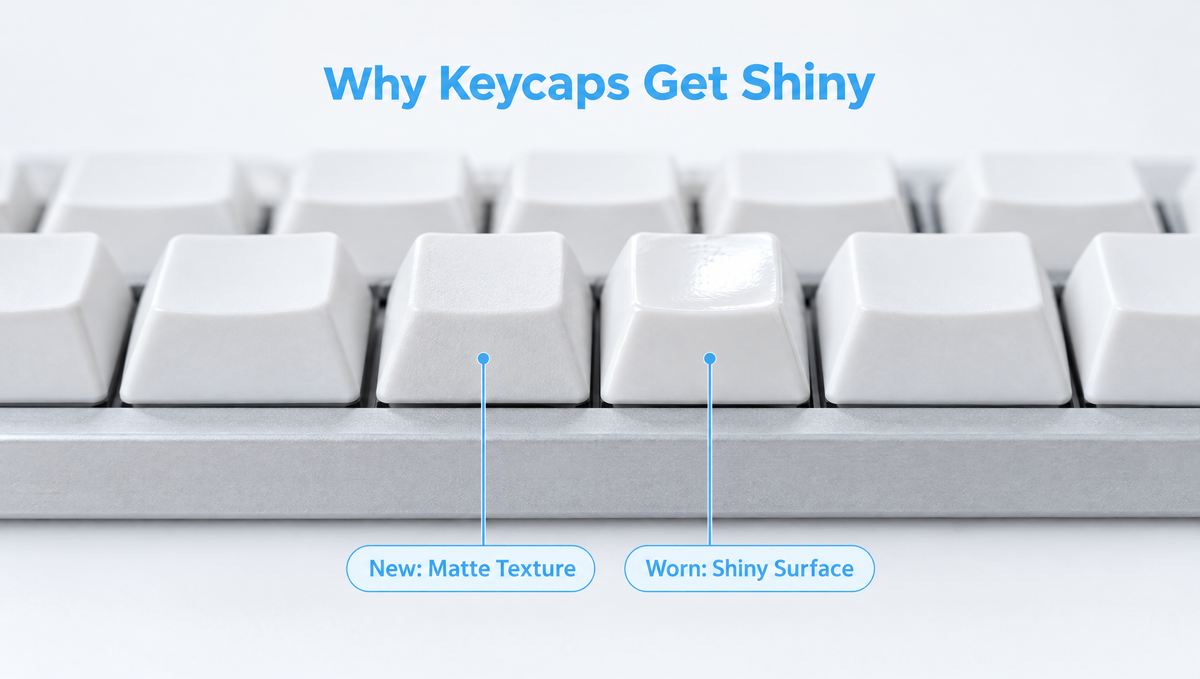
Why Do Keycaps Get Shiny?
If the WASD keys, spacebar, or home row on your keyboard have started to look glossy and slick, you are seeing keycap shine. It is one of the most common questions in keyboard communities: why do keycaps get shiny, is it just grease, and can you fix it? The short answer is that shine is surface wear, not dirt. Your fingertips slowly polish away the keycap's original matte texture until the plastic underneath reflects light.
This guide explains what causes shiny keycaps, why ABS keycaps shine much faster than PBT keycaps, whether cleaning or polishing can reverse it, and how to choose shine-resistant keycaps so your next set stays matte for years.
What Is Keycap Shine?
New keycaps usually have a lightly textured, matte surface. That texture scatters light, which is why fresh caps look soft and even. Every keystroke rubs a tiny amount of that texture away. After months or years of typing and gaming, the surface on your most-used keys becomes smooth, and a smooth plastic surface reflects light like a mirror instead of scattering it.
That is why keycap shine shows up in a very personal pattern:
- Gamers usually see it first on W, A, S, D, Shift, Ctrl, and the spacebar.
- Typists see it on the home row, the spacebar, and frequently used letters such as E, T, and A.
- Programmers often add shine to keys like the brackets, Enter, and Backspace.
Because it is a change to the plastic surface itself, keycap shine is permanent wear. It does not wash off the way a fingerprint smudge does.
Is Keycap Shine Caused by Oil or Wear?
This is the biggest misconception. Many people assume shiny keycaps are just coated in skin oil, so they scrub harder. In reality, friction is the main cause. Your fingertips gradually wear down the textured top layer and expose smoother plastic beneath it.
Skin oils and sweat still play a supporting role. They add a temporary greasy film that makes worn keys look even glossier, and oils and grime on the surface can contribute to wear on softer plastics over time. So there are really two things happening:
- Temporary grease: A film of oil and dirt that cleaning can remove. If a key looks less shiny after a wipe, some of what you saw was grease.
- Permanent shine: The smoothed, polished surface left behind after the texture has worn away. Cleaning cannot bring that texture back.
A useful test: clean the key gently and let it dry. Whatever gloss remains is true keycap shine.
ABS vs PBT Keycaps: Which Shines Faster?
Keycap material makes the biggest difference in how quickly shine appears. If you want to identify what you have, our guide on how to tell if keycaps are PBT or ABS walks through the common tells.
ABS Keycaps
ABS (acrylonitrile butadiene styrene) is the most common keycap plastic, especially on budget and many prebuilt keyboards. It is easy to mold, takes color well, and is ideal for crisp doubleshot legends. The trade-off is that ABS is a relatively soft plastic, so its surface texture wears smooth quickly. Heavily used ABS keycaps can start to shine within months, depending on how much you type and how textured the caps were to begin with.
PBT Keycaps
PBT (polybutylene terephthalate) is harder and more wear-resistant. Its surface texture holds up far longer under the same use, which is why enthusiasts recommend PBT keycaps for shine resistance. Long-time keyboard users commonly report PBT sets showing only a faint shine after many years, while ABS sets on the same desk shine much sooner.
The important caveat: PBT resists shine, but it is not immune. With enough use, any plastic will eventually smooth out. Quality also varies between sets. Thin, low-cost caps or sets that mix materials may wear faster than you would expect from the PBT label.
Quick Comparison
- Shine resistance: PBT is much better; ABS shines sooner.
- Surface feel: PBT is usually dry and slightly textured; ABS is usually smoother from the start.
- Legends: Both materials can be doubleshot. PBT is also commonly dye-sublimated.
- Look over time: ABS develops a glossy patina; PBT tends to stay matte much longer.
For a broader look at plastics, see our article on keycap materials.
Does Shine Mean Your Legends Will Wear Off?
Not necessarily. Shine and legend wear are related but different problems. How long your letters last depends mostly on how the legends are made:
- Doubleshot legends are molded from a second piece of plastic that runs through the cap. They cannot rub off, even if the surface becomes very shiny.
- Dye-sublimated legends are infused into the plastic rather than sitting on top, so they are also very durable under normal use.
- Pad-printed or surface-printed legends sit on the outside of the cap and can fade or rub away on heavily used keys.
So a doubleshot ABS set may become glossy but stay perfectly readable, while a cheaply printed set can lose its letters before it ever looks shiny.
Can You Fix Shiny Keycaps?
Once the texture is gone, there is no reliable way to restore the original factory finish. Here is how the common "fixes" actually work out:
- Cleaning: Removes the grease layer and makes keys look better, but will not remove true shine. Our guide to cleaning PBT and ABS keycaps covers safe methods.
- Harsh scrubbing: Abrasive pads and aggressive scrubbing can actually make shine worse by polishing the surface further, and they can damage printed legends.
- Sanding or re-texturing: Some hobbyists experiment with fine abrasives to dull the gloss. Results are uneven, it is easy to round off the sculpted shape, and it can destroy legends. It is not something we recommend.
- Chemical smoothing: Enthusiasts have experimented with solvent vapor to give ABS caps an all-over glossy finish. This goes the opposite direction, making every key shiny, and it risks warping or melting the plastic. Avoid it on keycaps you care about.
- Replacing the worst keys or the whole set: The only dependable way to get a matte surface back.
Some people also simply keep the shine. On vintage-style ABS sets, an even glossy patina is part of the charm, much like worn keys on an old typewriter.
How to Prevent Keycap Shine
You cannot stop wear entirely, but you can slow it down a lot:
- Start with PBT keycaps. This is the single most effective step for keeping a matte finish.
- Wash your hands before long sessions. Less oil and grit on your fingertips means less grime working against the keycap surface.
- Clean keycaps gently and regularly. Remove them with a proper keycap puller, wash them in lukewarm soapy water, and let them dry completely before reinstalling. Avoid hot water, which can warp keycaps.
- Use soft cloths, not abrasive pads. Microfiber is enough to lift grease without polishing the surface.
- Keep spares or a second set. Swapping sets spreads wear across both, and spare WASD or modifier keys let you replace only the worst offenders.
Removing caps safely matters too. A wire-style puller grips the keycap edges evenly so you do not crack the cap or stress the switch stem. Our guide on how to use a keycap puller without damage covers the technique, and the Glacier Keycap/Switch Puller Tool handles both keycaps and switches if you clean or swap parts often.
How to Choose Shine-Resistant Keycaps
When you shop for keycaps that don't shine, look past the product photos and check these details:
- Material: Look for sets clearly listed as PBT.
- Legend method: Doubleshot or dye-sublimated legends will outlast any surface shine.
- Surface texture: A light, even texture gives the cap more surface to wear through before it goes glossy.
- Profile and compatibility: Make sure the profile and key coverage match your layout. Our keycap compatibility guide explains what to check.
Most of the sets in our keycaps collection are PBT. A few examples:
- The Glacier Mix Keycaps Set is a 128-key PBT set in Cherry profile that fits MX-style switches.
- The Glacier Contour Lines Keycaps pair PBT plastic with Cherry profile sculpting and side-print, shine-through legends for backlit boards.
- The Glacier Blue Keycaps Set is a PBT Cherry profile set with an ice blue, white, and black colorway.
- The Glacier Frosted Keycaps Set is a PBT set in OEM profile with a frosted finish that diffuses backlighting.
If you love a glossy vintage look, a doubleshot ABS set such as the Domikey All in One Vintage Keycaps is a different philosophy: the legends are molded in, so the patina that develops over time becomes part of the character rather than a flaw.
You can browse by profile in our Cherry profile keycaps and OEM profile keycaps collections.
Frequently Asked Questions
Why are my keycaps shiny?
Your keycaps are shiny because repeated finger contact has worn away their matte surface texture, leaving a smooth plastic surface that reflects light. Skin oil can make the effect look worse, but the underlying cause is wear. It appears first on your most-used keys.
Do PBT keycaps get shiny?
PBT keycaps can eventually get shiny, but much more slowly than ABS. PBT is a harder, more wear-resistant plastic, so a good PBT set typically keeps its texture for years of daily use. Quality varies, so very thin or low-cost sets may wear faster.
Can you remove shine from keycaps?
Cleaning removes the oily film that makes worn keys look glossier, but it cannot restore the original texture. Sanding or chemical treatments are unreliable and can ruin the keycap shape or legends. Replacing the keycaps is the only dependable way to get a matte finish back.
How long does it take for ABS keycaps to shine?
It depends on how heavily you use the keyboard and how textured the caps were new. On a daily-use keyboard, ABS keycaps can show noticeable shine on the most-used keys within months, while lightly used keys may stay matte much longer.
Is keycap shine bad?
Keycap shine is cosmetic and does not affect how the keyboard works. Some people dislike the slick feel and uneven look, while others enjoy the worn-in patina. If grip and appearance matter to you, PBT keycaps are the best way to keep a matte, textured surface.


