

What Is an Alice Layout Keyboard?
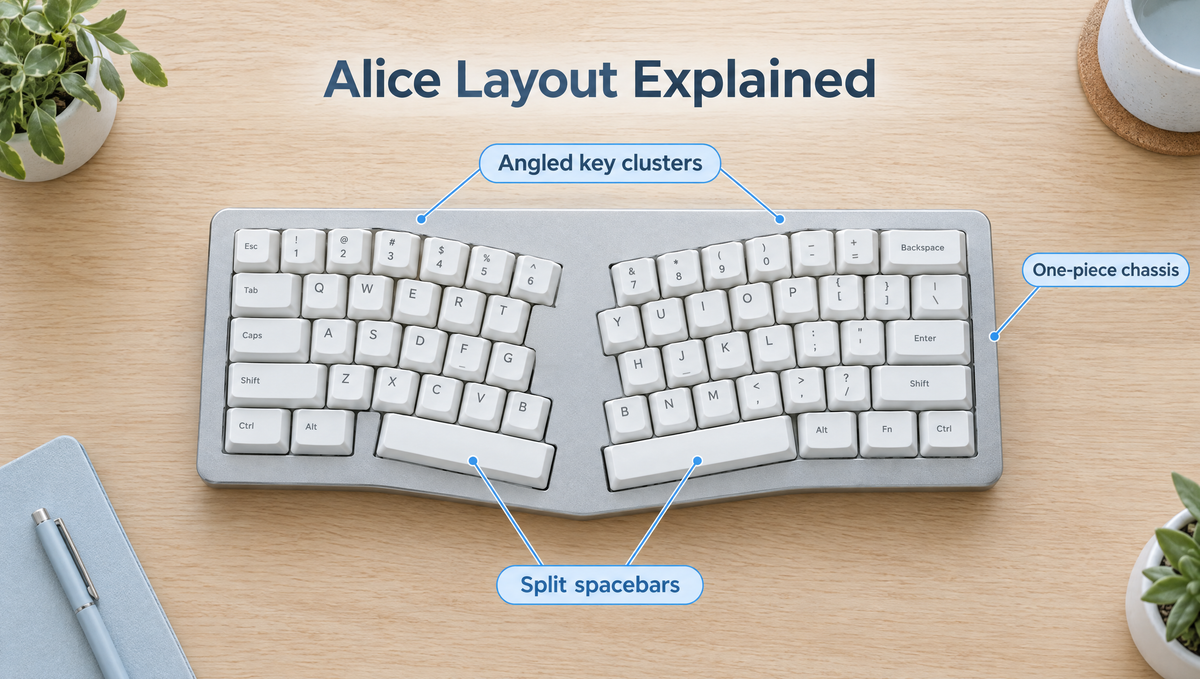
An Alice layout keyboard is a one-piece mechanical keyboard with the key area split down the middle and each half angled slightly inward, so your wrists sit straighter while you type. It looks like a pair of wings, it still uses a familiar row-staggered QWERTY arrangement, and it has become the most popular way to try an ergonomic mechanical keyboard without committing to a fully split board.
If you have seen one on a desk setup post and wondered whether an Alice keyboard is worth it, this guide covers what the layout actually is, how it differs from a standard or split keyboard, the learning curve, gaming on an Alice, keycap compatibility, and who should (and should not) buy one.
Where the Alice Layout Came From
The layout takes its name from the TGR Alice, a keyboard by Malaysian designer Yuk Tsi that launched in 2018 as a very small production run. It built on the ideas of an earlier angled design, the EM7, and quickly became one of the most copied layouts in the hobby.
The original had a few distinctive traits:
- Two angled halves with a gap in the middle of the key area.
- Two short spacebars instead of one long bar.
- Two B keys, one on each half.
- No dedicated arrow keys.
Community designs followed, including the open-source Arisu layout, which added arrow keys and dropped the duplicate B. Today, most keyboards sold as "Alice" or "Alice-style" are closer to that arrangement than to the original, and the two names are often used interchangeably.
How an Alice Keyboard Differs From a Standard Layout
On a regular keyboard, both hands point inward toward the center of the board, which bends the wrists outward toward the little finger. An Alice layout rotates each half of the key area so your hands can meet the keys at a more natural angle.
The practical differences:
- Angled key clusters. The left and right halves are rotated a few degrees toward each other. The exact angle varies from board to board.
- Row stagger stays. Keys are still offset row by row like a normal keyboard, so QWERTY muscle memory mostly carries over. That is the big difference from column-staggered split keyboards.
- Split spacebars. One thumb key under each hand. Both usually send Space by default, but on a programmable board either one can be remapped.
- A wider footprint. The angle and center gap make an Alice wider than a standard 65% or 75% board with a similar key count.
- A single chassis. Unlike a split keyboard, it is one piece, so it sits on a desk and fits a keyboard tray like any other board.
If you are still weighing sizes in general, our guide to choosing the best keyboard layout covers the standard options first.
Is an Alice Keyboard Ergonomic?
The main ergonomic claim for an Alice keyboard is simple: angling the halves reduces the outward bend of the wrists that a straight, flat keyboard encourages. Many people who switch report that their wrists feel more relaxed over long typing sessions.
It is worth being realistic about the limits, though:
- It is a compromise, not a full split. Your hands are still fairly close together, so an Alice does little to open up the shoulders the way two separated halves can.
- Height and tilt still matter. Desk height, chair height, and keeping the wrists from bending upward matter as much as the key angle.
- It is not a medical device. If you have ongoing pain, speak to a professional rather than expecting a keyboard to fix it.
For a broader look at ergonomic designs, including split, tented, and curved boards, see the benefits of ergonomic keyboards.
Alice vs Split Keyboards: Which Should You Choose?
The Alice vs split keyboard question comes up constantly among people moving toward ergonomic setups. The short version:
- Choose an Alice if you want a noticeable comfort improvement, a short adjustment period, and a board that still looks and works like a normal keyboard.
- Choose a split keyboard if you want the hands at shoulder width, adjustable tenting, or a column-staggered layout, and you are willing to spend weeks relearning.
Many people treat the Alice as a stepping stone. If you like the angled typing position, you learn a lot about what you want before spending on a fully split setup.
The Alice Layout Learning Curve and the B Key Problem
For most touch typists, the Alice learning curve is short, often a matter of days rather than weeks. For people with habits that cross the center of the keyboard, it can be much longer. Experiences vary a lot, and the reason is almost always the same: which hand you use for the middle keys.
The split falls between the keys that standard touch typing assigns to each hand: T, G, and B on the left, Y, H, and N on the right. If you already type that way, the gap barely matters. If you reach across, you will feel it straight away:
- Typing B with the right hand is the most common problem. It is the reason the original Alice had two B keys, and why some boards still include a second one.
- Hitting Y or H with the left hand breaks for the same reason.
- Thumb habits change. If you always hit Space with one thumb, that thumb now only has its own half of the bar.
Tips for a faster transition:
- Spend a few short sessions on a typing trainer before moving your daily work over.
- Accept slower speed for the first days instead of switching back and forth.
- If your board has a spare key, map it to B while you retrain, then decide if you still need it.
- Use the second spacebar for something useful, such as Backspace or a layer key, once Space on one side feels natural. Our guide to split and dual spacebars has common setups.
Are Alice Keyboards Good for Gaming?
Alice keyboards for gaming work fine for most people, with a few things to know before you buy:
- WASD sits on the angled left half. Some players find the rotated position comfortable. Others need a few sessions to get used to it.
- Keys near the split move. Binds on keys like 6, T, G, or B can feel farther away, so you may want to rebind a few actions.
- A shorter left spacebar changes where your thumb lands for jump. Most people adjust quickly.
- Width affects mouse space. An Alice is wider than a compact board, which leaves less room for low-sensitivity mouse swipes.
If gaming is your main use and you play at low sensitivity, a compact standard layout is still easier. If you split your time between long typing sessions and gaming, an Alice is a reasonable all-rounder.
Alice Keycap Compatibility: What to Check Before Buying Keycaps
Alice keycap compatibility is the biggest practical downside of the layout. Most keys are standard sizes, but a few are not:
- Split spacebars come in shorter, non-standard lengths, and the sizes vary between boards.
- The left Shift on many Alice boards is shorter than the standard 2.25u.
- A second B key needs a spare keycap, if your board has one.
- Some modifiers around the spacebars can be unusual widths.
Before buying a set, compare your board's layout with the set's kit contents key by key, and look for sets that include an Alice or ergo kit. A standard base kit alone often won't cover every key. Profile matters too: with sculpted profiles like Cherry or OEM, each row has its own keycap shape, so a spare keycap of the right width from the wrong row will sit at the wrong height and angle. Our keycap compatibility guide explains units, rows, and stems in more detail, and you can browse sets in the keycaps collection.
Building an Alice Keyboard: Kits, Switches, and Tools
Many Alice boards are sold as barebone keyboard kits, meaning you add your own switches and keycaps. The Weikav Record Alice V2 Keyboard Kit is an example. It is a CNC aluminum Alice-style kit with a leaf-spring mount, a hot-swap PCB that accepts both 3-pin and 5-pin mechanical switches, south-facing RGB, VIA support, and wired, 2.4GHz, and Bluetooth connections. Its listed polling rate is 1000Hz wired and on 2.4GHz and 125Hz on Bluetooth. The kit ships without switches and keycaps but includes a keycap and switch puller.
A few build tips specific to Alice boards:
- Count your switches from the actual board, not from the percentage in the name. Split spacebars and duplicate keys can add switches compared with a standard layout of similar size.
- Check both spacebar stabilizers before fitting keycaps. Two short stabilized keys means two places for rattle. Our guide to tuning keyboard stabilizers covers the fixes.
- Install switches straight down and check the pins first. Bent pins cause more dead keys on new builds than anything else, and a keyboard tool like the Glacier Keycap/Switch Puller Tool keeps removal square.
- Try switches before buying a full set. A switch keychain tester is an inexpensive way to compare feel before you choose from the key switches collection.
More barebone options, including standard layouts, are in the keyboard kits collection.
Who Should Buy an Alice Keyboard?
An ergonomic Alice layout is a good fit if you:
- Type for long stretches and want a more relaxed wrist position.
- Already touch type with standard finger placement.
- Want something ergonomic that still works as one normal-looking keyboard.
- Enjoy the build side of the hobby and don't mind shopping carefully for keycaps.
It is a weaker fit if you:
- Type B, Y, or H with the "wrong" hand and don't want to retrain.
- Need maximum mouse space for low-sensitivity gaming.
- Want to use any keycap set without checking compatibility.
- Need the shoulder-width hand position that only a true split keyboard gives.
Alice Layout FAQ
Is the Alice layout hard to get used to?
For touch typists who already use standard finger placement, usually not. Most adjust within a short period. People who cross hands on the middle keys, especially typing B with the right hand, take longer because those habits have to change.
Why do some Alice keyboards have two B keys?
The original Alice included a B on each half because many people press B with their right index finger. Many current Alice-style boards have only one B on the left half, which keeps keycap compatibility simpler.
Do normal keycap sets fit an Alice keyboard?
Most of the keys, yes. Usually the split spacebars, a shorter left Shift, and a few modifiers are the problem. Look for sets that include Alice or ergo keys, and check your board's layout against the set's contents before you buy.
Is an Alice keyboard better than a split keyboard?
Neither is simply better. An Alice is easier to learn and stays one piece, while a true split keyboard gives more adjustment, including hand spacing and tenting. An Alice is often the easier first step into ergonomic keyboards.
Can you game on an Alice layout keyboard?
Yes. WASD sits on the angled left half, and most players adjust quickly. You may want to rebind actions on keys near the split, and the wider board leaves a little less room for your mouse.
Final Thoughts on Alice Layout Keyboards
The Alice layout is popular because it hits a sensible middle ground: a more natural wrist angle, familiar row-staggered keys, and a single board that fits any desk. The trade-offs are real, including a short learning curve, a wider footprint, and keycap shopping that needs more care, but for many typists they are worth it.
If you type correctly with each hand and want a more comfortable daily board, an Alice-style kit is one of the most approachable ways into ergonomic mechanical keyboards.


