

Are Hall Effect Keyboards Good for Typing?
Are Hall effect keyboards good for typing? It is one of the most common questions people ask right now, and the debate has been running hot across keyboard forums and review sites all year. Magnetic keyboards were built and marketed for competitive gaming, so it is fair to wonder whether a Hall effect keyboard for typing, writing, and everyday office work makes sense, or whether you should stick with a traditional mechanical board.
The short answer: yes, a magnetic keyboard can be excellent for typing, but only if you set it up for typing instead of leaving it on aggressive gaming settings. Most complaints about typos, "twitchy" keys, and odd feel come down to configuration, not the technology itself. This guide covers how magnetic switches feel compared to mechanical switches, the best actuation point for typing, whether to use rapid trigger for typing, and the settings that make a Hall effect keyboard comfortable for long writing sessions.
How a Hall Effect Keyboard Differs When You Type
A standard mechanical switch registers a keypress when two metal contacts touch at a fixed point in the key's travel. On most common switches that actuation point sits around 2mm into roughly 4mm of total travel, and you cannot change it without changing the switch.
A Hall effect or magnetic switch has a magnet in the stem and a sensor on the PCB that measures how far the key has moved. Because the board knows the key's depth at every point, you can decide exactly where a press counts. If you want the full technical background, our guide to adjustable actuation explains how magnetic keyboards detect key position.
For typing, that difference matters in three ways:
- Actuation is a setting, not a spec. You can make keys register very early or very deep, which directly affects accuracy.
- Reset behavior can change. Features like rapid trigger change when a key is considered released, which is great for gaming but can feel different when typing quickly.
- There is no contact leaf to wear out. Since detection is contactless, magnetic switches avoid the metal contact wear and chatter issues that can affect traditional switches over time.
Why Some Typists Dislike Magnetic Keyboards at First
Most negative first impressions of typing on a Hall effect keyboard come from one of a few causes:
- Actuation set too shallow. Gaming presets often use very short actuation points. At a few tenths of a millimeter, simply resting your fingers on the home row or brushing a neighboring key can register a character, which feels like the keyboard is producing random typos.
- Rapid trigger left on everywhere. With rapid trigger, a key resets as soon as it starts moving up and fires again as soon as it moves back down. If your finger pressure wavers slightly mid-press, that can register a repeated letter.
- Linear-only switch options. For a long time almost every magnetic switch was linear. Typists who love a tactile bump found them less satisfying, and some felt it harder to tell when a key had registered.
- Uncalibrated keys. A key that is out of calibration can actuate earlier or later than its neighbors, making typing feel inconsistent.
The good news is that every one of these is fixable with settings or switch choice.
Best Actuation Point for Typing on a Hall Effect Keyboard
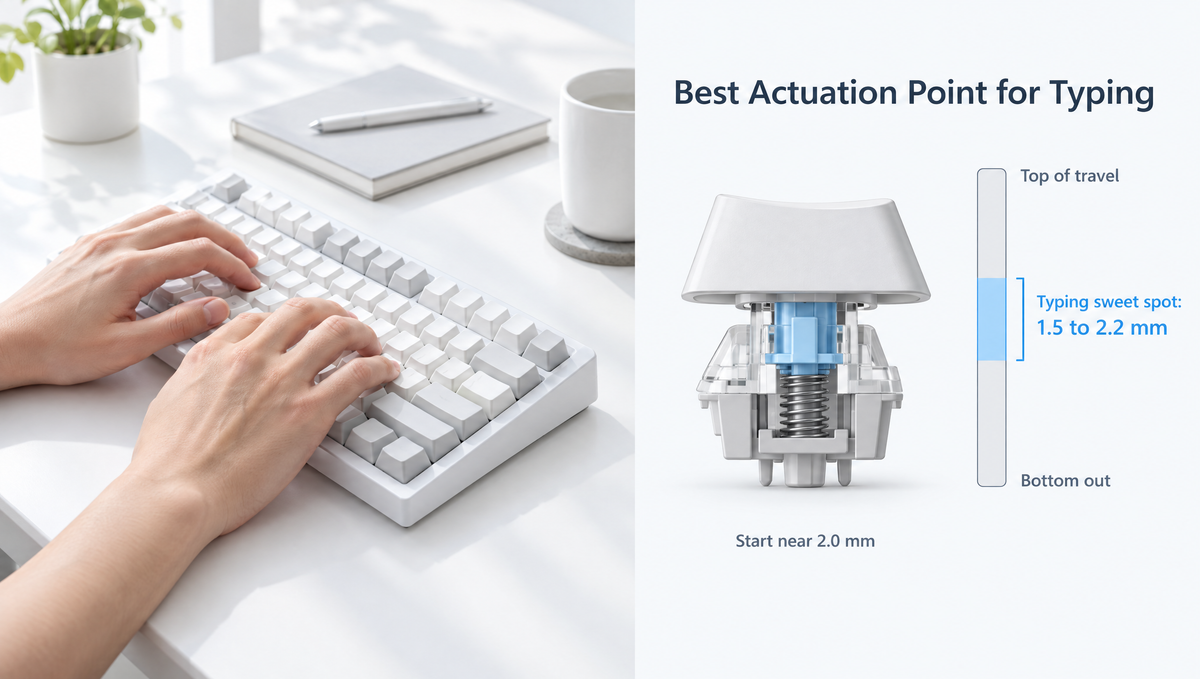
The best actuation point for typing is usually deeper than what gamers use. A setting in the range of roughly 1.5mm to 2.2mm is a common recommendation for typing, because it sits close to where a traditional mechanical switch actuates and leaves enough buffer to prevent accidental presses.
How to find your own sweet spot:
- Start near 2.0mm. This mimics the feel of a typical mechanical switch and is a comfortable baseline for most people.
- Type a few paragraphs and watch for typos. If you see extra letters from resting fingers or brushed keys, go deeper in small steps.
- If you feel like you are pushing too hard, go shallower. Light typists who rarely bottom out often like something closer to 1.2mm to 1.5mm.
- Adjust in small increments. Changing a few tenths of a millimeter at a time makes it easier to feel the difference.
A benefit of magnetic keyboards is that a shallower actuation point lets you register keys without bottoming out, which some typists find reduces finger strain during long sessions. The key is finding a depth that is light enough to feel effortless but deep enough that stray touches do not count.
Should You Use Rapid Trigger for Typing?
Rapid trigger is the headline feature of most magnetic keyboards. Instead of a fixed reset point, a key releases the moment it starts traveling upward and can re-actuate immediately on the next downward movement. In fast-paced games, that makes strafing and repeated inputs more responsive. Our rapid trigger guide covers the mechanics in detail.
For typing, the benefit is much smaller, and very sensitive rapid trigger settings can work against you. Practical recommendations:
- Turn rapid trigger off for general typing, or use a less sensitive setting, if you notice doubled letters.
- Keep it on only the keys that benefit, such as WASD or other movement keys, if your software allows per-key settings.
- Try it before ruling it out. Some fast typists with a very consistent, light touch do like it for keys such as Backspace. It is a preference, not a rule.
Other Hall Effect Keyboard Settings That Help Typists
Beyond actuation and rapid trigger, a few more adjustments can make a magnetic keyboard for typing feel much better:
- Use separate profiles for gaming and typing. If your keyboard's software supports multiple profiles or on-board memory, save a deeper, rapid-trigger-off typing profile and a shallower gaming profile, then switch between them instead of compromising.
- Set per-key actuation where it helps. Some people set keys like Caps Lock, Escape, or Delete deeper so they are harder to hit by accident.
- Calibrate after switch swaps or if keys feel uneven. Our magnetic keyboard calibration guide walks through fixing drift and inconsistent keys.
- Keep advanced gaming features limited. Features like Dynamic Keystroke (DKS) and SOCD handling are useful in games but are rarely needed for writing. Apply them only to the keys and profiles where you actually use them.
Hall Effect vs Mechanical Keyboard for Typing: Feel and Sound
Settings cover accuracy, but feel and sound are just as important for anyone who types all day. This is where the Hall effect vs mechanical keyboard for typing debate gets more personal.
Switch feel
Mechanical switches come in linear, tactile, and clicky varieties, with a huge range of weights and bump shapes. Magnetic switches have historically been almost entirely linear. That is starting to change: switch makers, including Gateron, have begun releasing tactile magnetic switches, though the selection is still small compared with traditional mechanical switches. If you type on tactile switches today and love them, make sure a tactile magnetic option is supported on the board you are considering before you buy.
Sound
The sensing method itself does not create sound. Most of what you hear comes from the switch housing, spring, stem bottoming out, keycaps, plate, foam, and case. That means a magnetic keyboard can be tuned for sound much like a mechanical one, with foam, keycap choice, and switch choice. Our guide on how to make a keyboard quieter covers many techniques that apply to both.
Durability
Because magnetic switches register keypresses without metal contacts touching, they avoid contact wear as a failure point. For heavy typists who put millions of keystrokes into a board, that is a genuine long-term advantage.
Who Should Use a Hall Effect Keyboard for Typing?
A magnetic keyboard makes the most sense for typing if:
- You game and type on the same keyboard and want one board that can switch between a gaming profile and a typing profile.
- You prefer linear switches and like a light, smooth keystroke.
- You want to tune how light or deep keys register instead of being locked into one switch's actuation point.
- You value long-term durability and contactless sensing.
A traditional mechanical keyboard may still suit you better if you strongly prefer tactile or clicky feedback, want the widest possible range of switch options, or simply do not want to spend time adjusting software.
If you want both, a hybrid board is worth a look. Our hybrid keyboard guide explains how some boards run magnetic switches on gaming keys and mechanical switches everywhere else.
Magnetic Keyboard Options for Typing and Gaming
If you are shopping, look for a board with a wide adjustable actuation range, per-key settings, and easy calibration. The Skyloong GK68HE Magnetic Keyboard and Skyloong HE75 Magnetic Keyboard both offer adjustable actuation from 0.1mm to 4.0mm, giving plenty of room to set a deeper typing profile alongside a fast gaming setup. The Skyloong GK68HEAT Mix Keyboard supports magnetic and mechanical switches at the same time if you want tactile mechanical switches for typing keys.
For switches, the Gateron Magnetic Jade Linear Switches are a pre-lubed magnetic linear option. You can browse the full magnetic keyboards and magnetic switches collections, and always check a board's supported switch list before buying magnetic switches.
Frequently Asked Questions
Are Hall effect keyboards good for typing?
Yes, as long as they are set up for typing. Using a deeper actuation point, around 1.5mm to 2.2mm, and turning off or reducing rapid trigger removes most of the typos people blame on magnetic keyboards. Many people use the same Hall effect keyboard for both gaming and typing by switching profiles.
What is the best actuation point for typing?
Most typists are comfortable between about 1.5mm and 2.2mm. Starting at 2.0mm mimics a typical mechanical switch. Go deeper if resting fingers cause accidental keypresses, or slightly shallower if keys feel heavy or you want to bottom out less.
Why does my magnetic keyboard make typos?
The most common causes are a very shallow actuation point, highly sensitive rapid trigger, or keys that need recalibration. Increase the actuation depth, turn rapid trigger off for typing keys, and run a calibration if some keys behave differently from others.
Should I turn off rapid trigger for typing?
For most people, yes, or at least lower its sensitivity. Rapid trigger is designed for fast repeated inputs in games. When typing, small changes in finger pressure can register repeated letters. Many users keep rapid trigger in a gaming profile and disable it in a typing profile.
Are there tactile Hall effect switches?
Yes, though they are still far less common than linear magnetic switches. A few switch makers now offer tactile magnetic switches. Check that any magnetic switch you buy is on your keyboard's supported switch list, since magnetic switches are not universally interchangeable.
Final Thoughts on Typing With a Hall Effect Keyboard
Hall effect keyboards are good for typing once you treat typing as its own setup rather than an afterthought to gaming. Set a deeper actuation point, reduce or disable rapid trigger for everyday keys, keep your board calibrated, and use separate profiles if your software supports them. If you still miss a tactile bump or want the widest switch choice, a traditional mechanical or hybrid keyboard remains a great option, and the right choice ultimately comes down to how you type and play.


