

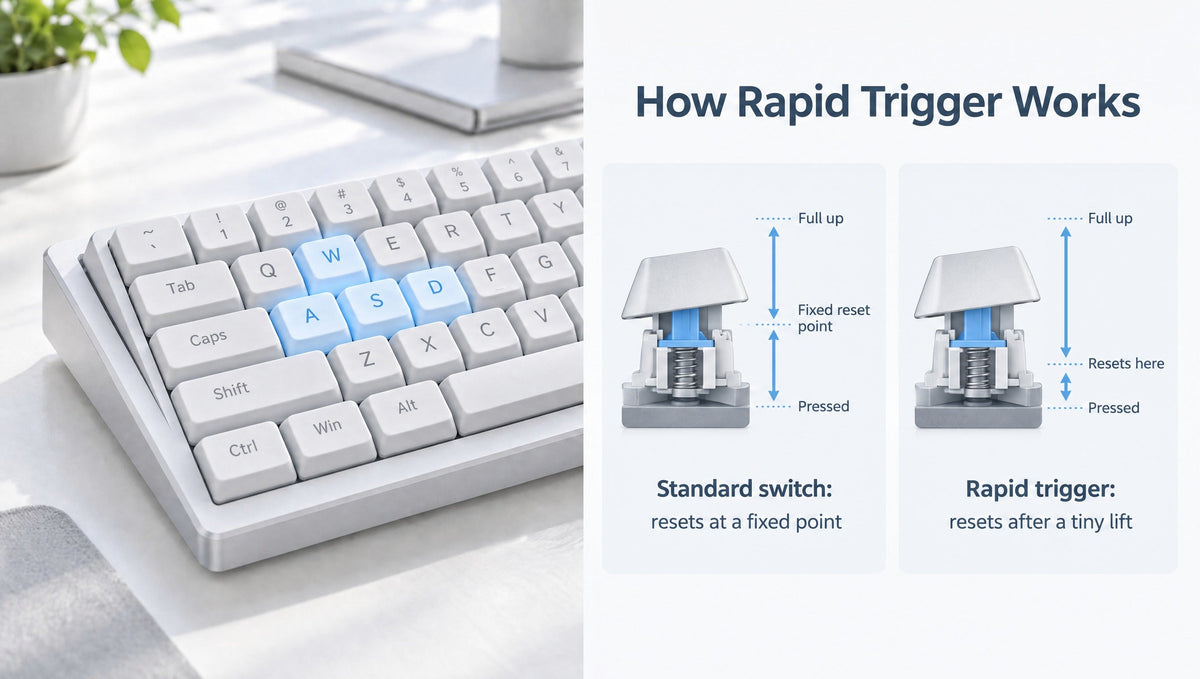
Best Rapid Trigger Settings for CS2 and Valorant: Where to Start
If you just bought a Hall effect keyboard, the first question is almost always the same: what are the best rapid trigger settings for CS2 and Valorant? The software lets you set actuation as low as a tenth of a millimeter and rapid trigger sensitivity even finer, so it is tempting to drag every slider to the minimum and jump into a ranked match.
That is usually the fastest way to start walking into enemies by accident. The best rapid trigger settings are not the lowest numbers your keyboard allows. They are the lowest numbers your fingers can control consistently. This guide gives you safe starting values for actuation point and rapid trigger sensitivity in CS2 and Valorant, explains what each setting actually does, and walks through a simple tuning method so you can dial in a Hall effect keyboard without guesswork.
If you are new to the feature itself, our complete guide to how rapid trigger works covers the fundamentals. Here we focus on the numbers.
The Rapid Trigger Settings You Need to Understand
Every magnetic keyboard app names things a little differently, but almost all of them expose the same core controls:
- Actuation point – how far down a key must travel before it registers the first press. Lower means the key fires earlier.
- Rapid trigger sensitivity (press) – after a key has been released by rapid trigger, how far it has to travel back down to register again.
- Rapid trigger sensitivity (release) – how far a key has to travel upward before it stops registering. This is the setting that matters most for stopping movement quickly.
- Continuous rapid trigger – an option on some boards that keeps rapid trigger active all the way up the key travel, instead of fully resetting once the key rises above the actuation point.
- Dead zones – small buffer areas at the top and bottom of the key travel that are ignored, so tiny vibrations or bottoming out do not trigger false inputs.
Many keyboards let you set press and release sensitivity separately or link them together. If you are unsure, link them to start and split them later once you know which direction is causing problems. For a deeper look at how the sensor measures key position, see adjustable actuation explained.
Why Rapid Trigger Helps in CS2 and Valorant
Both games punish shooting while moving. Your shots are far more accurate once your character has come to a stop, which is why players counter-strafe: releasing one movement key and tapping the opposite key to stop quickly before firing.
On a traditional mechanical switch, a key stays active until it rises back above a fixed reset point. With rapid trigger, the movement key deregisters as soon as you start lifting by the release sensitivity you chose. Your character begins stopping earlier, and your stopping motion becomes more consistent from fight to fight.
That is the real benefit. Rapid trigger does not make the keyboard electronics faster, and it will not fix poor crosshair placement. It removes wasted key travel from movement, which makes peeking, strafing, and stopping feel tighter.
Best Rapid Trigger Settings for CS2
These are conservative CS2 rapid trigger settings designed for someone coming from a regular mechanical keyboard. They are starting points, not a finish line.
- W, A, S, D actuation: 0.6 to 0.8 mm
- W, A, S, D rapid trigger sensitivity: 0.4 to 0.5 mm
- Crouch (Ctrl) and walk (Shift): around 1.0 mm, with rapid trigger off or relaxed
- Jump (Space): 1.5 to 2.0 mm
- Utility, reload, and everything else: 1.5 to 2.0 mm
- Continuous rapid trigger: off to start
Experienced magnetic keyboard users often end up somewhere lower, around 0.3 to 0.5 mm actuation on movement keys. Get there gradually. The most common complaint from players who start too low is micro-stutter in their movement: the natural pressure changes in a resting finger cause a held key to briefly release and re-register.
A note on Snap Tap and SOCD in CS2
Rapid trigger is not the same thing as SOCD features like Snap Tap. In August 2024 Valve announced that hardware-assisted counter-strafing and similar movement automation would be detected on Valve official servers and result in a kick from the match. Null binds and SOCD-style last-input-priority features fall into that category. Rapid trigger on a single key is a separate function and was not part of that restriction, but keep any SOCD or snap-tap mode turned off for CS2. Our guide to SOCD, Snap Tap, and null binds explains the difference in detail.
Best Rapid Trigger Settings for Valorant
Valorant players often run slightly more aggressive Valorant rapid trigger settings on movement keys, but the same rule applies: start where you are in control, then lower.
- W, A, S, D actuation: 0.5 to 0.8 mm
- W, A, S, D rapid trigger sensitivity: 0.3 to 0.4 mm
- Crouch: 0.8 to 1.0 mm
- Walk: around 1.0 mm
- Abilities (Q, E, C, X) and ultimate: 1.5 to 2.0 mm, so a resting finger cannot fire a utility by mistake
- Jump: 1.5 to 2.0 mm
Ability keys deserve the most caution. An accidental movement input costs you a fraction of a second. An accidental ultimate or wasted flash can cost the round, so keep those keys deeper even if your movement keys are very sensitive.
Rules on SOCD-style features are not identical across every game and tournament, and they can change. If you play Valorant competitively or in organized events, check the current game and event rules before enabling anything beyond standard rapid trigger and adjustable actuation.
How to Tune Your Rapid Trigger Settings Step by Step
The best Hall effect keyboard settings come from testing, not copying a pro's profile. Hand size, finger pressure, keycap profile, and switch spring weight all change how a setting feels. Use this process:
- Start with the conservative values above and play a few sessions in deathmatch or a practice mode before ranked.
- Change one thing at a time. Adjust either actuation or rapid trigger sensitivity, never both at once, so you know which one made the difference.
- Lower in small steps, around 0.1 mm per change, and give each change at least one full session.
- Test holding a key, not just tapping it. Hold W and rest your finger naturally. If your character stutters or briefly stops, your release sensitivity is too fine.
- Watch for accidental inputs. If keys fire when you rest a finger on them, raise that key's actuation point.
- Back off one step from the lowest value you can use cleanly. That margin keeps you consistent when you are tense in a close round.
- Save separate profiles for CS2, Valorant, and typing so you are not re-tuning every time you switch activities.
Common Rapid Trigger Mistakes
- Setting every key to the minimum. Values near 0.1 mm look impressive in screenshots, but they often create accidental inputs for real players.
- Applying movement settings to the whole keyboard. Only the keys you rapidly press and release benefit from aggressive rapid trigger. Everything else is better with a deeper, safer actuation point.
- Ignoring calibration. If one key behaves differently from its neighbors, recalibrate before blaming the setting. Our guide on magnetic keyboard calibration covers drift and dead zones.
- Swapping switches without re-checking settings. Different magnetic switches can have different magnet strength and travel, so the same number may not feel the same. Recalibrate and retest after any switch change.
- Confusing rapid trigger with SOCD. They solve different problems, and only one is restricted on Valve official servers.
What to Look for in a Rapid Trigger Keyboard
You can only tune as finely as your hardware allows. When comparing magnetic keyboards for gaming, check for:
- A wide adjustable actuation range, so you can run shallow movement keys and deep utility keys on the same board.
- Fine rapid trigger sensitivity, with separate press and release values if possible.
- Per-key settings and saved profiles for different games.
- Onboard memory, so your settings stay with the keyboard.
- Hot-swappable magnetic switch support, if you want to experiment with switch feel later.
As examples from our catalog, the Skyloong HE75 Magnetic Keyboard and the Skyloong GK68HE Magnetic Keyboard both list adjustable actuation from 0.1 mm to 4.0 mm, 0.01 mm rapid trigger, an 8000Hz polling rate, and hot-swap support for compatible magnetic switches. That range is far wider than you need for the starting values in this guide, which leaves plenty of room to tune. You can browse the full lineup in our magnetic keyboards collection, and replacement switches in magnetic switches.
Frequently Asked Questions
What is the best rapid trigger sensitivity for CS2?
A good starting point for CS2 is 0.4 to 0.5 mm rapid trigger sensitivity on W, A, S, and D, with actuation around 0.6 to 0.8 mm. Lower it gradually in 0.1 mm steps until you notice stutter or accidental inputs, then go back up one step.
Is 0.1 mm actuation too low for gaming?
For most players, yes, at least at first. At 0.1 mm, the weight of a resting finger or a small bump to the desk can register a keypress. Some experienced players use very low values on movement keys, but 0.5 to 0.8 mm is a far more controllable place to start.
Is rapid trigger allowed in CS2 and Valorant?
Rapid trigger itself is a single-key feature and is widely used in both games. Valve's 2024 restriction targets hardware-assisted counter-strafing and input automation such as SOCD or Snap Tap, which results in a kick on Valve official servers. Rules can differ by game and tournament, so check current rules before competing.
Should I turn on continuous rapid trigger?
Leave it off while you are learning. Continuous rapid trigger keeps the key responsive all the way up its travel instead of fully resetting above the actuation point. Some players prefer it, but it changes how keys behave near the top of their travel, so try it only after your basic settings feel stable.
Should I use the same settings for gaming and typing?
No. Gaming settings that feel great on WASD usually cause typos when you type. Save a separate typing profile with a deeper actuation point and rapid trigger turned off or relaxed, and switch profiles when you leave the game.
Final Thoughts
The best rapid trigger settings for CS2 and Valorant are personal, but the path to finding them is not. Start conservative, tune one key and one value at a time, keep utility keys deep, and back off one step from the most aggressive setting you can control. Do that, and your Hall effect keyboard will make counter-strafing and peeking feel sharper without costing you rounds to accidental inputs.


