

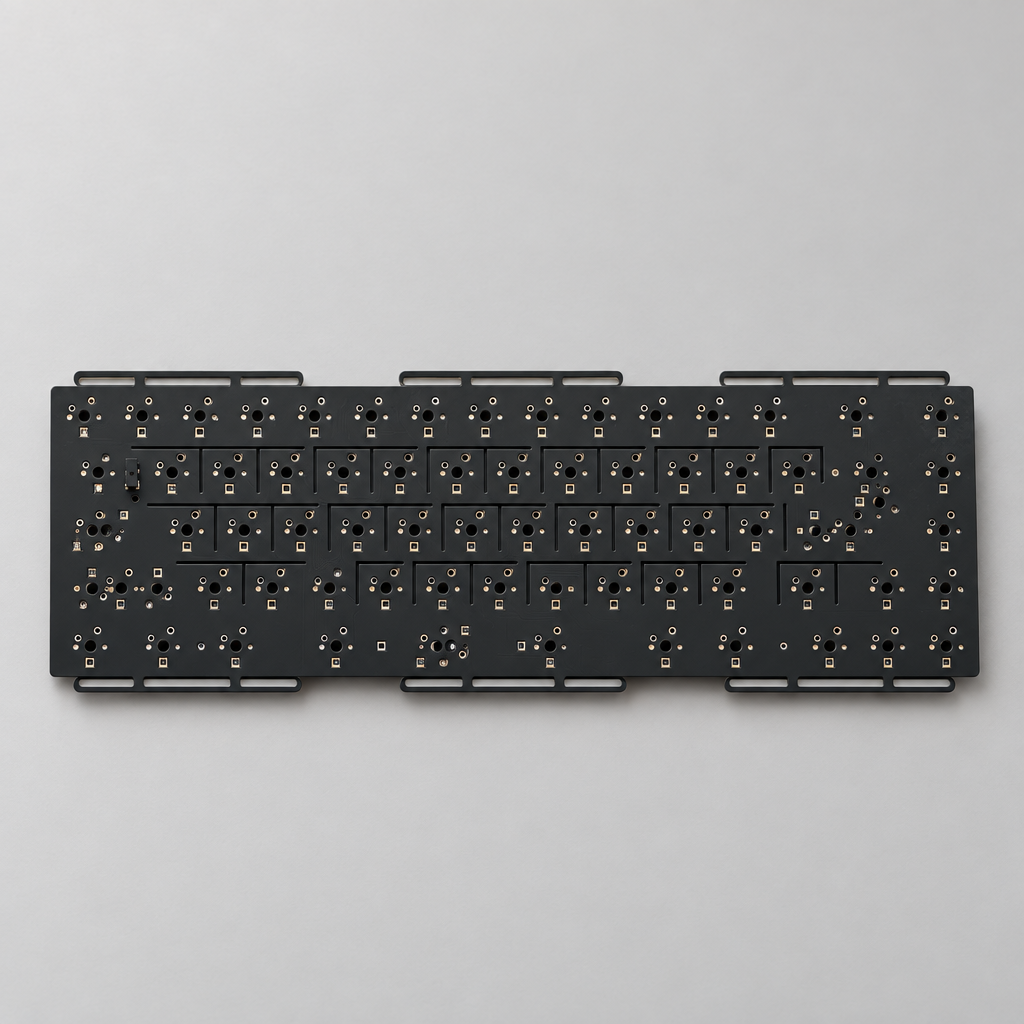
What Are Flex Cuts on a Mechanical Keyboard?
Flex cuts are deliberate slots, slits, or cutouts routed into a mechanical keyboard's PCB or switch plate to make it bend slightly when you press a key. If you have ever read a keyboard kit spec sheet and wondered what a flex cut PCB actually does, the short answer is that it trades rigidity for a softer, springier bottom-out. The cuts remove material between switch positions, so the board flexes downward a fraction of a millimeter under your finger instead of stopping dead.
The idea spread through the custom keyboard community alongside gasket mounting, and it is now one of the most common questions new builders ask when comparing kits: do flex cuts matter, or are they marketing? They matter, but far less than the mount style and plate material sitting around them. This guide covers how flex cuts work, PCB flex cuts versus plate flex cuts, what each cutting pattern does to typing feel and keyboard sound, the downsides nobody puts on a product page, and how to decide whether you need them.
How a Flex Cut PCB Changes Typing Feel and Bottom-Out
A standard keyboard PCB is made from FR-4, a glass-reinforced epoxy laminate, and the industry-standard thickness is 1.6 mm. At that thickness, with a continuous sheet of fiberglass under every switch, the board barely moves. When you bottom out, the stem strikes the bottom of the switch housing, and that impact passes into the plate and PCB holding the switch. If neither can move, the energy goes straight back up into your fingertip.
Flex cuts interrupt that path. By routing slots between switch rows or around individual switch positions, the designer leaves narrow bridges of FR-4 that behave like tiny leaf springs. The result is a softer, more cushioned bottom-out with a small amount of give at the end of the keystroke. Builders often describe the feel as "bouncy" or "poppy" rather than sharp.
Two other factors feed into the same result:
- PCB thickness. Some kits use a 1.2 mm PCB instead of 1.6 mm. A thinner board flexes more everywhere, cuts or no cuts, but is more fragile to handle during a build.
- How the PCB is mounted. A board screwed down at a dozen points cannot flex much however many slots it has. A design that lets the assembly float is what gives the cuts room to work.
This is the single most important thing to understand about flex cuts: they only do something if the rest of the keyboard lets them. Cuts in a board bolted rigidly to a thick aluminum case are close to decorative.
Plate Flex Cuts vs PCB Flex Cuts: What Is the Difference?
People use "flex cuts" loosely, but two separate things are going on.
PCB flex cuts are routed into the circuit board itself. Because the PCB carries the switch sockets and traces, the designer has to work around the electronics, so these are usually long slots between rows rather than a cut around every key.
Plate flex cuts are routed into the switch plate, the sheet that holds the switches in position. With no traces to avoid, designers can be far more aggressive, cutting around each switch or isolating whole zones. That is why plate cuts usually affect feel more than PCB cuts.
Plate material stacks on top of this. A polycarbonate plate is already soft, so cutting it produces a very pillowy, sometimes mushy result, while a steel or brass plate is stiff enough that cuts only take the hardest edge off. FR-4 and aluminum sit in between. Our guide to choosing a keyboard plate material covers each option in detail.
Common Flex Cut Patterns and What Each One Does
Not all cuts are the same. The pattern determines how much the board moves and where.
- Long row cuts. Slots running horizontally between key rows. The most common pattern, mild and even, and the easiest to route on a PCB without disturbing traces.
- Zoned cuts. Cuts concentrated around specific keys — often the spacebar, shift and enter — where impact is heaviest. Useful for taking harshness out of the keys you slam hardest.
- Per-key cuts. Material removed around every individual switch so each key position can move semi-independently. This is the most aggressive pattern and produces the most consistent bounce across the board, but it is almost always a plate feature rather than a PCB one.
- Hybrid patterns. A mix, typically per-key cuts in the alphas and solid material under the stabilized keys where rigidity helps stabilizer performance.
That last point matters: designers often leave the area under stabilizers solid on purpose, because a flexing surface under a stabilizer wire tends to worsen rattle.
Do Flex Cuts Change Keyboard Sound?
Yes, though not as much as marketing copy implies, and not always in the direction you want.
Cutting slots into a large flat panel breaks up its resonance. A solid PCB or plate can ring like a thin sheet of metal or fiberglass, adding a high, hollow overtone to every keystroke. Interrupting that surface tends to produce a lower, more damped and more controlled sound with fewer metallic overtones. That is the effect people are chasing when they associate flex cuts with a "thocky" typing sound.
Two things temper this. Cuts open up air paths inside the case, which can make a board sound slightly hollower unless foam fills the space, and a heavily cut plate sometimes adds its own faint creak as it flexes. If your goal is purely acoustic, foam and tape mods and a well-tuned stabilizer set move the needle far more, and our guide to getting a thocky keyboard sound walks through the changes in order of impact.
Flex Cuts vs Gasket Mount vs Plate Material: What Actually Matters Most?
If you are trying to build a keyboard with a soft, forgiving typing feel, here is a realistic ranking of what to prioritize, from biggest effect to smallest:
- Mounting style. Gasket, top mount and other floating designs change how the entire assembly moves — by far the largest single variable. Our comparison of keyboard mounting styles covers each one.
- Plate material and thickness. Swapping a steel plate for polycarbonate or FR-4 is a dramatic change you can feel immediately.
- Switch choice. Spring weight and stem design affect perceived softness more than most people expect.
- Foam and damping. Case foam, plate foam and PE foam shape sound and remove hollowness.
- Flex cuts. A refinement on top of the four above, not a substitute for any of them.
Plenty of kits deliver a soft, cushioned typing feel through mount and plate design rather than aggressive cutting. The Weikav MAX102 Keyboard Kit, for example, uses a PCB-gasket structure with silicone particle damping, corner pads and an FR-4 plate, while the Domikey Laby81 Keyboard Kit combines a gasket and top-mount structure with a Teflon-coated frame and plate. Both reach a similar destination by a different route. Compare structures across the range in our keyboard kits collection.
The Downsides of Flex Cuts Nobody Puts on the Spec Sheet
Flex cuts are not free. There are real engineering trade-offs, and they are worth knowing before you pay extra for them.
- Less room for traces. Every slot removes routing space. Designers have to work signal traces around the cuts, which constrains the layout and, on a poorly designed board, can affect signal integrity.
- Weaker support under hot-swap sockets. This is the big one. On a hot-swap PCB, the socket is surface-mounted and relies on the board around it for support. Narrow FR-4 bridges between aggressive cuts flex every time you type, and repeated flexing near a solder joint is what causes joints to fatigue and crack over time.
- Higher cost. Precision routing and careful handling during assembly add cost, and a cut board is more prone to warping in production.
- Sensitivity to design errors. Slot placement and geometry have to be right. A badly placed cut creates a stress point rather than a spring.
- Not everyone likes the feel. Plenty of typists prefer a firm, immediate bottom-out and find a flexible board vague or unfinished. That is a legitimate preference, not an unrefined palate.
Handling matters more on a cut board too. When removing switches, support the PCB from underneath and pull straight up, as described in our guide to using a keycap puller and switch puller without damage, and use proper keyboard tools rather than improvised ones.
Should You Buy a Keyboard Kit With Flex Cuts?
Use these rules of thumb.
Flex cuts are worth seeking out if you type for long hours and find rigid boards fatiguing, you already prefer gasket-mounted boards with softer plates, or you are building a second or third keyboard and chasing a feel you have already identified.
Flex cuts are not worth paying extra for if this is your first custom build, you want a firm and predictable bottom-out for gaming, or you want the most durable hot-swap board you can get. Put the money into a better mount, a plate material you actually like, and switches that suit your typing style.
Treat "flex cut PCB" on a spec sheet as one data point among several. The mount type, the plate material, whether a foam set is included, and how the stabilizers are implemented tell you far more about how a keyboard will feel. If you are still narrowing down a build, our prebuilt versus custom keyboard comparison is a good place to start, and you can browse assembled options in the keyboards collection.
Frequently Asked Questions About Flex Cut Keyboards
What is a flex cut keyboard?
A flex cut keyboard is one whose PCB, switch plate, or both have slots routed into them so the assembly bends slightly when keys are pressed. The goal is a softer bottom-out and a more damped sound compared with a fully rigid board. The term describes a construction detail, not a category of keyboard.
Do flex cuts weaken a keyboard PCB?
They reduce structural strength by design, which is the point, but that has consequences. The narrow fiberglass bridges between cuts give less support to surface-mounted hot-swap sockets, and repeated flexing near solder joints can cause fatigue over time. A well-engineered flex cut board is fine in normal use; the risk comes with aggressive patterns and careless handling.
Are flex cuts better than a gasket mount?
No — they do different jobs, and gasket mounting has the larger effect. A gasket mount changes how the whole plate and PCB assembly is suspended in the case; flex cuts change how much that assembly bends. Many keyboards use both. If you can only have one, the mount matters more.
Can I add flex cuts to a keyboard I already own?
Cutting a PCB yourself is a bad idea — you will almost certainly sever traces and kill the board. Cutting a plate is possible but needs proper tools and a steady hand, and mistakes are permanent. The practical route to a softer feel is swapping to a more flexible plate, adjusting foam, or changing switches and springs.
Do flex cuts make a keyboard sound thockier?
They can help by breaking up panel resonance and reducing high, hollow overtones, but they are a minor contributor. Case material, plate material, keycap thickness, foam placement and switch choice have far more influence on whether a keyboard sounds deep and thocky or high and clacky.
The Bottom Line on Flex Cuts
Flex cuts are a genuine engineering technique, not marketing invention, and on a well-designed kit they do produce a softer bottom-out. They are also one of the most over-weighted specs in the hobby: a keyboard with flex cuts, a rigid mount and a steel plate will feel stiffer than one with no cuts, a gasket mount and a polycarbonate plate.
Work down the list in order — mount, plate, switches, foam, then cuts — and you will get the typing feel you are after without paying a premium for a feature that only works when everything else is right.


