

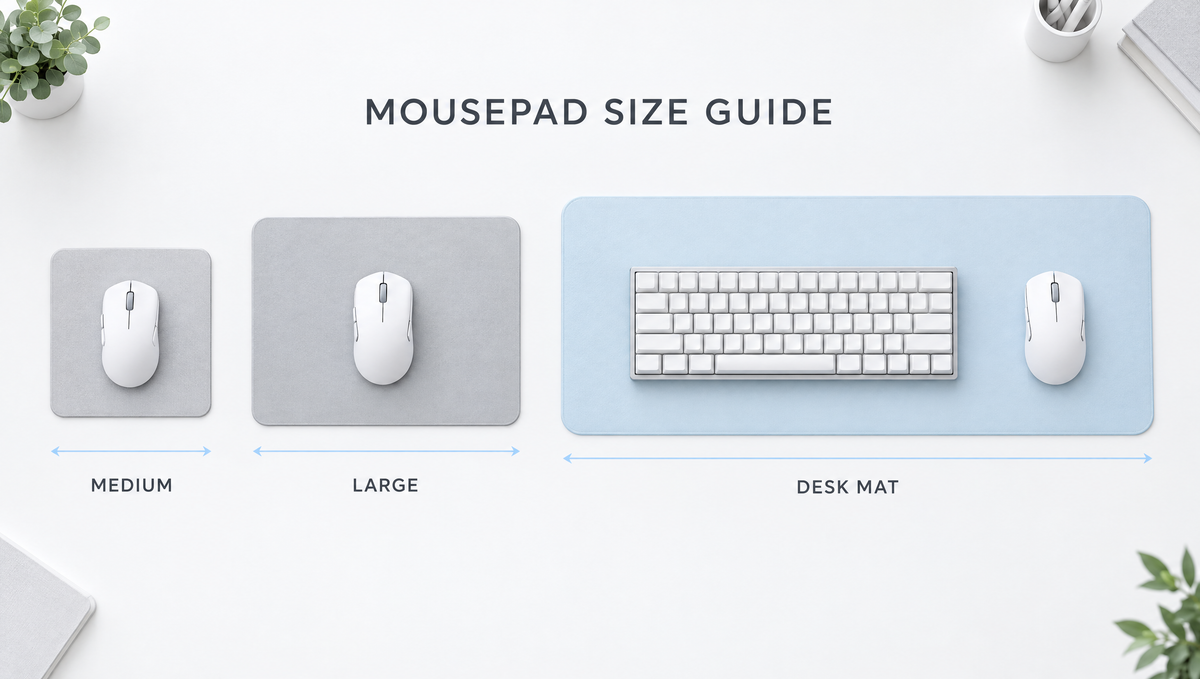
Mousepad Size Guide: Why Size Matters More Than You Think
Choosing a mousepad size sounds simple until you see the options: medium, large, XL, XXL, extended, desk mat. Ask "what size mousepad do I need?" in any gaming or keyboard community and you will get answers ranging from a small travel pad to a mat that covers the whole desk. The truth is that the right gaming mousepad size depends on three things: your mouse sensitivity, how you hold and move your mouse, and how much desk space your keyboard and setup need.
This mousepad size guide walks through the common size categories, how to measure the space you actually use, when a desk mat makes more sense than a standalone mousepad, and how your keyboard layout changes the math.
Common Mousepad Sizes Explained
There is no industry standard for mousepad sizes. One brand's "large" can be another brand's "XL", so always check the actual dimensions in millimeters or inches rather than trusting the name. As a rough guide, most pads fall into these groups:
- Small and medium mousepads – roughly 250 x 200 mm up to about 360 x 300 mm. Good for travel, tight desks, office work, and high-sensitivity players.
- Large mousepads – roughly 400 x 350 mm up to about 490 x 420 mm. The all-rounder size for most gamers, with enough room for wide arm movements without taking over the desk.
- XL square pads – some brands sell near-square pads around 450–500 mm on each side, giving extra vertical room for players who lift and reset the mouse often or rest their forearm on the pad.
- XXL, extended mousepads and desk mats – commonly around 800 x 300 mm, 900 x 400 mm, or larger. These sit under both the keyboard and the mouse.
- Full desk mats – 1000 mm wide and beyond, such as 1200 x 600 mm, designed to cover most of a desk surface.
The key takeaway: compare the usable width and depth, not the label.
How Mouse Sensitivity Decides Your Mousepad Size
The biggest factor in what size mousepad you need is your sensitivity. Competitive players usually describe this as cm/360: how many centimeters you move the mouse to turn a full 360 degrees in a game.
- Low sensitivity (long cm/360) means big arm movements, so you need a wide pad. Running off the edge mid-flick is the classic sign your pad is too small.
- High sensitivity (short cm/360) means small wrist movements, so a medium or large pad is usually plenty.
Sensitivity in games is a combination of your mouse DPI and the in-game sensitivity setting, so changing DPI alone does not tell the whole story. If you want a refresher on how those settings interact, see our guide to mouse DPI and sensitivity.
How to measure the mousepad width you actually need
You do not need a calculator to find your ideal mousepad dimensions. Try this simple test:
- Load into a practice range or any game you play regularly with your normal settings.
- Place your mouse at the left edge of the area you can comfortably reach.
- Slowly move the mouse to the right until you complete one full 360-degree turn.
- Measure the distance the mouse traveled with a ruler or tape measure.
That distance is your minimum comfortable pad width for the mouse area alone. Add a buffer of several centimeters on each side so fast flicks do not carry the mouse off the edge. If the result is wider than your current pad, you have found your upgrade reason.
For depth, think about how far you push the mouse forward and pull it back, and whether your forearm or elbow rests on the pad. Arm aimers who anchor their forearm on the surface often appreciate a deeper pad of 400 mm or more.
Grip Style, Arm Aiming, and Mousepad Size
How you move the mouse also affects the best mouse pad size for gaming:
- Arm aimers move from the elbow or shoulder and typically play at lower sensitivity. They benefit most from large, XL, or extended pads.
- Wrist aimers pivot from the wrist and often play at higher sensitivity. A large pad is usually enough, and a smaller pad can keep the desk tidy.
- Hybrid aimers use the wrist for small adjustments and the arm for big turns. A large or extended pad covers both styles comfortably.
Grip style matters too. Palm grip users tend to make broader arm movements, while fingertip grip users lean on finger and wrist control. Our mouse grip styles guide explains the differences in more detail.
Desk Mat vs Mousepad: Which Should You Get?
The desk mat vs mousepad question comes up constantly in keyboard communities, because a desk mat is also a big part of how a mechanical keyboard setup looks and sounds.
Reasons to choose a desk mat (extended mousepad)
- Maximum mouse room for low-sensitivity players, with no edge to run into.
- One consistent surface under the keyboard and the mouse, which keeps everything visually tidy.
- Some acoustic dampening, since a cloth and rubber mat between the keyboard and a hard desk can soften desk resonance and reduce some of the hollow sound a keyboard transfers into the desk.
- Grip under the keyboard, as the rubber base helps stop lighter boards from sliding around.
Reasons to choose a standalone mousepad
- Easier to swap surfaces, so you can try a faster or more controlled pad without replacing the whole desk setup.
- Wear stays where it matters. The mouse area wears faster than the rest of a desk mat, and replacing a smaller pad is cheaper.
- Keyboard position freedom, especially if you angle your keyboard or move it out of the way during games.
- Portability for LAN events, travel, or switching between desks.
Surface type is a separate choice from size. If you are deciding between cloth, hard, and glass, read our comparison of cloth vs hard vs glass mousepads.
Keyboard Layout and Desk Mat Size
If you go the desk mat route, your mechanical keyboard layout decides how much room is left for the mouse. Exact widths vary by model and case design, but approximate keyboard widths look like this:
- 60% keyboards – roughly 29–30 cm wide, leaving the most mouse space.
- 65% and 75% keyboards – roughly 31–33 cm wide, with arrow keys and only a small increase in footprint.
- TKL (80%) keyboards – roughly 36 cm wide, dropping the numpad but keeping the full navigation cluster.
- Full-size and 96% keyboards – roughly 38–46 cm wide, the biggest footprint of all.
To check whether a desk mat size works, add your keyboard width, the 360 distance you measured earlier, and a few centimeters of gap between them. For example, a 900 mm mat with a full-size keyboard of around 44 cm leaves under 45 cm for the mouse area once you allow some spacing, which may be tight for very low-sensitivity players. The same mat with a 65% board leaves noticeably more room.
This is one reason compact layouts are so popular with FPS players. Browse our 60% layout keyboards and 75% layout keyboards if you want to free up mouse space without giving up a mechanical keyboard.
How to Choose the Right Mousepad Size: Quick Checklist
- Measure your desk first. A pad that hangs over the edge or bunches against a monitor stand will annoy you daily.
- Measure your 360 distance using the test above, then add a buffer on each side.
- Decide on keyboard placement: on the mat, or on the desk next to a standalone pad.
- Check thickness. Thicker pads (around 4–6 mm) feel softer and are more forgiving on uneven desks, while thinner pads (around 2–3 mm) feel firmer and sit lower.
- Look at the edges. Stitched edges resist fraying on large pads that see a lot of arm contact.
- Think about cleaning. Larger cloth mats collect more dust and are harder to wash in a sink.
If you play at higher sensitivity or mostly work and browse, a compact pad like the Glacier Frosted Mousepad keeps the desk clean and comes in Black Frost and Ice Blue. You can see our current options in the mousepads collection, and pair it with a lightweight mouse from our gaming mice collection, such as the 65g Skyloong M1 Mouse.
Mousepad Size FAQ
What size mousepad is best for gaming?
For most players, a large mousepad around 450 x 400 mm is the safest all-round choice. Low-sensitivity FPS players who aim with their arm usually benefit from an XL or extended pad around 900 x 400 mm, while high-sensitivity players can be comfortable on a medium pad.
Is a bigger mousepad better?
Not automatically. A bigger pad only helps if you actually use the space. If your sensitivity is high, an oversized mat mostly adds cost and makes cleaning harder. Match the pad to your measured 360 distance and your desk size.
Should my keyboard go on the mousepad?
It is a personal choice. Putting the keyboard on a desk mat gives a uniform look, adds grip, and can slightly soften the sound transferred into the desk. Keeping the keyboard off the mat lets you use a smaller mouse-only pad and replace it more cheaply when the mouse area wears.
Is a 900 x 400 mm desk mat big enough for a full-size keyboard?
It works for many people, but it is tight for low-sensitivity players because a full-size keyboard can take up close to half the width. If you use a full-size board and play at low sensitivity, consider a wider mat or a more compact keyboard layout.
What does cm/360 mean for mousepad size?
cm/360 is the distance you move your mouse to turn 360 degrees in a game. The longer your cm/360, the wider your mousepad needs to be. Measuring it with a quick in-game test is the most reliable way to pick a size.
Final Thoughts on Choosing a Mousepad Size
The best mousepad size is the one that fits both your sensitivity and your desk. Measure your 360 distance, decide whether your keyboard lives on the mat, and compare real dimensions instead of size names. Get those three things right and you will never run out of room mid-flick again.


