

Tactile Switches Explained: Why the Bump Matters
Tactile switches are the middle ground of the mechanical keyboard world. They give you a physical tactile bump partway through the keypress, so your finger feels the key register without the loud click of a clicky switch or the uninterrupted glide of a linear.
But "tactile" covers a huge range of feel. Some tactile keyboard switches have a bump so faint that people describe them as "scratchy linears." Others hit with a sharp, pronounced bump right at the top of the press. If you have ever tried a tactile switch and thought, "Is this it?", the problem was probably not tactile switches in general. It was the bump type.
This guide explains how tactile switches work, what separates a weak bump from a strong one, how to read tactile switch specs, and how to choose the best tactile switches for typing, gaming, or both.
How Do Tactile Switches Work?
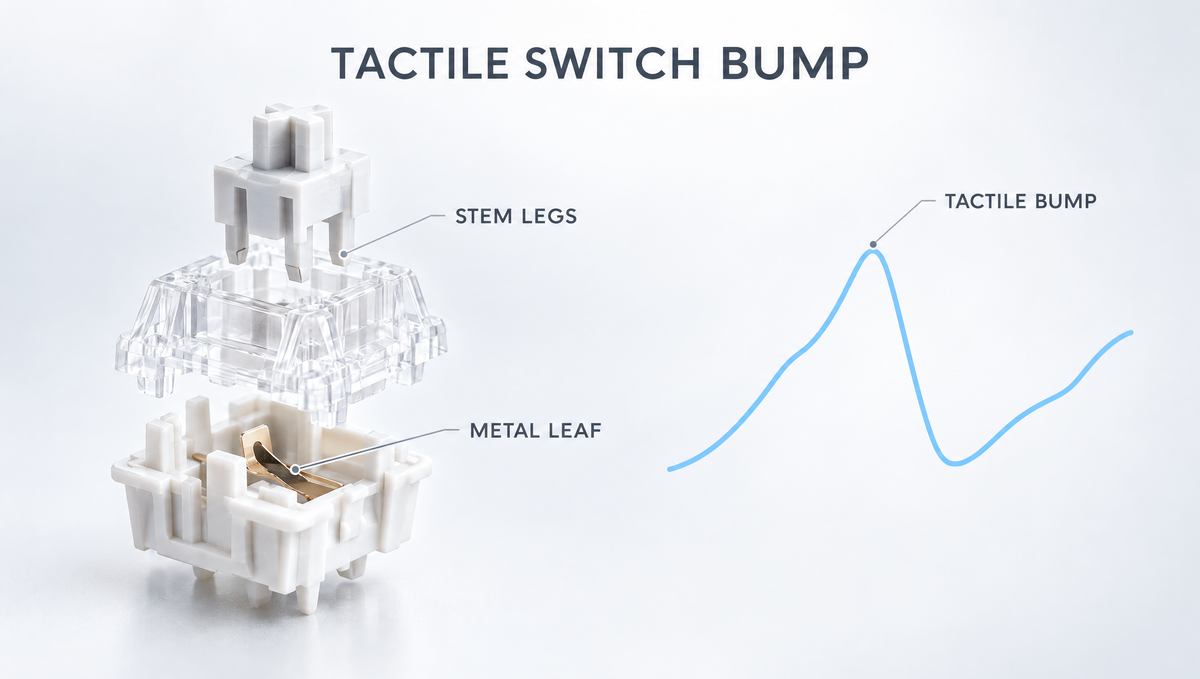
Most tactile keyboard switches use the familiar MX-style layout: a stem, a spring, a top and bottom housing, and a metal contact leaf. The difference from a linear switch lives on the stem legs.
On a tactile stem, the front legs are shaped with a raised profile. As you press the key, those legs push against the metal contact leaf in the bottom housing. Force builds as the leaf resists, then drops sharply once the legs slide past the high point. That rise and sudden drop in resistance is the bump you feel.
- Linear switches have smooth legs, so force simply rises with the spring all the way down.
- Tactile switches add a resistance peak and drop, but stay relatively quiet.
- Clicky switches add a separate click mechanism on top of a tactile event, producing an audible click.
Because the bump comes from the leg profile, two tactile switches with the same spring can feel completely different. The shape, height, and position of that profile is what gives every tactile switch its personality.
Tactile Bump Types: Position, Size, and Shape
When people compare tactile switches, they are really comparing three things about the bump.
Bump Position
- Early (top-loaded) bump: the bump arrives almost as soon as you start pressing, with little free travel before it. These feel immediate and are popular with typists who want constant feedback.
- Mid-travel bump: there is a short stretch of travel before the bump. Many classic "brown-style" tactile switches work this way, and because your finger is already moving when it meets the bump, it can feel softer.
Bump Size
Size is about how big the force peak is and how far the force drops afterward. A large tactile drop feels pronounced and obvious. A small drop feels subtle and can disappear entirely if you type quickly or press hard.
Bump Shape
- Rounded bumps ramp up and fall off gradually. They feel smooth and long, more like rolling over a hill.
- Sharp bumps rise and drop quickly. They feel crisp and distinct, more like stepping over a ledge.
Neither shape is better. Rounded bumps tend to suit long typing sessions, while sharp bumps suit people who want unmistakable feedback on every keystroke. The best way to see these differences on paper is a switch force curve, which plots force against travel and shows exactly where the bump starts, peaks, and drops.
Why Do Some Tactile Switches Feel Mushy or Scratchy?
This is one of the most common complaints new keyboard owners post about, especially after trying a mild brown-style switch. A few factors are usually behind it.
- The bump is small relative to the spring. If the force drop after the peak is minor, the bump blends into the spring resistance and feels vague.
- The bump sits mid-travel. A bump that arrives after your finger has already built momentum is easy to push straight through.
- Leg-to-leaf friction. Tactile switches rely on contact between the stem legs and the leaf, so some texture is normal. Dry, unlubed switches can feel scratchy as a result, and many switches smooth out slightly as they break in.
- Typing style. Fast, heavy typists who bottom out every key feel the bump less than light typists who press just past the bump.
If a tactile switch feels like a "scratchy linear" to you, the fix is usually a switch with a larger, earlier bump, not abandoning tactile switches altogether.
How to Read Tactile Switch Specs
Tactile switch spec sheets can be confusing because they sometimes list more than one force. Here is what the common terms mean:
- Operating (actuation) force: the force needed at the point where the key registers.
- Tactile force (peak force): the force at the top of the bump. This is what you have to overcome to get past it.
- Pre-travel: how far the key moves before it actuates.
- Total travel: the full distance until the key bottoms out.
The gap between tactile force and operating force is a useful hint about how noticeable a bump will be. The Kailh Box Winter Tactile Switches are a good example: Kailh lists an operating force of 38±10 gf and a tactile force of 55±10 gf, so the bump peak sits well above the force needed to actuate.
Some manufacturers describe the bump in other ways. Gateron describes both the Gateron Quinn Tactile Switches and the Gateron Baby Kangaroo 2.0 Switches as having a 0.5mm tactile peak designed to create a larger, more pronounced tactile drop than conventional tactile switches.
Tactile vs Linear vs Clicky: Which Should You Choose?
The tactile vs linear debate never really ends, but the choice gets easier when you focus on how you use your keyboard.
Choose tactile switches if you:
- Type a lot and want confirmation of each keypress without loud noise
- Tend to bottom out and want feedback that helps you ease off
- Work in a shared space where clicky switches would be disruptive
- Want a switch that handles both typing and casual gaming
Choose linear switches if you:
- Want the smoothest, most consistent keystroke for fast gaming inputs
- Find any bump distracting during rapid repeated presses
Choose clicky switches if you:
- Want both a bump and an audible click, and noise is not a concern
For a deeper look at noise trade-offs, see our guide to clicky vs silent switches for gaming.
Are Tactile Switches Good for Gaming?
Yes, for many players. Competitive players often prefer linears because nothing interrupts a fast press, but tactile switches work well for gaming, especially in games where you type in chat, use many keybinds, or simply want to feel each input register.
The main thing to watch is bump size. A very strong, heavy bump can feel tiring during long sessions of rapid tapping. If gaming is a big part of your use, a moderate, rounded bump is often the safer middle ground than the most aggressive tactile switch you can find.
How to Choose the Best Tactile Switches for You
Use these questions to narrow down your options:
- Do you want the bump subtle or obvious? If milder tactiles felt mushy to you before, look for switches described as having a large tactile peak or drop.
- Do you want it early or mid-travel? Early bumps feel more immediate. Mid-travel bumps feel softer and more forgiving.
- How heavy do you like your keys? Check the operating and tactile force. Lighter switches reduce fatigue; heavier ones help heavy-handed typists avoid accidental presses.
- What sound do you want? Housing material, keycaps, and your keyboard build all shape tactile switch sound, so treat switch sound tests as a rough guide.
- Is your keyboard hot-swappable? A hot-swap board lets you try different tactile switches without soldering, which makes experimenting far easier.
Some options from our catalog to start with:
- Gateron Quinn Tactile Switches: a 5-pin POM tactile with a 0.5mm tactile peak and a 22mm double-stage gold-plated spring, for typists who want a clear bump.
- Gateron Baby Kangaroo 2.0 Switches: pre-lubed tactiles with a POM stem and nylon PA66 base, also built around a 0.5mm tactile peak for a pronounced drop.
- Gateron Beer Tactile Switches: pre-lubed tactiles with a 50gf operating force, 2.0mm pre-travel, and 3.4mm total travel.
- Kailh Box Winter Tactile Switches: a lighter-actuating tactile with a POM stem and base and a clearly specified tactile force.
You can compare more options in our full tactile switches collection, or browse by brand in Gateron tactile switches and Kailh tactile switches.
Try Before You Commit: Testing Tactile Switches
Tactility is personal, and a spec sheet cannot fully tell you how a bump will feel under your own fingers. Before buying 70 or more switches, it is worth trying a few by hand.
- A switch keychain tester lets you press switches side by side and compare bump position and strength.
- Press slowly first to feel exactly where the bump begins and ends, then type quickly to see whether the bump still comes through at speed.
- If you have a hot-swap keyboard, swap a handful of switches into keys you use constantly, like the home row and spacebar area, and type on them for a few days.
Our guide on how to test switches before buying covers this in more detail. When it is time to swap, a proper tool from our keyboard tools collection, such as the Glacier Keycap/Switch Puller Tool, helps you remove switches without bending pins.
Should You Lube Tactile Switches?
You can, but tactile switches need a lighter touch than linears. Because the bump comes from contact between the stem legs and the metal leaf, putting thick lube on the legs can dampen the bump and make the switch feel duller.
- Many builders lube the rails, sides, and spring as usual while skipping the front legs or using only a very thin coat there.
- If your switches are already factory pre-lubed, try them stock first. Several of the tactiles listed above are pre-lubed.
- Test one or two lubed switches before doing a full set, so you can compare against an unlubed switch.
For the full process, see our step-by-step guide on how to lube mechanical keyboard switches.
Frequently Asked Questions About Tactile Switches
What is a tactile switch on a keyboard?
A tactile switch is a mechanical keyboard switch with a noticeable bump partway through the keypress. The bump is created by the stem legs pushing against the metal contact leaf, giving you physical feedback without the loud click of a clicky switch.
Why does my tactile switch feel like a linear?
The bump is probably small or sits mid-travel, so it blends into the spring resistance, especially if you type fast or bottom out hard. Switches with a larger tactile drop or an earlier bump will feel far more obvious.
Are tactile switches louder than linear switches?
Tactile switches are usually similar to linears in volume because neither has a click mechanism. The bump itself makes little sound; most of the noise comes from bottoming out, the housing, the keycaps, and the keyboard build.
Are tactile switches better for typing?
Many typists prefer them because the bump confirms each keypress and can encourage a lighter touch. That said, it is a personal preference, and some fast typists prefer the smooth stroke of a linear switch.
Does lubing tactile switches remove the bump?
Heavy lube on the stem legs can soften the bump noticeably. Lubing other parts of the switch while skipping or only lightly coating the legs keeps most of the tactility intact.
Final Thoughts on Tactile Switches
Tactile switches are not one feeling but a whole family of them. The position, size, and shape of the tactile bump decide whether a switch feels crisp and pronounced or soft and subtle. If a mild tactile once disappointed you, a switch with a larger, earlier bump may be exactly what you were looking for.
Start with a tester, read the tactile force alongside the operating force, and explore our tactile switches to find the bump that feels right under your fingers.


